Why Nx?
Because architecture without a model is just folder structure
Section titled “Because architecture without a model is just folder structure”“Why Nx, anyway?”
The question sounds harmless. Usually you get harmless answers to it too.
Because monorepo. Because Angular, Nest, React, and libraries fit together. Because builds get faster. Because it lets you manage apps and libs better. Because that’s just what modern tools do.
That’s not wrong.
But it’s too short.
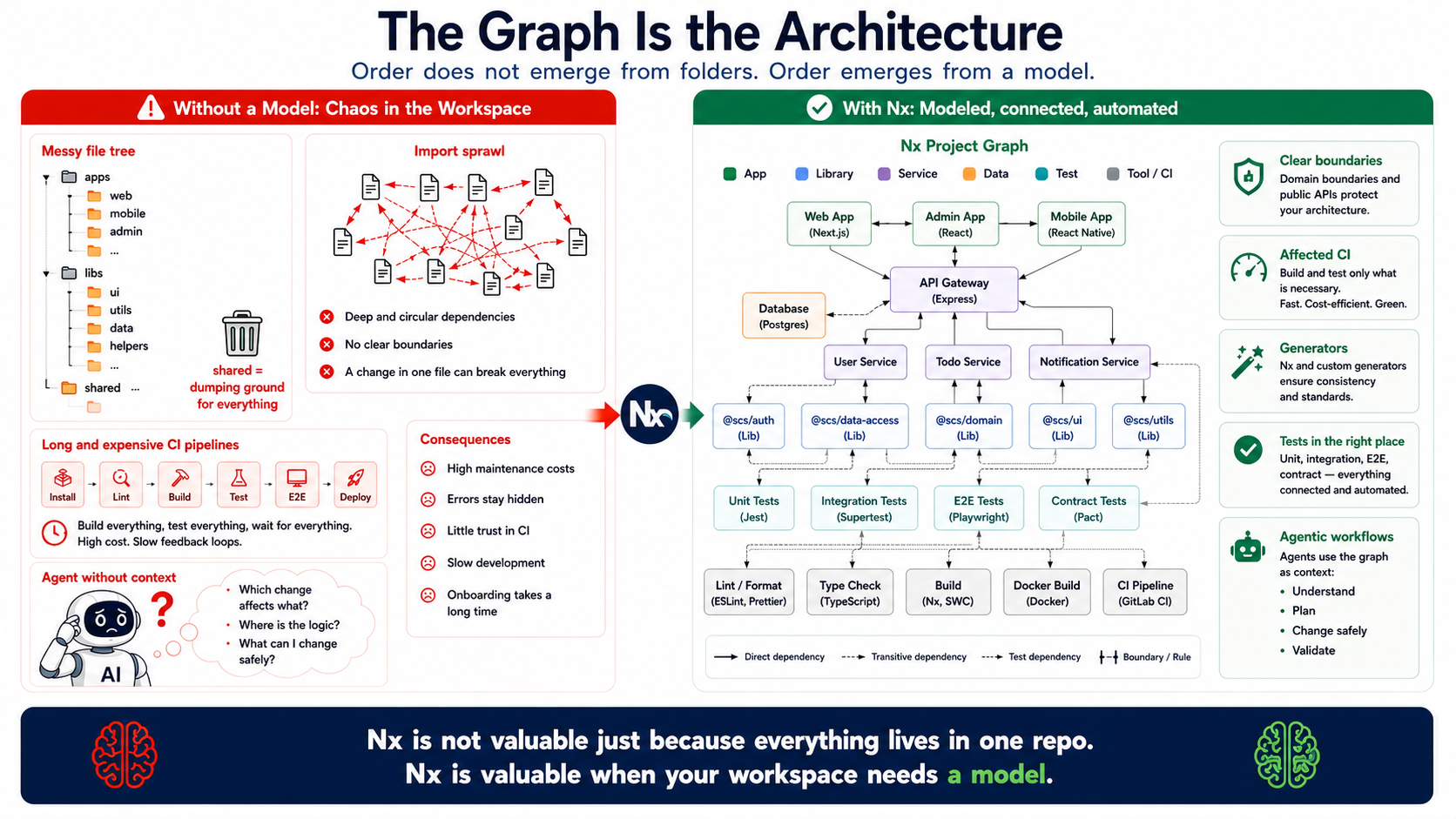
Nx isn’t worth it because everything sits in one repository. Nx is worth it when a workspace needs a model.
A model for projects. A model for dependencies. A model for tasks. A model for inputs and outputs. A model for affected changes. A model for CI. A model for architecture rules. And increasingly: a model for agents that shouldn’t have to guess blindly through the file tree anymore.
Or, shorter:
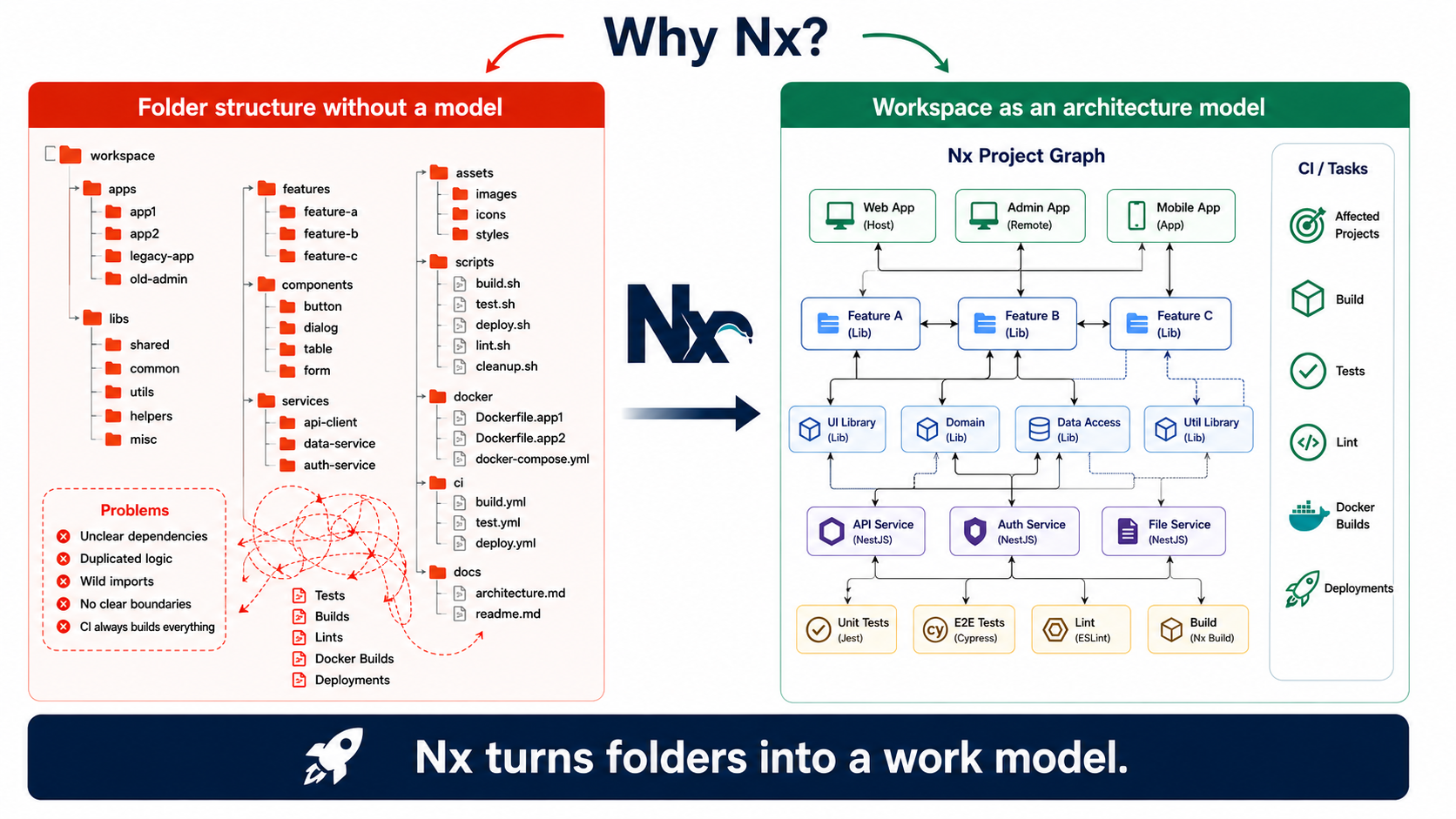
Nx turns folders into a working model.
The wrong answer: because monorepo
Section titled “The wrong answer: because monorepo”The most common reflex is:
We’re using Nx because we want a monorepo.
That’s a bit like saying:
We’re building architecture because we need folders.
A monorepo is, to begin with, just an organizational decision. It says: several things live in the same repository.
That alone isn’t architecture yet.
You can have very clean boundaries inside a monorepo. But you can also build an excellently version-controlled junkyard in there. With shared, common, utils, wild imports, implicit dependencies, and a CI pipeline that fires up the entire engine room on every single change.
The repository isn’t the interesting part.
The interesting part is the question:
Does your workspace understand what’s happening inside it?
Does it know which app depends on which library? Does it know which tests are relevant? Does it know which change affects which deployment? Does it know which boundary got violated? Does it know which tasks have which inputs? Does it know which artifacts get produced?
If the answer is no, you might have a monorepo.
But not yet an architecture model.
What Nx actually is
Section titled “What Nx actually is”Nx isn’t simply:
- a monorepo tool
- a build wrapper
- Angular CLI with more files
- a collection of generators
- a reason to throw everything into one repo
- a magic CI acceleration device
- a substitute for architecture decisions
Nx is more a tool that makes a workspace explicit.
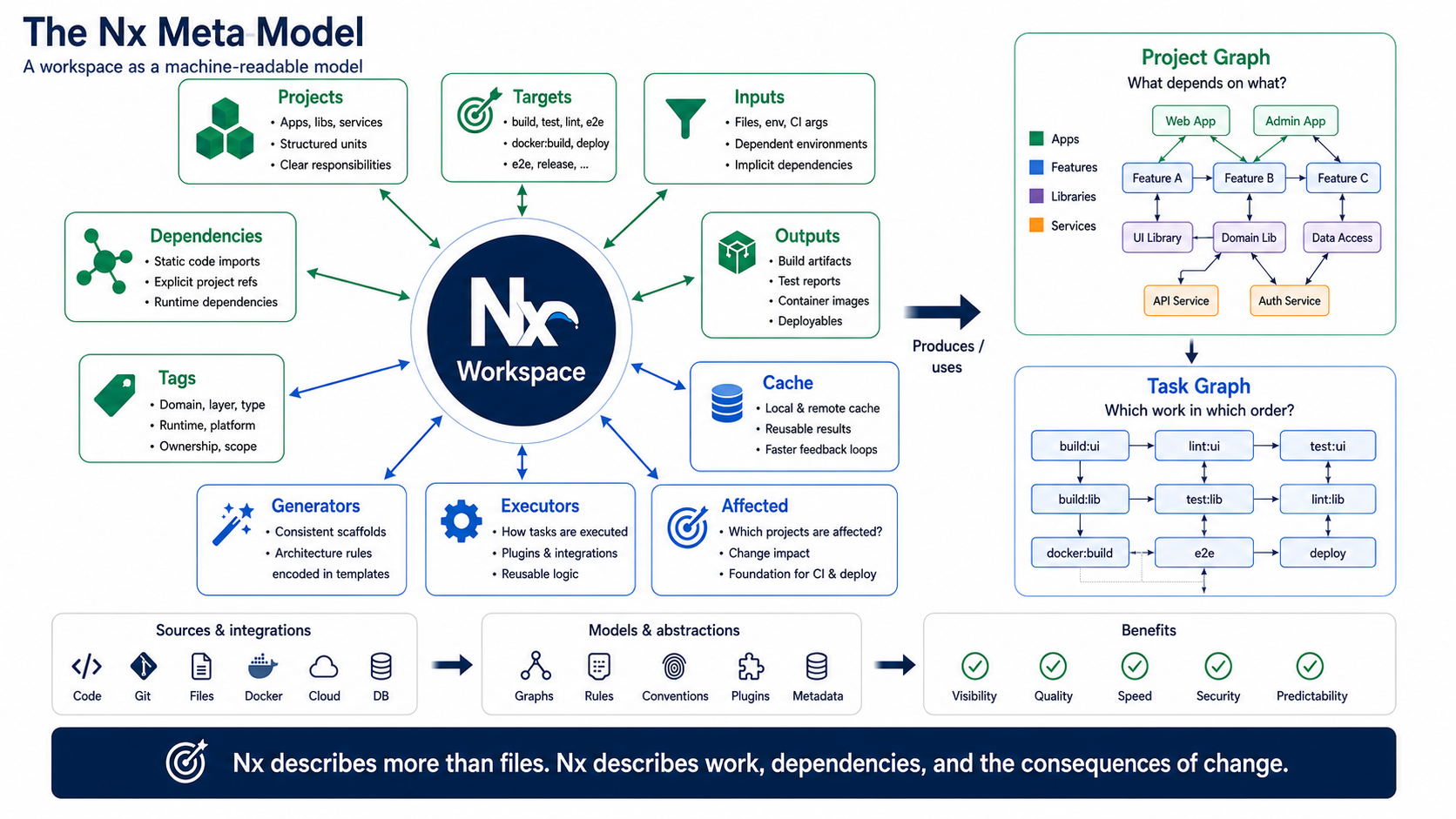
It models projects, dependencies, targets, tasks, inputs, outputs, generators, rules, caches, and change consequences.
Nx doesn’t just describe files. Nx describes work, dependencies, and the consequences of change.
That sounds dry at first.
It isn’t, though.
Because that’s exactly where architecture starts becoming practical.
Not as a diagram in the wiki. Not as a PowerPoint with boxes. Not as “this is supposedly how it should be.”
But as an executable model.
The Nx meta-model
Section titled “The Nx meta-model”The most important part of Nx isn’t the monorepo.
The most important part is the graph.
More precisely: the combination of the project graph, the task graph, targets, inputs, outputs, tags, and rules.
Nx models questions like:
- What is a project?
- What does it depend on?
- Which tasks can it run?
- Which inputs affect these tasks?
- Which outputs get produced?
- Which projects are affected by a change?
- Which rules apply between projects?
- Which tags describe roles, layers, or domains?
- Which targets are standardized?
- Which artifacts get produced for CI and deployment?
That’s the actual meta-model.
Not because it sounds particularly academic. But because it treats the workspace not just as a collection of files, but as a system of units of work and dependencies.
A project, then, isn’t simply a folder under apps or libs.
A project is a node in the working model.
It has tasks. It has dependencies. It has boundaries. It has allowed and forbidden relationships. It can be affected. It can be built, tested, checked, published, or deployed.
That’s architecturally valuable, because structure doesn’t just get documented.
It becomes executable.
The graph is uncomfortably honest
Section titled “The graph is uncomfortably honest”Architecture diagrams have a problem.
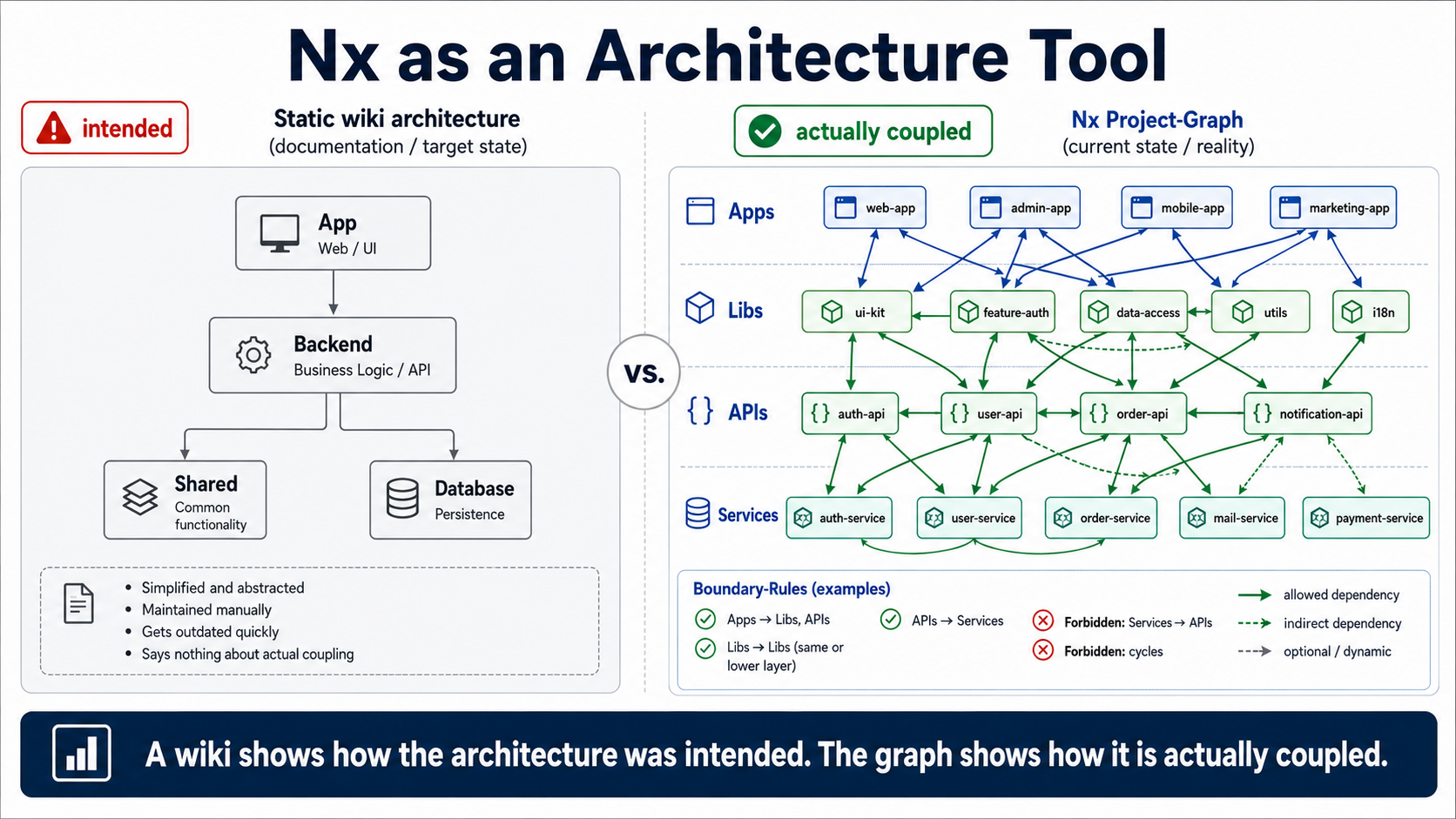
They often show how a system was meant to be.
The code shows what actually came of it.
The Nx graph sits uncomfortably close to the second truth.
An architecture diagram in the wiki shows how a system was meant to be. The Nx graph shows how the workspace is actually coupled.
That can be nice.
But it can also hurt.
When a small UI library suddenly depends on half the feature areas.
When a domain lib secretly imports infrastructure.
When every app reaches into the same shared crate.
When a feature is supposedly isolated, but the graph looks like cooked spaghetti.
At that point, Nx isn’t the problem.
Nx is just holding up the mirror.
The graph is uncomfortably honest.
And that’s exactly why it’s valuable.
Nx as an architecture tool
Section titled “Nx as an architecture tool”Nx is most useful when architecture needs to be checked, not just discussed.
For example:
- Which domain is allowed to import which other domain?
- Is a UI library allowed to access a data-access library?
- Is a feature allowed to use infrastructure code directly?
- Are apps allowed to import other libraries’ internal paths?
- Are there clear public APIs?
- Are vertical slices really cut vertically?
- Are technical utilities harmless, or have they long since become hidden domain logic?
- Which change triggers which tests, builds, or deployments?
That’s the point where Nx goes beyond being a “build tool.”
Of course Nx can build, test, lint, and cache.
But the more interesting part is:
Nx can help make architecture rules machine-readable.
Not perfectly. Not completely. Not as a substitute for thinking.
But as a very useful feedback system.
What Nx is good at
Section titled “What Nx is good at”Nx can structure large workspaces.
Not by magically producing good folders. But by making projects visible as coherent units.
Nx can make dependencies visible.
That sounds trivial, until you see for the first time that your own “clean” workspace is actually held together by three shared libraries and five direct imports.
Nx can provide the project graph and the task graph.
The project graph shows what depends on what. The task graph shows which work has to run in which order.
That’s a difference.
A library can look harmless from a domain perspective but be expensive for CI. A task can look isolated but drag many other tasks along with it. Nx makes connections like these tangible.
Nx can compute affected projects.
That matters for CI. But it’s also architecture feedback.
More on that later.
Nx can run builds, tests, and lints in a targeted way.
In large workspaces, that’s not a luxury. At some point, it becomes the line between “CI is part of the development flow” and “CI is the place where pull requests grow old.”
Nx can limit expensive checks to affected areas.
Not every commit has to build everything. Not every style fix has to touch every deployment. Not every change to an isolated library should send the entire workspace into a panic.
Nx can generate code consistently.
Generators aren’t just convenience. Good generators carry architecture decisions. Bad generators spread edge cases faster.
Nx can make architecture rules checkable through tags and boundaries.
That gets especially interesting when tags aren’t just decorative labels, but carry real meaning:
- domain
- layer
- type
- runtime
- ownership
- deployment context
Nx can structure migrations.
That matters especially in long-lived workspaces. Architecture isn’t just initial beauty. Architecture is the ability to change over time.
Nx can standardize recurring targets.
If every project names build, test, lint, docker:build, serve, e2e, or deploy differently, you no longer have a tooling model. You have folklore.
Nx can connect full-stack workspaces.
Frontend, API, services, domain libs, UI libs, E2E tests, Docker targets, and deployment steps can all become visible within the same working model.
That’s especially valuable in SCS, microfrontend, or vertically sliced full-stack workspaces.
Host, remote, API, service, domain lib, UI lib, tests, and deployment aren’t loose artifacts sitting in random folders then.
They’re parts of a modeled workspace.
And Nx can supply agents and tools with machine-readable context.
That’s becoming more important than a lot of people currently want to admit.
What Nx can’t do
Section titled “What Nx can’t do”Now for the uncomfortable part.
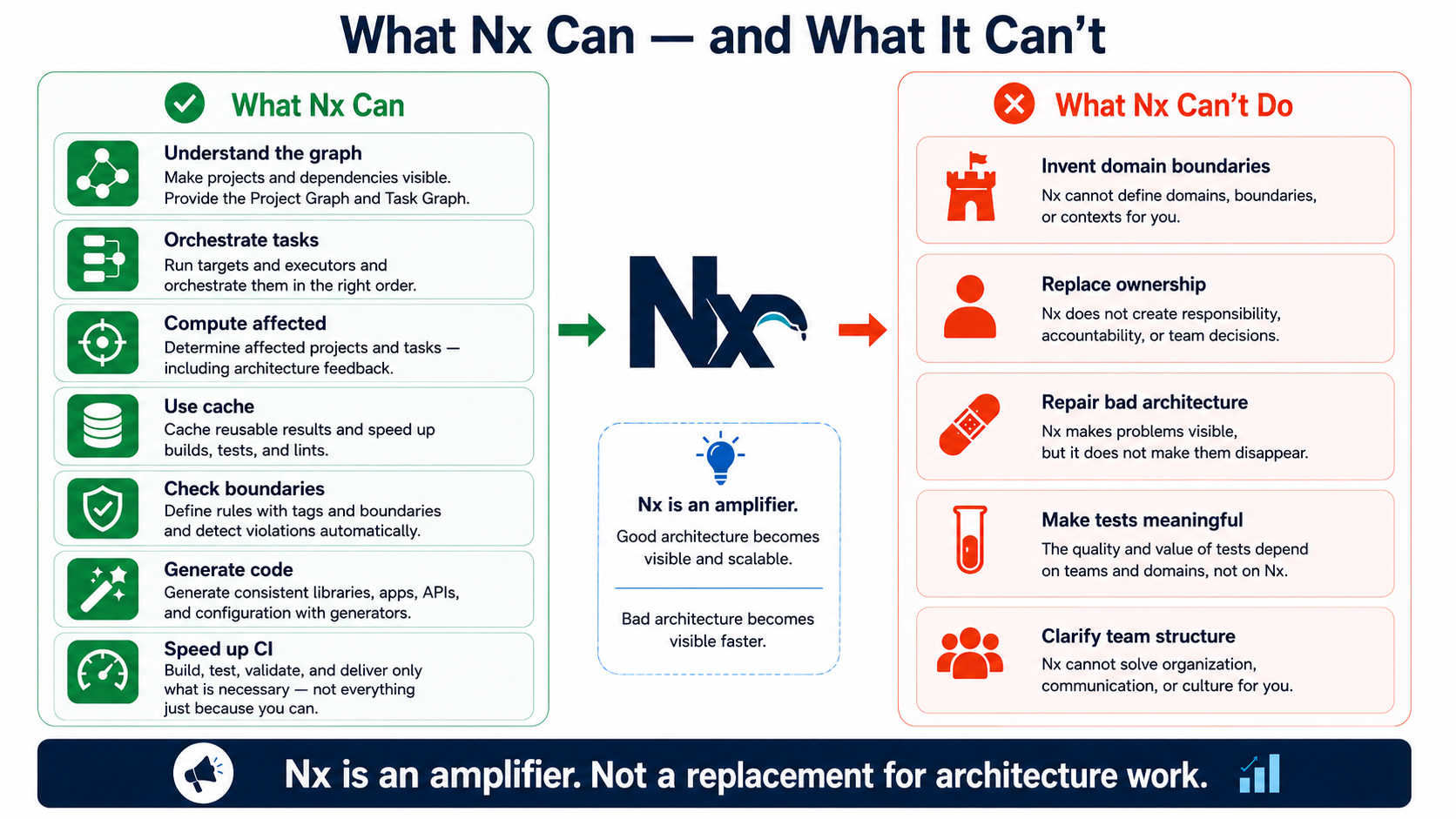
Nx can’t invent domain boundaries.
If nobody knows where the domain ends, Nx can’t conjure that up.
Nx can’t fix bad architecture.
It can make it visible. It can make rules checkable. It can show impact. But it doesn’t decide for you whether something should be an app, a feature lib, a domain lib, a data-access lib, or a utility.
Nx can’t create ownership.
If nobody feels responsible for a library, it doesn’t get better just because it’s displayed nicely in the graph.
Nx can’t clarify team structure.
If five teams are touching the same libraries, bending the same APIs, and building in the same workarounds, the workspace isn’t the problem. It’s just the crime scene.
Nx can’t replace missing tests.
Affected tests only help when there are tests that actually say something.
A fast, empty test run isn’t a sign of quality. It’s just fast.
Nx can’t turn bad generators into good architecture.
A generator that produces bad boundaries scales bad boundaries.
Consistent, at least. Just consistently wrong.
Nx can’t make up for a lack of discipline.
You can define boundary rules and then work around them. You can maintain tags or let them rot. You can take public APIs seriously or import deep internal paths everywhere.
Nx can’t save a junkyard named shared.
You have to do that yourself.
Nx isn’t a substitute for architecture work. It’s a tool for making architecture work more visible and more checkable.
Or, a bit more unkindly:
Nx doesn’t fix bad architecture.
It just makes it visible faster.
Affected is architecture feedback
Section titled “Affected is architecture feedback”A lot of teams first see affected as a CI performance feature.
That’s understandable.
As a workspace grows, builds get slow. Tests get expensive. Lints take forever. Docker builds pile up. E2E tests block things. Deployments get cautious, because nobody’s sure anymore what a change actually affects.
Then nx affected sounds like salvation.
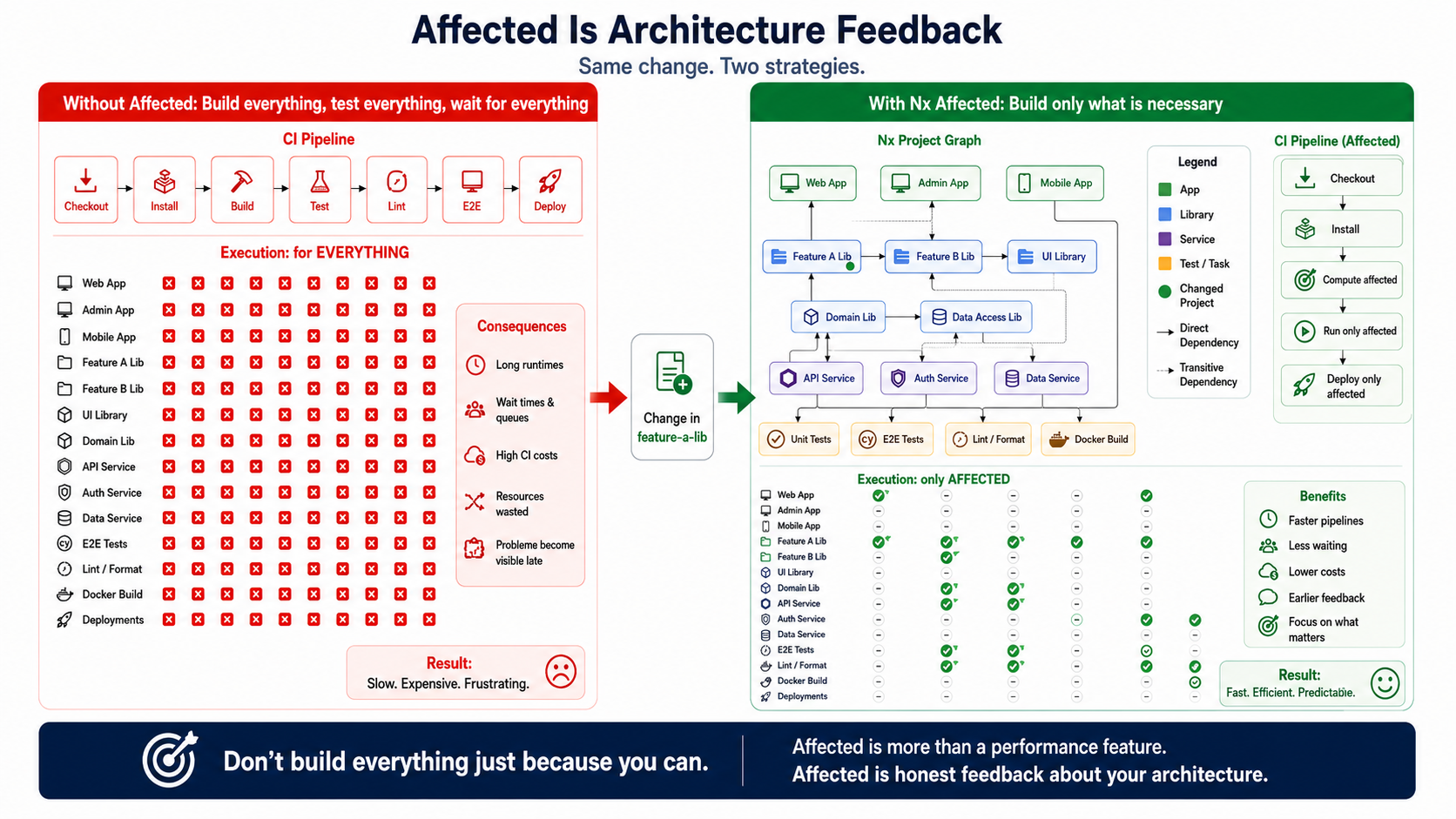
Only build affected projects. Only run affected tests. Only check affected lints. Only build affected Docker images. Only trigger affected deployments.
That’s powerful.
But it’s more than performance.
Affected is architecture feedback.
Nx can compute which projects are affected by a change. From that, you can run in a targeted way:
- builds
- tests
- lints
- E2E tests
- Docker builds
- deployments
- format checks
- quality gates
- release steps
That changes the CI question.
A lot of teams react to slow CI first with more technology:
More runners. More parallelization. More caching. More dashboards. More YAML acrobatics. More “that runs overnight.”
Nx flips the question around.
Not:
What can we run?
Instead:
What does this change actually affect?
That’s a different way of thinking.
Don’t build everything just because you can.
Affected only works when the graph describes reality
Section titled “Affected only works when the graph describes reality”Affected strategies are only strong when the graph knows real boundaries.
That’s the catch.
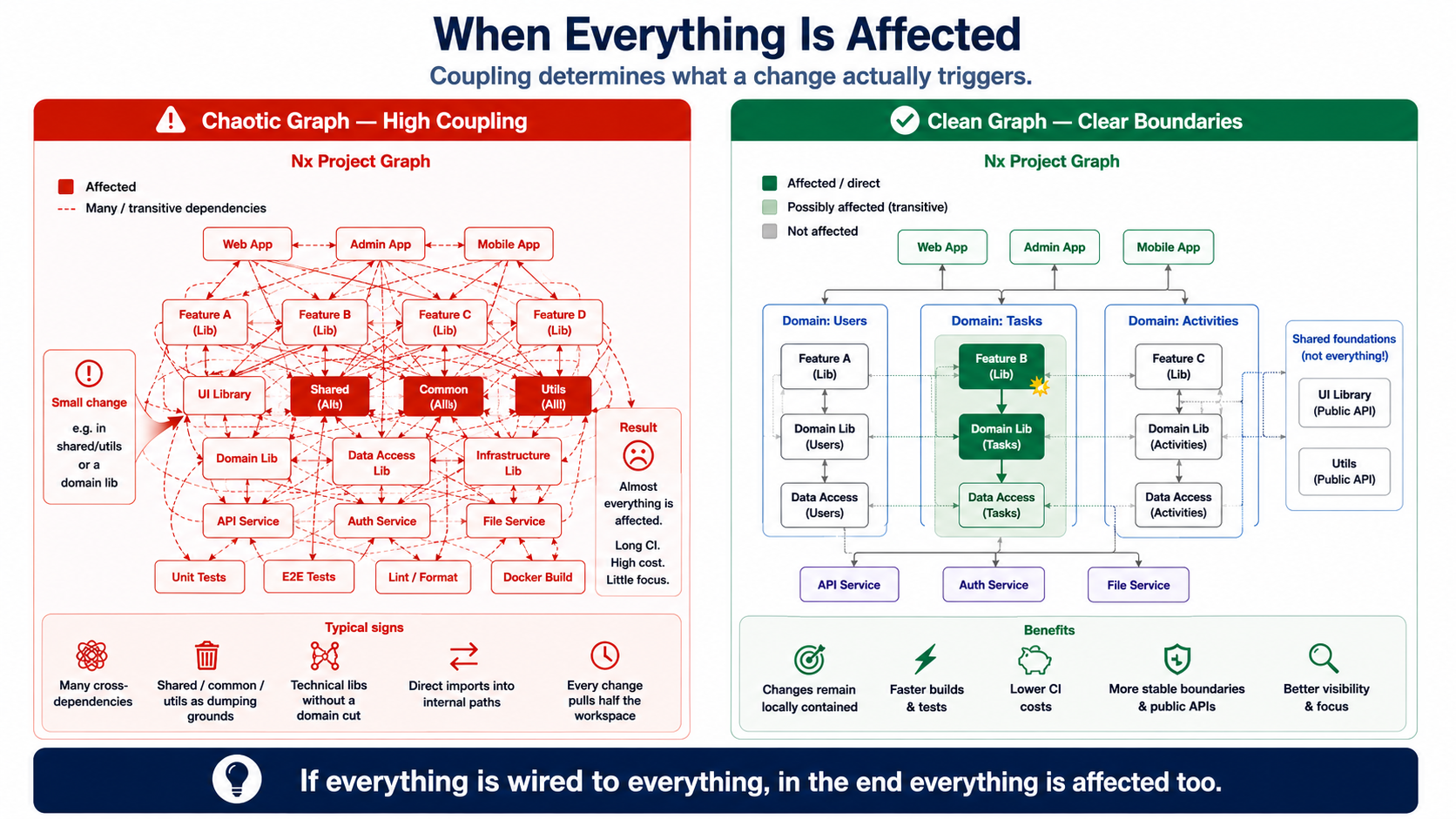
If everything is wired to everything, in the end everything is affected too.
That’s not an Nx problem.
That’s the architecture clearing its throat inside the graph.
If a small change suddenly marks half the workspace as affected, that’s not bad news from Nx. It’s honest news about coupling.
Of course you can then try to make CI faster anyway. More cache. More parallelization. More exclusions. More special-case rules.
You can do that.
But at some point you’re no longer optimizing CI.
You’re numbing architecture feedback.
A workspace with clean boundaries has a different effect:
A change in an isolated domain lib affects few consumers. A change in a UI component affects relevant apps, but not arbitrary services. A change in an SCS affects its remote, API, service, tests, and deployment, but not automatically the entire workspace. A change to a central base library is allowed to affect a lot — but then everyone should understand that this library is central.
Affected, then, isn’t just a trick.
It’s a lie detector.
If the graph keeps saying “everything is affected,” maybe the graph isn’t being too pessimistic.
Maybe the architecture is just being honest about how coupled it is.
CI is a consumer of the architecture model
Section titled “CI is a consumer of the architecture model”CI often gets treated like a technical afterthought.
There are a few jobs lying around. A few stages. A few npm scripts. Docker somewhere. Tests somewhere. Deployments somewhere. And when it gets slow, you just add another runner next to it.
That can work for a while.
But in larger workspaces, CI itself becomes a consumer of the architecture.
CI has to know:
- Which projects exist?
- Which targets are relevant?
- Which projects are deployable?
- Which tests belong to which change?
- Which Docker images need to be built?
- Which services need to be deployed?
- Which artifacts get produced?
- Which stacks belong together?
- Which change is harmless, and which one is system-critical?
If CI can’t derive these things from the workspace model, special paths spring up.
YAML knows things Nx doesn’t know. Shell scripts know things the graph doesn’t know. Deployment matrices know things that appear in no architecture rule. And eventually nobody knows anymore which knowledge actually lives where.
Nx can help here, because targets, affected analysis, and project metadata provide a shared language.
But only if CI actually uses the graph.
If CI only uses Nx as a complicated npm-script launcher, little is gained.
Then nx shows up in the log, sure.
But the model stays unused.
The customization trap
Section titled “The customization trap”Customization is tempting.
And sometimes absolutely reasonable.
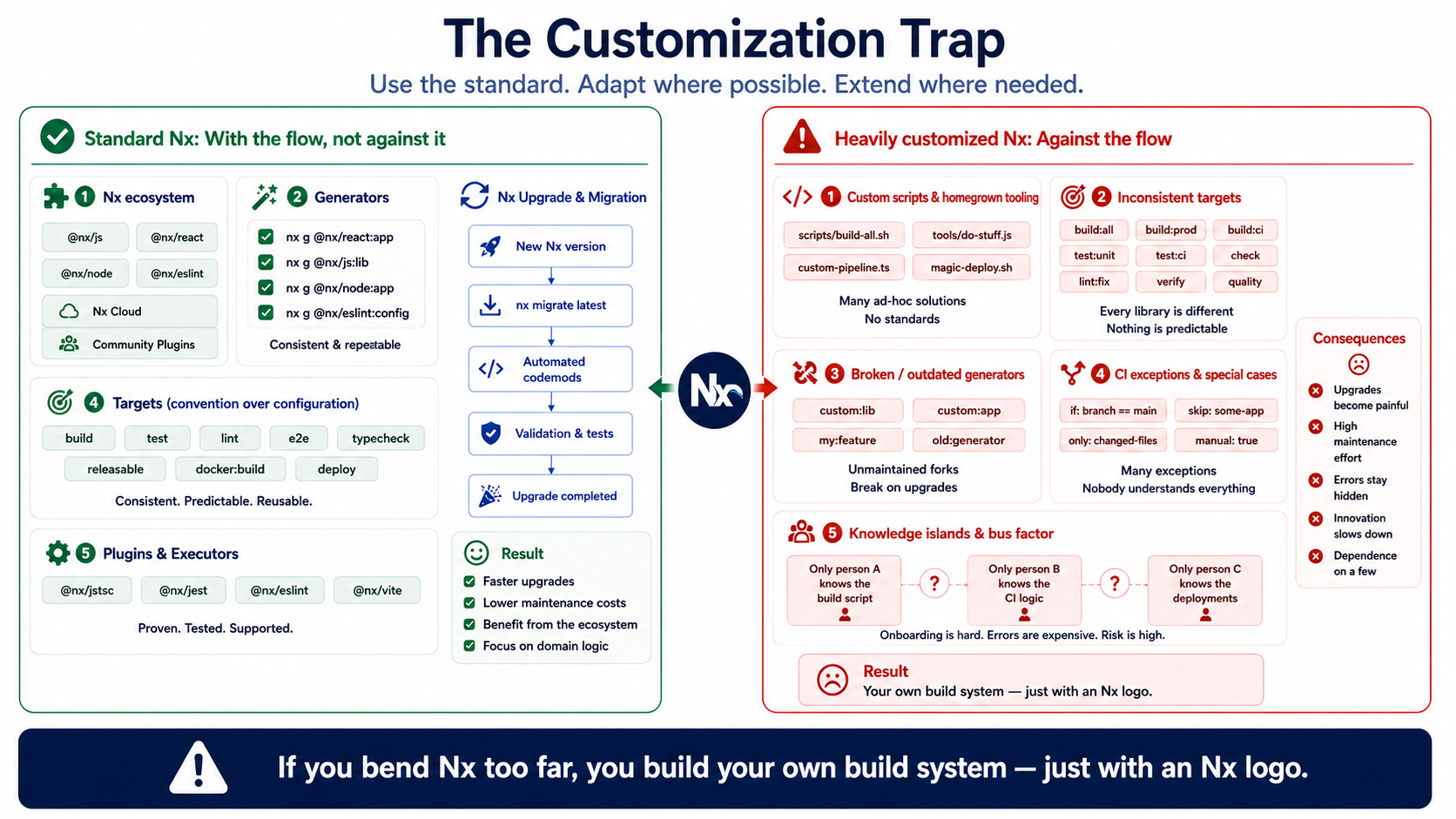
Custom generators can help produce a consistent SCS structure. Standardized targets can ensure that every deployable project gets built the same way. Tags can express domains, layers, types, or runtime contexts. Deployment conventions can move into the tooling instead of gathering dust across ten Confluence pages.
That’s good customization.
It expresses architecture rules.
It gets dangerous when customization replaces or hides the tooling conventions.
Then every project has its own target names. Generators produce edge cases. Shell scripts bypass the graph. CI only uses Nx as a thin wrapper. Migration paths get harder. New developers don’t understand the system. Agents understand the system even less. Knowledge migrates into custom scripts. The graph shows structure, but no longer behavior.
At that point, you’ve built your own build system.
Just with an Nx logo on it.
Customization makes sense where it expresses architecture rules. It’s dangerous where it replaces tooling conventions.
The harder you bend Nx out of shape, the less value the shared model has.
And the shared model is the actual reason Nx is interesting.
Not the ability to run arbitrary shell scripts under a different name.
Anti-patterns: shared, common, utils, and other parking lots
Section titled “Anti-patterns: shared, common, utils, and other parking lots”Every larger workspace eventually develops places where decisions disappear.
They’re usually called:
sharedcommonutilscorebasemischelpers
Of course not every utility library is bad.
But a lot of these folders aren’t architecture concepts.
They’re parking lots for decisions nobody wanted to make.
shared is often not an architecture concept. It’s a parking lot for decisions nobody wanted to make.
The problem isn’t the name alone.
The problem is the meaninglessness.
If everything is shared, nothing is protected anymore.
Then features import arbitrary helpers. Apps reach deep into internal paths. Domain code ends up in technical utilities. UI logic leaks into data access. Tests hang off random details. And eventually nobody knows anymore who owns what.
Typical Nx traps look like this:
- Everything ends up in
shared - Everything ends up in
common - Everything ends up in
utils - technical libraries have no domain boundary
- feature libs import everything
- apps reach deep into internal lib paths
- there are no clear public APIs
- tags exist but don’t get maintained
- boundary rules are defined but get worked around
- there are too many mini-libraries with no domain reason
- there are too few libraries, so everything becomes central
- generators produce code but no architecture
- CI calls Nx but doesn’t use affected logic
- affected is expected, but dependencies are everywhere
- every team builds its own conventions
- Nx gets mistaken for a substitute for architecture decisions
- the graph gets ignored until CI is slow
The catch is:
Nx makes these things visible.
But it doesn’t automatically prevent them.
A workspace still needs decisions.
Which domains exist? Which technical layers make sense? Which libraries are stable enough to be shared? Which things deliberately shouldn’t be shared? Which public APIs are allowed? Which imports are forbidden? Which generators carry real architecture? Which targets have to be standardized?
Without these decisions, Nx doesn’t become an architecture tool.
It just becomes a faster way to manage a bigger mess.
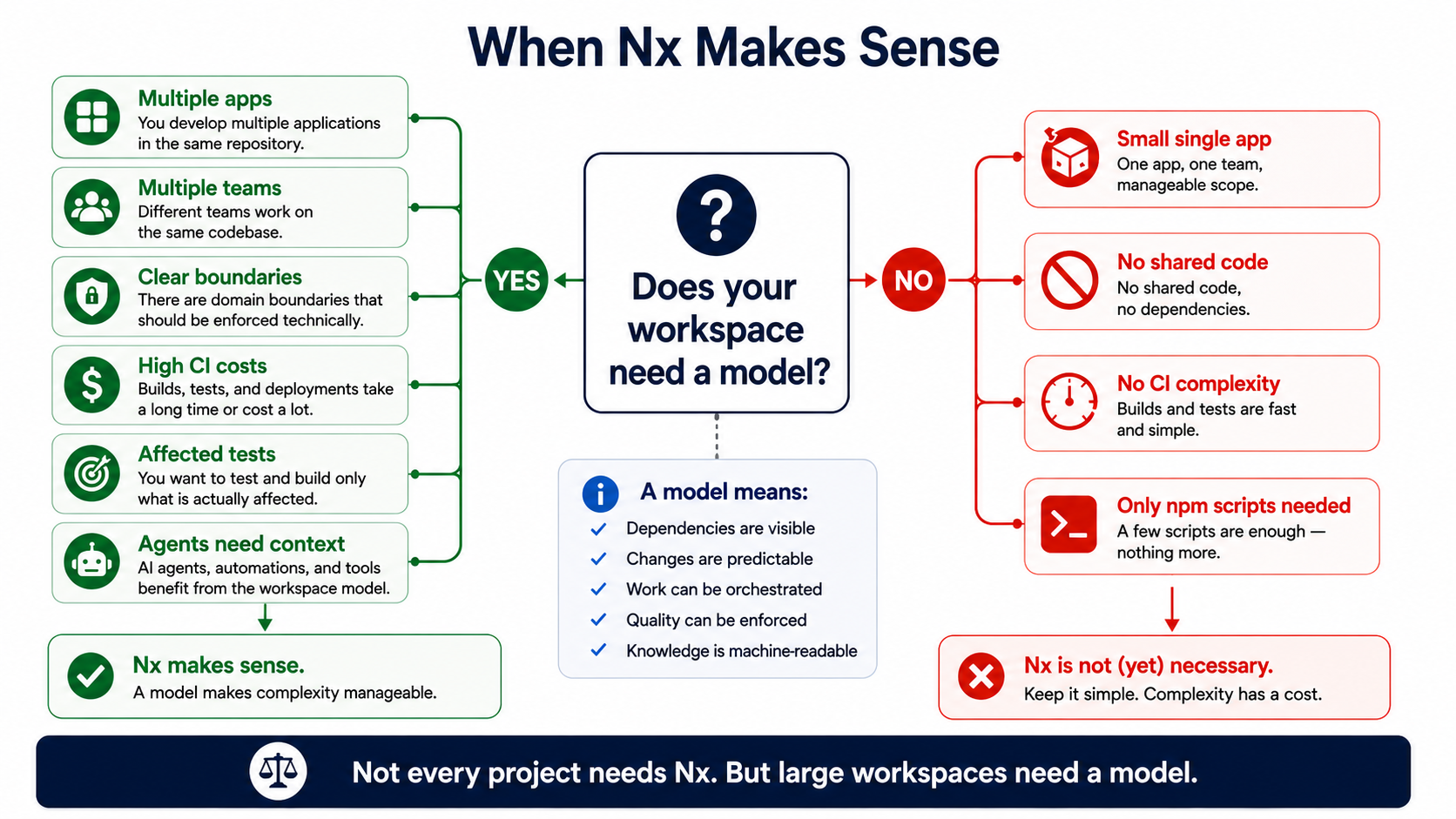
When Nx makes sense
Section titled “When Nx makes sense”Nx makes sense when a workspace needs more than folders and npm scripts.
For example, with:
- multiple apps
- multiple libraries
- multiple teams
- frontend + backend + API + services in one workspace
- microfrontends
- Module Federation
- self-contained systems
- vertical slices
- recurring architecture rules
- high CI costs
- a lot of pull requests
- a need for affected builds and affected tests
- standardized generation
- clear boundaries
- long-term product development
- agentic workflows that need context
- workspaces where changes need to be precisely scoped
Especially in an SCS, microfrontend, or full-stack workspace, Nx can be particularly effective.
A domain area there isn’t limited to a backend API.
It can consist of:
- Remote
- API
- Service
- domain libs
- UI libs
- data access
- tests
- E2E
- Docker targets
- deployment steps
All of that can be modeled in Nx as a coherent, bounded workspace.
Not because everything belongs together in some wild way.
But because the connections are explicit.
That’s an important difference.
A good Nx workspace doesn’t say:
Everything is allowed to know everything.
It says:
We know what’s allowed to know what.
When Nx is overkill
Section titled “When Nx is overkill”Nx isn’t always the right answer.
Sometimes a simple structure is enough.
And that’s completely fine.
Nx is probably overkill for:
- a small standalone app
- a single team
- barely any shared code
- low CI complexity
- prototypes
- throwaway projects
- very simple repos
- projects where Angular CLI, Vite, or npm scripts are completely sufficient
- teams that don’t want to maintain a model
The last point matters.
If nobody takes the graph seriously, Nx is just a more complicated way to run npm scripts.
Then you pay the complexity cost without getting the actual benefit.
Nx needs upkeep.
Not excessively. Not religiously. Not as a tool fetish.
But tags, boundaries, targets, generators, and project structure have to be taken seriously.
Otherwise the graph eventually becomes just a colorful picture you briefly open in architecture meetings, before going back to importing everything directly.
Nx and agentic workflows
Section titled “Nx and agentic workflows”Now for the part that’s going to matter a lot more over the next few years.
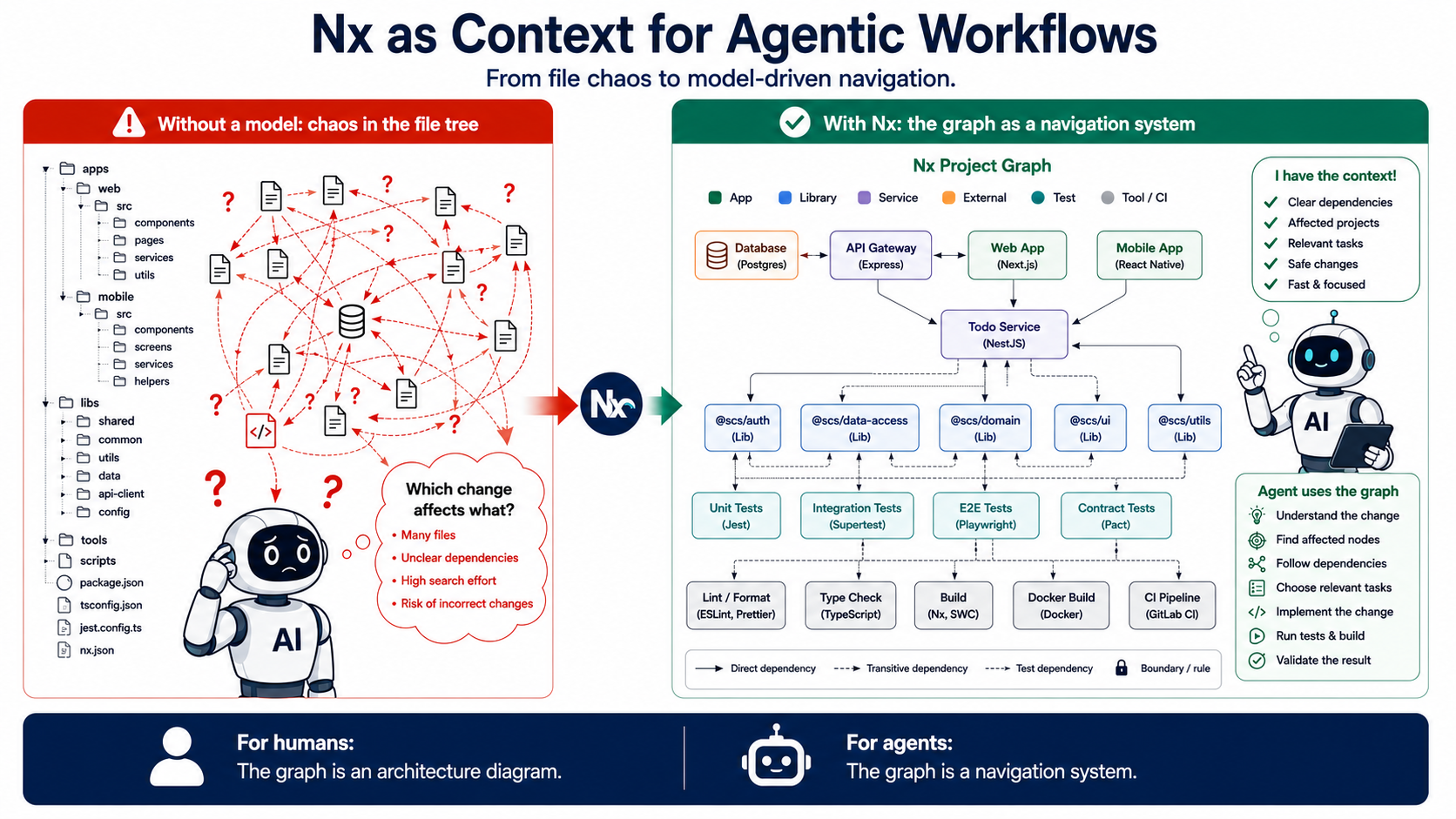
For humans, the Nx graph is an architecture diagram.
For agents, it’s a navigation system.
Coding agents need context.
Not just files.
They need to know:
- Which projects exist?
- What depends on what?
- Which tests are relevant?
- Which commands exist?
- Which boundaries must not be violated?
- Which library is allowed to import where?
- Which API service belongs to which frontend?
- Which change affects the DB, backend, API, UI, and tests?
- Which targets need to run after a change?
- Which projects are even allowed to be changed?
- Which artifacts get produced for build, test, and deployment?
A human can painstakingly piece a lot of this together.
They read folders, search for imports, ask colleagues, click through CI, dig up old tickets, interpret names, and eventually develop a feel for the system.
An agent doesn’t automatically have that feel.
It needs a model.
If it only sees the file tree, it guesses.
And agents that guess are impressively fast at producing chaos.
Nx can help here, because it makes the workspace machine-readable.
The agent doesn’t have to ask blindly:
Where are the relevant tests?
It can get closer to the answer through targets and affected analysis.
It doesn’t just have to guess:
Which projects belong together?
The graph provides a starting point.
It doesn’t have to import arbitrarily, thinking:
This should probably work.
Boundary rules can give it limits.
But the same rule applies here too:
Nx only helps when the workspace is well-maintained.
If everything is custom scripts, edge cases, wild imports, and neglected tags, an agent just understands the chaos faster too.
Agents don’t just scale productivity.
They scale disorder too.
The more code gets changed by agents, the more important a machine-readable architecture model becomes.
Not because agents replace architecture.
But because otherwise they’re working without an architecture model.
And that’s about as reassuring as an intern with root access and way too much confidence.
The better question
Section titled “The better question”So the better question isn’t:
Should we use Nx?
The better question is:
Does our workspace need an executable model?
If the answer is no, Nx is probably not necessary.
If the answer is yes, Nx becomes interesting.
But then you shouldn’t stop at “monorepo.”
Then it’s about architecture.
Draw project boundaries deliberately.
Define clear public APIs.
Don’t use tags as decoration.
Take boundary rules seriously.
Standardize targets.
Use affected not just for speed, but as architecture feedback.
Keep generators small, consistent, and meaningful.
Avoid shared as a junkyard.
Treat CI as a consumer of the architecture model.
Treat agents as future consumers of the architecture model.
Customize only where it expresses rules — not where it destroys conventions.
Nx isn’t a magic wand.
It’s an amplifier.
It amplifies good structure.
And it makes bad structure louder.
The takeaway
Section titled “The takeaway”The most important part of Nx isn’t the monorepo.
The most important part is the graph.
Nx isn’t worth it because everything lives in one repo. Nx is worth it when your workspace needs a model: for humans, for CI, and for agents.
Or, even shorter:
Nx works best when the graph describes the architecture. When everything is wired to everything, it just honestly describes the problem.