Create Slice: Writing as a command flow
Loading data is a read problem.
Creating data is a command problem.
That sounds like a small distinction.
It isn’t, though.
A retrieve slice answers the question:
What should the UI show?
A create slice answers a different question:
What domain intent is the user sending into the system?
That’s why I don’t want to show create in this article as “a POST from the component.”
And also not as “we just extend the same store with a few methods.”
There are many ways to model create flows:
- calling a service directly from the facade
- a store method with
create() - a command store
- classic effects
- optimistic updates
- form state with a submit status
- event-driven projections
I’ll get into some of these variants later.
This article is deliberately about an event-driven create slice.
The submit doesn’t save directly.
The submit sends an intent.
The boundary
Section titled “The boundary”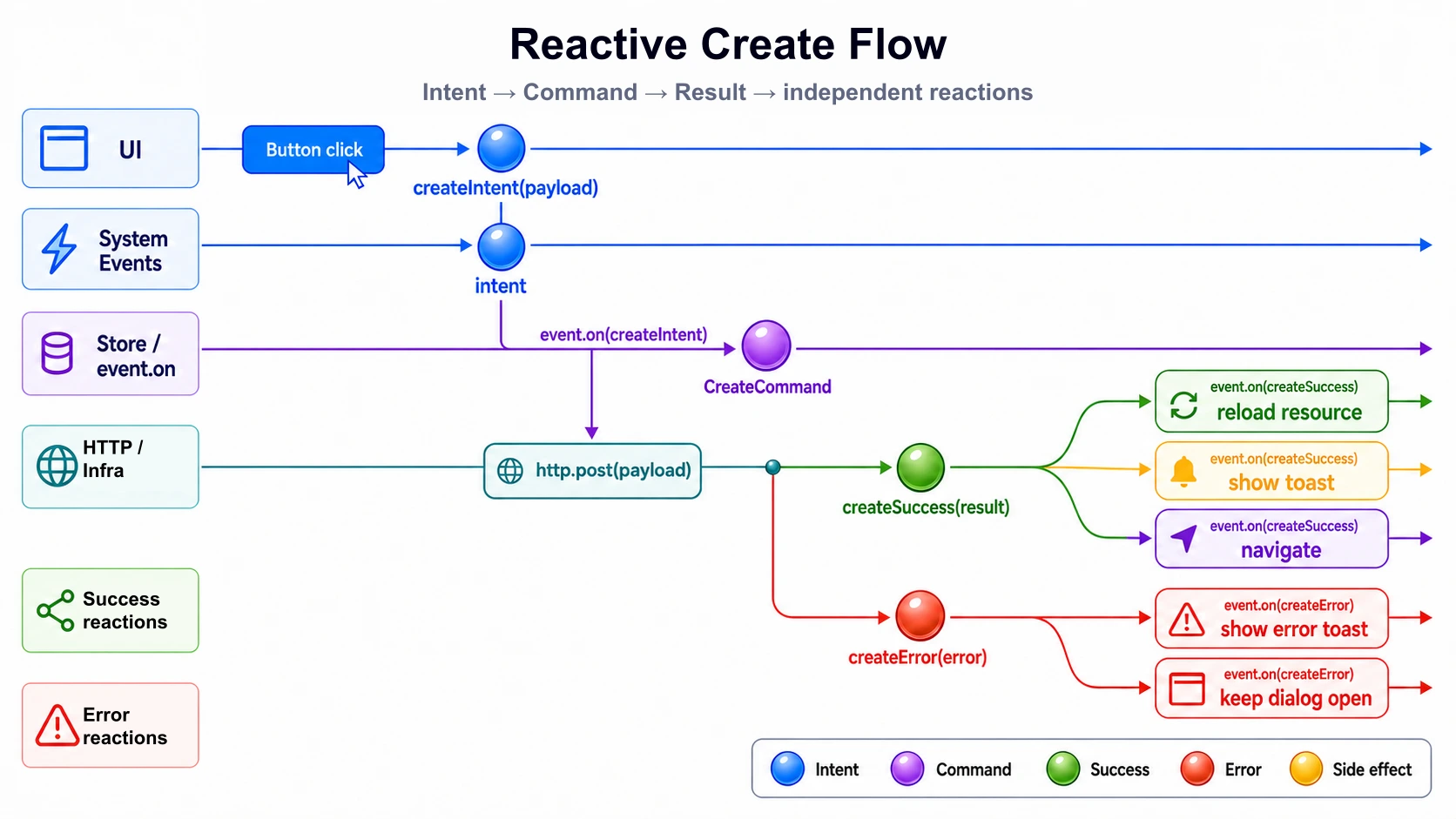
The most important point:
Create is not retrieve with a different HTTP method.
With retrieve, we read external data and build a ViewModel from it.
With create, we send an intent into the system.
That intent can succeed.
It can fail.
And both outcomes can be followed by several independent reactions.
submit → createRequested → POST → createSucceeded | createFailed → independent reactionsThat’s a different design than:
submit → http.post() → listStore.reload() → router.navigate() → toast.show()In the direct flow, every step knows too much about the next one.
In the event-driven slice, intent, execution, and reaction are separated.
Why not just put everything in one store?
Section titled “Why not just put everything in one store?”The obvious solution is often one big store.
It loads the list.
It holds the selected element.
It knows the form state.
It validates inputs.
It sends the POST.
It handles errors.
It updates the list.
Maybe it even navigates back.
And at some point, this store is still called ArticleStore, but it’s actually a small god.
It knows everything.
It can do everything.
It’s needed everywhere.
That’s convenient at the start.
But it mixes two very different models:
- Read model: What does the UI show?
- Command model: What intent gets executed?
This separation isn’t academic.
Read models are allowed to be convenient, denormalized, and UI-close.
Commands should be small, explicit, and intent-oriented.
If both land in the same store, the store quickly grows in two directions at once: it becomes a projection model and a command center.
That’s exactly why I separate, in this slice:
ArticleResource  → encapsulates a private httpResource  → provides article, isLoading, error, and reload
Read Store  → orchestrates source signals  → computes the ViewModel
Command Store  → listens to command events  → executes writes  → fires success/error events
The Read Store isn’t the place where commands somehow also get handled.
The Command Store isn’t the place where ViewModels come from.
A small lifecycle constraint in NgRx Signal Store
Section titled “A small lifecycle constraint in NgRx Signal Store”This introduces a small amount of framework-level friction in NgRx Signal Store.
Architecturally, I want to separate the read model and the command model.
Practically, though, the NgRx Signal Store is DI-driven: a store only exists in the relevant scope once it gets provided and injected.
That’s very pleasant for read models.
A page needs data, so it injects its facade or its store.
For a separate command store, it’s less elegant.
Because a command store often doesn’t get rendered directly at all. It’s meant to accept an intent, execute a side effect, and then produce events.
Still, it has to exist.
As of NgRx Signal Store 21, that means: if I separate the Read Store and the Command Store, I have to deliberately instantiate the Command Store once, in the slice scope.
For example:
- via the page’s providers
- via the route’s providers
- via a facade that injects the command store
- via a small bridge service
That’s not dramatic.
But it’s important not to gloss over it.
That separation requires one small lifecycle decision.
NgRx describes the events plugin as an event-based state management layer for the Signal Store. In NgRx 21, withEffects in the events plugin was also renamed to withEventHandlers. That fits well with this slice, because we don’t model writes as a direct store method, but as an event flow.
Why no resource() for create?
Section titled “Why no resource() for create?”In the retrieve article, httpResource lived in the infrastructure because it carries HTTP and API semantics.
For create, the point is even sharper.
Angular’s resource API is meant for asynchronous read dependencies. The Angular documentation explicitly points out that resource is meant for read operations, not mutations, because running loads can be aborted on changes or on destroy. httpResource is also a wrapper around HttpClient that exposes request status and response as signals, and runs through the Angular HTTP stack, including interceptors.
That’s why I deliberately don’t use a resource() write for create.
A write is not a derived read state.
A write is a command.
Retrieve:resource loads data
Create:command executes an intent
For this article, that means:
- read side: private
httpResourceinsideArticleResource - write side:
HttpClientinArticleCommand - connection: events
The concrete HttpResourceRef never leaves the infrastructure.
hasValue() and the guarded access to value() stay there too.
These aren’t domain decisions of the Read Store. They’re technical lifecycle semantics of the Angular resource.
The Read Store afterward only consumes clearly named signals and one explicit reload() operation.
Example: creating an article
Section titled “Example: creating an article”We stay with the Lorem API.
The retrieve article read from:
GET https://lorem-api.com/api/article/fooThis create slice writes to a create URL:
POST https://lorem-api.com/api/articleWhether this API actually responds exactly like this in a real system isn’t decisive for the slice.
What matters is the boundary:
Form → CreateArticleCommand → ArticleCommand.createArticle(command) → articleCreateEvents.createSucceeded | createFailed → articleReadEvents.loadRequested → Read Store triggers ArticleResource.reload()Target structure
Section titled “Target structure”One possible structure for the slice:
article/├── entities/│ └── article.model.ts├── infrastructure/│ ├── article.dto.ts│ ├── article.mapper.ts│ ├── article.resource.ts│ ├── article-create.dto.ts│ ├── article-create.mapper.ts│ └── article.command.ts├── +state/│ ├── article.store.ts│ ├── article.vm.ts│ ├── article-view-model.mapper.ts│ ├── create-article.command.ts│ ├── article-create.events.ts│ ├── article-read.events.ts│ └── article-command.store.ts├── application/│ ├── article.facade.ts│ └── article-create.facade.ts└── presentation/ ├── article-create-page.component.ts └── article-create-page.component.htmlAt first glance, this looks like more than the retrieve slice.
But the files have clear jobs:
create-article.command.ts  → domain intent
article-create.events.ts  → requested / succeeded / failed
article.command.ts  → write operations against the external API
article-command.store.ts  → event handlers for the write flow
article-read.events.ts  → read side can request a reload
article.resource.ts  → encapsulates the private httpResource and provides safe source signals
article.store.ts  → orchestrates source signals and reacts to loadRequested
The added structure prevents a single store from having to know everything.
1. Command: describing the intent
Section titled “1. Command: describing the intent”A command is not a DTO.
A command is not a ViewModel.
A command is not a form model either.
A command describes the intent that comes from the UI.
export interface CreateArticleCommand { readonly title: string; readonly subtitle: string; readonly content: string;}This article doesn’t need more.
No validation.
No metadata.
No UI flags.
The command model deliberately stays small.
CreateArticleCommand = the user wants to create an articleThe DTO comes later, at the API boundary.
Not here.
2. Events: requested, succeeded, failed
Section titled “2. Events: requested, succeeded, failed”Now we define the events of the create slice.
import { eventGroup, type } from '@ngrx/signals/events';
import { CreateArticleCommand } from './create-article.command';
export const articleCreateEvents = eventGroup({  source: 'Article Create',  events: {    createRequested: type<CreateArticleCommand>(),    createSucceeded: type<{ readonly articleId: string }>(),    createFailed: type<{ readonly error: unknown }>(),  },});
The important part isn’t the syntax.
The important part is the language:
createRequestedcreateSucceededcreateFailedcreateRequested isn’t a result yet.
It’s only an intent.
createSucceeded and createFailed are results of execution.
This separation is valuable.
Because reactions shouldn’t hang off the submit.
They should hang off the result.
3. Read events: reload as its own intent
Section titled “3. Read events: reload as its own intent”The Command Store shouldn’t know the Read Store directly.
It shouldn’t say:
articleStore.reload()That would be direct coupling again.
Instead, there’s a read event:
import { eventGroup, type } from '@ngrx/signals/events';
export const articleReadEvents = eventGroup({  source: 'Article Read',  events: {    loadRequested: type<void>(),  },});
This might sound like a small indirection.
But that indirection is exactly the boundary:
createSucceeded → loadRequested → Read Store triggers ArticleResource.reload()The write side doesn’t say how the read side loads.
It only says:
After this successful write, the read article data should be requested again.
4. Infrastructure: command to DTO, then POST
Section titled “4. Infrastructure: command to DTO, then POST”Up to the infrastructure, we work with the command.
The DTO only emerges at the API boundary.
article-create.dto.ts
Section titled “article-create.dto.ts”export interface CreateArticleDto { readonly title: string; readonly subtitle: string; readonly content: string;}
export interface CreateArticleResponseDto { readonly id: string;}The DTO describes the external contract.
Not the internal language.
article-create.mapper.ts
Section titled “article-create.mapper.ts”import { CreateArticleCommand } from '../+state/create-article.command';import { CreateArticleDto } from './article-create.dto';
export const toCreateArticleDto = ({ title, subtitle, content }: CreateArticleCommand): CreateArticleDto => ({ title, subtitle, content,});The mapping is boring here.
That’s good.
It still shows the right place, though.
If the external API later needs different field names, extra wrappers, or technical metadata, that happens at this boundary.
Not in the component.
Not in the facade.
Not in the command.
article.command.ts
Section titled “article.command.ts”import { HttpClient } from '@angular/common/http';import { Injectable, inject } from '@angular/core';
import { CreateArticleCommand } from '../+state/create-article.command';import { CreateArticleResponseDto } from './article-create.dto';import { toCreateArticleDto } from './article-create.mapper';
@Injectable()export class ArticleCommand { private readonly http = inject(HttpClient);
readonly createArticle = (command: CreateArticleCommand) => this.http.post<CreateArticleResponseDto>('https://lorem-api.com/api/article', toCreateArticleDto(command));}There’s a file article.command.ts in the infrastructure for this slice.
It bundles the write operations the Command Store can execute.
The relationship is deliberately one-to-one:
ArticleCommandStore → uses ArticleCommandThe store decides when a write operation gets executed.
The infrastructure decides how this write gets translated against the external API.
The payload model stays in the state slice:
CreateArticleCommand → domain intentThe DTO only emerges at the API boundary:
CreateArticleCommand → toCreateArticleDto() → POST5. Command Store: executing requested, firing the result
Section titled “5. Command Store: executing requested, firing the result”Now comes the Command Store.
It holds no ViewModel.
It renders nothing.
It listens to events, executes the infrastructure, and publishes result events.
import { inject } from '@angular/core';import { mapResponse } from '@ngrx/operators';import { signalStore, withProps } from '@ngrx/signals';import { Events, withEventHandlers } from '@ngrx/signals/events';import { exhaustMap, map } from 'rxjs';
import { ArticleCommand } from '../infrastructure/article.command';import { articleCreateEvents } from './article-create.events';import { articleReadEvents } from './article-read.events';
export const ArticleCommandStore = signalStore(  withProps(() => ({    _articleCommand: inject(ArticleCommand),  })),
  withEventHandlers(({ _articleCommand }, events = inject(Events)) => ({    createArticle$: events.on(articleCreateEvents.createRequested).pipe(      exhaustMap((command) =>        _articleCommand.createArticle(command).pipe(          mapResponse({            next: (response) =>              articleCreateEvents.createSucceeded({                articleId: response.id,              }),            error: (error: unknown) => articleCreateEvents.createFailed({ error }),          }),        ),      ),    ),
    reloadOnCreateSucceeded$: events.on(articleCreateEvents.createSucceeded).pipe(map(() => articleReadEvents.loadRequested())),
    // notifyOnCreateSucceeded$: events    //   .on(articleCreateEvents.createSucceeded)    //   .pipe(    //     map(() =>    //       notificationEvents.showSuccess({    //         summary: {    //           key: 'articles.notifications.create.success.summary',    //         },    //         detail: {    //           key: 'articles.notifications.create.success.detail',    //         },    //       }),    //     ),    //   ),
    // navigateOnCreateSucceeded$: events    //   .on(articleCreateEvents.createSucceeded)    //   .pipe(    //     map(() => articleNavigationIntentEvents.openList()),    //   ),  })),);
The store does three things:
1. accept createRequested2. execute the POST via infrastructure3. publish createSucceeded or createFailedAfter that, it translates createSucceeded into a read event:
createSucceeded → loadRequestedThis is deliberately not a direct call to the Read Store.
The Command Store doesn’t know the resource.
It doesn’t know the ViewModel.
It doesn’t know presentation.
It only knows events.
The additional success reactions are deliberately only sketched in the code as future events.
Navigation and notification don’t have to happen as direct imperative side effects in the Command Store either.
Instead, they can also be described as events:
createSucceeded  → notificationEvents.showSuccess(...)
createSucceeded  → articleNavigationIntentEvents.openList()
The Command Store then knows neither a toast service nor a router.
It only describes what should happen, in domain or UI terms, after a successful create.
Other parts of the slice or the application can pick up these events and turn them into real side effects.
tap therefore stays reserved for spots where an imperative boundary is genuinely reached: router, toast service, logging, or external APIs.
As long as a reaction can be described as an event again, map is the cleaner choice.
Why exhaustMap?
Section titled “Why exhaustMap?”For create flows, double submit is a real problem.
The user clicks twice.
The form submits twice.
The browser is slow.
The network hangs.
That’s why the choice of flattening operator isn’t a minor detail.
For this article, I use exhaustMap.
exhaustMap  → ignores further submits while a create is running
concatMap  → queues multiple creates one after another
mergeMap  → allows parallel creates
switchMap  → cancels earlier creates
For a create command, switchMap is often dangerous.
A write is not a search query.
Once a write is in flight, I usually don’t want to silently cancel it just because a second submit comes in.
exhaustMap is the conservative choice for this simple slice.
6. Read Store: reacting to loadRequested
Section titled “6. Read Store: reacting to loadRequested”The retrieve article already introduced the Read Store.
For create, we only add an event handler.
The concrete Angular resource stays completely in the infrastructure.
ArticleResource keeps the httpResource private and only exposes a small, named API publicly:
article: Signal<Article | null>isLoading: Signal<boolean>error: Signal<Error | undefined>reload(): voidThat keeps the technical guards in the right place too.
hasValue() protects access to value().
That is not a ViewModel decision made by the store.
It’s framework semantics of the Angular resource and therefore belongs in the infrastructure adapter that owns this resource.
The Read Store afterward knows neither:
HttpResourceRefhasValue()- the throwing behavior of
value() ResourceStatus- parse or request details
It only orchestrates source signals, the ViewModel projection, and read intents.
import { computed, inject } from '@angular/core';import { signalStore, withComputed, withProps } from '@ngrx/signals';import { Events, withEventHandlers } from '@ngrx/signals/events';import { tap } from 'rxjs';
import { ArticleResource } from '../infrastructure/article.resource';import { articleReadEvents } from './article-read.events';import { toArticleViewModel } from './article-view-model.mapper';
export const ArticleStore = signalStore(  withProps(() => ({    _articleResource: inject(ArticleResource),  })),
  withComputed(({ _articleResource }) => ({    isLoading: _articleResource.isLoading,    error: _articleResource.error,    vm: computed(() => toArticleViewModel(_articleResource.article())),  })),
  withEventHandlers(({ _articleResource }, events = inject(Events)) => ({    reloadOnLoadRequested$: events.on(articleReadEvents.loadRequested).pipe(tap(() => _articleResource.reload())),  })),);
The ViewModel mapper thereby maps:
Article | null → ArticleVm | nullThe domain entity itself stays strict.
There’s no artificial empty article just so the store can get by without a condition.
An existing Article must be valid.
The absence of a readable value gets normalized to null at the infrastructure boundary.
The store just projects this source further.
That’s the central point of the reload handling.
Not like this:
Command Store → articleStore.reload()But like this:
Command Store  → articleReadEvents.loadRequested()
Read Store  → events.on(loadRequested)  → ArticleResource.reload()
The write side only triggers a read intent.
The read side decides which source operation follows from it.
In doing so, though, it doesn’t interpret any technical resource lifecycle.
It only orchestrates:
loadRequested  → ArticleResource.reload()
article  → ArticleVm
tap is fine here.
Not because the store itself executes HTTP or resource logic.
But because the event flow triggers an explicit operation of its infrastructure dependency at this exact point.
Before this, events get mapped onto events.
Here, the read operation actually gets triggered.
That keeps the read flow quiet within the store.
Reading, you’re interested in:
- which source gets consumed
- which ViewModel emerges
- which intent triggers which operation
Not the usage instructions of httpResource.
If later several Read Stores have to react to the same write success, they don’t all have to be known to the Command Store.
They can each listen to events on their own.
7. Application: facade sends the intent
Section titled “7. Application: facade sends the intent”The create facade doesn’t execute a POST.
It doesn’t know an HttpClient.
It doesn’t call the Command Store directly either.
It only publishes the intent.
import { Injectable, inject } from '@angular/core';import { injectDispatch } from '@ngrx/signals/events';
import { articleCreateEvents } from '../+state/article-create.events';import { CreateArticleCommand } from '../+state/create-article.command';
@Injectable()export class ArticleCreateFacade {  private readonly dispatchCreate = injectDispatch(articleCreateEvents);
  readonly createArticle = (command: CreateArticleCommand): void => {    this.dispatchCreate.createRequested(command);  };}
The facade uses injectDispatch(articleCreateEvents).
That gives it a small, typed dispatch API for exactly this event group.
It doesn’t have to know a generic dispatcher or assemble an event manually.
The two stores are deliberately only injected in the constructor as lifecycle dependencies.
They make sure the event handlers of the Read Store and the Command Store exist within the slice scope.
The facade doesn’t call a store method.
That’s the public API of the create page:
createArticle(command)The facade doesn’t create an article.
It publishes the intent to create an article.
That’s a small linguistic shift with a big effect.
Because now the submit no longer hangs directly off the follow-up actions.
Presentation → facade.createArticle(command) → articleCreateEvents.createRequested(command)What happens after that no longer belongs to presentation.
8. Presentation: keeping the signal form thin
Section titled “8. Presentation: keeping the signal form thin”For input, I use Signal Forms.
But deliberately thin.
Signal Forms aren’t the architecture here.
They’re only the input layer.
Angular describes Signal Forms as a signal-based approach to managing form state in Angular applications. For this article, I only use the simple part of that: a small model, a form binding, and a submit. Validation, submit status, schema validation, and complex form interactions are deliberately left out.
article-create-page.component.ts
Section titled “article-create-page.component.ts”import { Component, inject, signal } from '@angular/core';import { form } from '@angular/forms/signals';
import { ArticleCommandStore } from '../+state/article-command.store';import { ArticleStore } from '../+state/article.store';import { ArticleCreateFacade } from '../application/article-create.facade';import { ArticleCommand } from '../infrastructure/article.command';import { ArticleResource } from '../infrastructure/article.resource';
@Component({ selector: 'app-article-create-page', templateUrl: './article-create-page.component.html', providers: [ArticleResource, ArticleCommand, ArticleStore, ArticleCommandStore, ArticleCreateFacade],})export class ArticleCreatePageComponent { protected readonly facade = inject(ArticleCreateFacade);
protected readonly model = signal({ title: '', subtitle: '', content: '', });
protected readonly articleForm = form(this.model);}The provider scope is deliberately shown locally on the page here.
In a real application, I’d often attach these providers to the route instead.
For the article, though, the local variant is helpful because it keeps the slice visibly self-contained.
What matters is:
ArticleResourceArticleCommandArticleStoreArticleCommandStoreArticleCreateFacadetogether form the scope of this create slice.
ArticleResource encapsulates the private httpResource here.
ArticleStore consumes its source signals and orchestrates the read flow.
The ArticleCommandStore is deliberately part of this scope here.
That’s only the scope decision, though.
In a real application, the Command Store also actually has to get instantiated once in this slice’s lifecycle, so its event handlers are active.
That is a small amount of lifecycle plumbing required by this approach.
Depending on the project, that can happen via the route, a deliberately injected slice service, or another lifecycle spot.
I deliberately don’t show a hidden constructor hack like inject(ArticleCommandStore) just for instantiation here.
That might make the code run, but it would obscure the dependency.
What matters more for the article:
Command Store exists in the slice scope → listens to createRequested → fires createSucceeded / createFailed
How exactly this lifecycle gets wired up in the project is framework mechanics.
The architectural boundary remains unchanged.
article-create-page.component.html
Section titled “article-create-page.component.html”<form class="article-create" (ngSubmit)="facade.createArticle(model())"> <label> Title <input [field]="articleForm.title" /> </label>
<label> Subtitle <input [field]="articleForm.subtitle" /> </label>
<label> Content <textarea [field]="articleForm.content"></textarea> </label>
<button type="submit">Create article</button></form>The template is deliberately unspectacular.
No HTTP.
No store.
No event dispatch.
No success logic.
No reload logic.
No navigation.
Presentation collects form data and calls the facade via ngSubmit.
Nothing more.
fill out form → submit() → facade.createArticle(command)That’s the component’s entire job.
9. Success is a branching point
Section titled “9. Success is a branching point”The real benefit of the event-driven slice shows up after the write.
A successful create can trigger several things:
createSucceeded → request read reload → navigate → show toast → close dialog → update badge countIn a direct flow, all of that quickly ends up behind the submit.
Then the sequence eventually looks like this:
submit() → post() → reloadList() → navigate() → toast() → closeDialog()That’s not a create slice anymore.
That’s an orchestration node in the UI.
In the event-driven flow, these reactions hang off the result:
createSucceeded  → loadRequested
createSucceeded  → notificationEvents.showSuccess(...)
createSucceeded  → articleNavigationIntentEvents.openList()
For this article, we only implement the reload.
Navigation and notification are deliberately only sketched.
That keeps the slice small.
The article shows the flow, not every possible reaction.
10. Error is also a result
Section titled “10. Error is also a result”Errors shouldn’t just end up as a local catchError in the component either.
An error is also a result of the command.
createRequested → POST → createFailed(error)What happens after that is, again, a reaction:
createFailed  → // show error toast
createFailed  → // keep dialog open
createFailed  → // mark form as failed
For this article, the event is enough.
A real UI could later react to createFailed and show a toast or keep the dialog open.
What matters:
The Command Store doesn’t decide how the error gets displayed.
It only publishes:
The create failed.
11. Why this isn’t overengineering
Section titled “11. Why this isn’t overengineering”For a single form, this design can look like more code.
That’s true.
A direct service call is shorter.
But shorter isn’t automatically simpler.
A direct service call is often only short because it hides coupling.
Component knows submitComponent knows HTTPComponent knows reloadComponent knows navigationComponent knows toastComponent knows error handlingThe event-driven slice makes these transitions visible.
Intent → Command → Result → ReactionThat’s not necessary for every mini form.
But it’s valuable as soon as a write has more than one local consequence.
For example:
- reload a list
- update a detail page
- trigger navigation
- show a toast
- close a dialog
- invalidate a cache
- update several read models
Then an event isn’t an academic detour.
It’s a decoupling.
12. The difference from the retrieve slice
Section titled “12. The difference from the retrieve slice”The retrieve slice had this direction:
API DTO → private httpResource → safe source signals → Entity | null → ViewModel | null → TemplateThe create slice has a different direction:
Form → Command → DTO → POST → Event → ReactionThat’s the core of it.
Read and write aren’t symmetric.
A read builds a model for display.
A write sends an intent into the system.
That’s why they shouldn’t automatically land in the same store in the frontend either.
Conclusion
Section titled “Conclusion”A create is not a POST from the component.
A create is an intent.
The component collects input.
The facade publishes an intent.
The Command Store executes this intent.
The infrastructure talks to the API.
Success and error become visible as events.
Read models react through their own events.
submit → createRequested(command) → ArticleCommand.createArticle(command) → createSucceeded | createFailed → loadRequested → Read Store triggers ArticleResource.reload()The most important point isn’t the extra code.
The most important point is the direction:
UI sends an intent.Command Store executes it.Events describe results.Reactions stay independent.That way, the Read Store stays a Read Store.
The infrastructure encapsulates its own technical resource.
The Read Store only orchestrates source signals, projections, and read intents.
The Command Store stays a Command Store.
And a harmless ArticleStore doesn’t turn into a godlike object that eventually controls half the feature.