Retrieve Slice: Select by ID without detail component logic
A detail page often gets opened through a route.
The classic pattern is familiar:
URL /articles/:id → detail component reads route param → component triggers loadById(id) → store or service loads data → detail template rendersThat’s not wrong.
On the contrary.
This flow has real advantages:
- Deep links work.
- Browser reload works.
- External links work.
- The URL describes the entry point.
Those are genuine arguments.
Still, in this article, I deliberately show a different approach.
Not because route parameters are bad.
But because I want to make a different point:
Think more reactively. Think in derivations. Keep components flat.
If a user selects an element from an already loaded list, that selection is view-owned state.
The detail page doesn’t then have to start, on init, reading an ID from the route, triggering a load from it, and then building a ViewModel.
It can simply render a projection:
articles + selectedArticleId → selectedArticle → selectedArticleVm → Detail TemplateThat’s the focus of this article.
The design
Section titled “The design”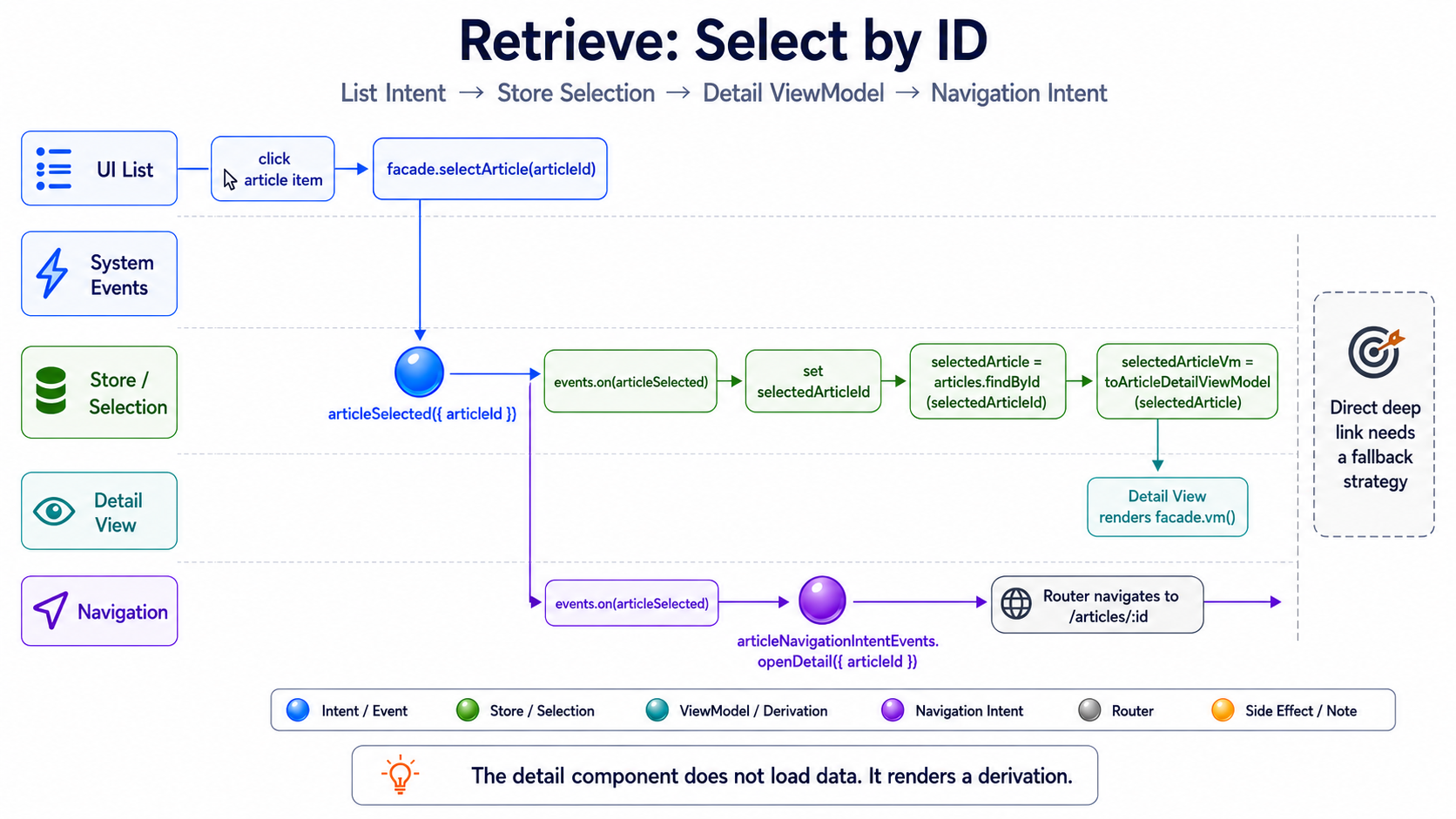
The most important point:
The detail component doesn’t load.
It doesn’t read a route parameter ID.
It doesn’t trigger loadById().
It doesn’t decide how an article gets found.
It only renders a ViewModel.
The selection happens beforehand:
List Item Click → selectArticle(articleId) → articleSelected({ articleId }) → selectedArticleId → selectedArticleVmNavigation is a reaction to the same selection.
Not the source of the selection.
The opposing position isn’t wrong
Section titled “The opposing position isn’t wrong”The classic route-param flow isn’t bad.
It solves a real problem:
How does a user get directly to a detail page?
If the answer is “through a URL,” then the URL has to contain enough information to restore that state.
That speaks for the classic flow:
Route Param → loadById → Detail ViewModelThe price, though, is that the detail page often gets more responsibility again.
It easily becomes the place where route parameter, load, selection, error state, and ViewModel construction all converge.
The flow shown here pays a different price.
It makes the in-app selection very cleanly reactive.
In exchange, direct entry via URL needs an additional fallback strategy.
Neither of these approaches is fundamentally wrong.
They optimize for different pressures.
Route Param Flow  → optimizes for restorability via URL
Selection Flow  → optimizes for reactive derivation within the in-app UI state
You just need to know what you’re choosing.
What this article deliberately doesn’t show
Section titled “What this article deliberately doesn’t show”This article doesn’t show a complete deep-link fallback.
So not:
Direct entry at /articles/foo → read route param → load article → set selectedArticleId → render detailThat would be technically correct.
But it would be a different slice.
You could use various strategies for this:
- reading the route parameter as a fallback
- a detail retrieve slice for direct entry
- a resolver
- an initial
loadRequested - rehydration from the URL
- a
byIdcollection withselectedId - a separate detail store
All valid.
But not the focus of this article.
Here, it’s about the in-app flow:
The list is loaded. The user selects an element. Detail is a derivation of that selection.
Target structure
Section titled “Target structure”One possible structure for this slice:
article/├── entities/│ └── article.model.ts├── infrastructure/│ ├── article.dto.ts│ ├── article.mapper.ts│ └── article.resource.ts├── +state/│ ├── article.store.ts│ ├── article-list.vm.ts│ ├── article-detail.vm.ts│ ├── article-list-view-model.mapper.ts│ ├── article-detail-view-model.mapper.ts│ ├── article-selection.events.ts│ └── article-navigation-intent.events.ts├── application/│ ├── article-list.facade.ts│ └── article-detail.facade.ts└── presentation/ ├── article-list-page.component.ts ├── article-list-page.component.html ├── article-detail-page.component.ts └── article-detail-page.component.htmlThe structure is deliberately similar to the retrieve slice.
The difference is the selection:
ArticleResource  → encapsulates a private httpResource  → provides articles, isLoading, error, and reload
ArticleStore  → holds selectedArticleId  → orchestrates articles and selection  → derives listVm and selectedArticleVm
The detail component doesn’t get the ID and search for it itself.
It gets a ViewModel.
Infrastructure boundary: the resource stays encapsulated
Section titled “Infrastructure boundary: the resource stays encapsulated”The slice builds on the same boundary as the retrieve article.
The concrete Angular resource stays completely in the infrastructure.
import { computed, Injectable } from '@angular/core';import { httpResource } from '@angular/common/http';
import { Article } from '../entities/article.model';import { mapArticleResponse } from './article.mapper';
@Injectable()export class ArticleResource {  private readonly resource = httpResource<readonly Article[]>(    () => ({      url: 'https://lorem-api.com/api/article',      method: 'GET',    }),    {      parse: mapArticleResponse,    },  );
  readonly articles = computed<readonly Article[] | null>(() => {    if (!this.resource.hasValue()) {      return null;    }
    return this.resource.value();  });
  readonly isLoading = this.resource.isLoading;  readonly error = this.resource.error;
  reload(): void {    this.resource.reload();  }}
hasValue() protects the technical access to value() here.
That’s framework semantics of the Angular resource.
It belongs at the spot where the resource gets created.
The store afterward only knows the application-close API:
articles: Signal<readonly Article[] | null>isLoading: Signal<boolean>error: Signal<Error | undefined>reload(): voidThat gives us two kinds of guards:
technical resource guard  → can the Angular resource be read safely?  → infrastructure
projection guard  → is there a source, a selection, and a matching article?  → pure ViewModel projection
Both guards make sense.
They just answer different questions.
The store shouldn’t spell out either of them as visible case logic.
It orchestrates named source signals, selection state, and projectors.
1. Selection event: selection as an intent
Section titled “1. Selection event: selection as an intent”The user clicks a list element.
That’s more than a UI click.
It’s a meaningful selection.
import { eventGroup, type } from '@ngrx/signals/events';
export const articleSelectionEvents = eventGroup({  source: 'Article Selection',  events: {    articleSelected: type<{ readonly articleId: string }>(),  },});
articleSelected doesn’t mean:
Navigate now.
And also not:
Load now.
It only means:
This article has been selected.
What follows from that are separate reactions.
2. Navigation intent: routing as a reaction
Section titled “2. Navigation intent: routing as a reaction”Once an article gets selected, the application should switch to the detail route.
But we describe that as an intent too.
import { eventGroup, type } from '@ngrx/signals/events';
export const articleNavigationIntentEvents = eventGroup({  source: 'Article Navigation Intent',  events: {    openDetail: type<{ readonly articleId: string }>(),  },});
That keeps the direction clear:
articleSelected → openDetail → Router navigatesThe store itself doesn’t have to know the router.
Neither does the list component.
3. ViewModels: list and detail are not the same
Section titled “3. ViewModels: list and detail are not the same”A list item needs different data than a detail page.
That’s why I separate the ViewModels.
article-list.vm.ts
Section titled “article-list.vm.ts”export interface ArticleListItemVm { readonly id: string; readonly title: string; readonly subtitle: string;}article-detail.vm.ts
Section titled “article-detail.vm.ts”export interface ArticleDetailVm { readonly id: string; readonly title: string; readonly subtitle: string; readonly heroImageUrl: string; readonly paragraphs: readonly string[];}This isn’t an end in itself.
The list shouldn’t accidentally get detail knowledge.
The detail page shouldn’t accidentally work with a list model.
Both views are projections of the same entity.
But they answer different UI questions.
4. Mapper: source and selection into ViewModels
Section titled “4. Mapper: source and selection into ViewModels”The mappers stay small.
They now also take on the projection guards relevant to the UI contract.
The store doesn’t have to contain conditions about source availability, selection, or a match because of this.
article-list-view-model.mapper.ts
Section titled “article-list-view-model.mapper.ts”import { Article } from '../entities/article.model';import { ArticleListItemVm } from './article-list.vm';
export const toArticleListViewModel = (articles: readonly Article[] | null): readonly ArticleListItemVm[] | null => { if (articles === null) { return null; }
return articles.map(toArticleListItemViewModel);};
const toArticleListItemViewModel = ({ slug, title, subtitle }: Article): ArticleListItemVm => ({ id: slug, title, subtitle,});null means here:
The source doesn’t currently deliver a readable article list.
A successfully loaded empty array, by contrast, stays a valid list ViewModel:
null  → source not currently available
[]  → source available, but no articles present
article-detail-view-model.mapper.ts
Section titled “article-detail-view-model.mapper.ts”import { Article } from '../entities/article.model';import { ArticleDetailVm } from './article-detail.vm';
interface SelectedArticleViewModelInput { readonly articles: readonly Article[] | null; readonly selectedArticleId: string | null;}
export const toSelectedArticleViewModel = ({ articles, selectedArticleId }: SelectedArticleViewModelInput): ArticleDetailVm | null => { if (articles === null || selectedArticleId === null) { return null; }
const selectedArticle = articles.find(({ slug }) => slug === selectedArticleId) ?? null;
if (selectedArticle === null) { return null; }
return toArticleDetailViewModel(selectedArticle);};
const toArticleDetailViewModel = ({ slug, title, subtitle, heroImageUrl, paragraphs }: Article): ArticleDetailVm => ({ id: slug, title, subtitle, heroImageUrl, paragraphs,});These conditions aren’t technical resource guards.
They describe the validity of the detail projection:
no source  → no detail ViewModel
no selection  → no detail ViewModel
selection finds no article  → no detail ViewModel
source and matching selection present  → ArticleDetailVm
What matters is the direction:
articles  → ArticleListItemVm[]
articles + selectedArticleId  → ArticleDetailVm | null
Not:
Template → article.title → article.content.split(...) → if author existsTemplates should render.
Not search, guard, or translate.
5. Store: orchestrating selection and derivations
Section titled “5. Store: orchestrating selection and derivations”The store consumes the safe articles signal from the infrastructure adapter.
In addition, it holds the current selection.
It does not know about HttpResourceRef.
It knows no hasValue().
And it doesn’t itself decide when a valid detail ViewModel emerges from source and selection.
import { computed, inject } from '@angular/core';import { patchState, signalStore, withComputed, withProps, withState } from '@ngrx/signals';import { Events, withEventHandlers } from '@ngrx/signals/events';import { map, tap } from 'rxjs';
import { ArticleResource } from '../infrastructure/article.resource';import { articleNavigationIntentEvents } from './article-navigation-intent.events';import { articleSelectionEvents } from './article-selection.events';import { toSelectedArticleViewModel } from './article-detail-view-model.mapper';import { toArticleListViewModel } from './article-list-view-model.mapper';
interface ArticleState {  readonly selectedArticleId: string | null;}
const initialState: ArticleState = {  selectedArticleId: null,};
export const ArticleStore = signalStore(  withState(initialState),
  withProps(() => ({    _articleResource: inject(ArticleResource),  })),
  withComputed(({ _articleResource, selectedArticleId }) => ({    isLoading: _articleResource.isLoading,    error: _articleResource.error,
    listVm: computed(() => toArticleListViewModel(_articleResource.articles())),
    selectedArticleVm: computed(() =>      toSelectedArticleViewModel({        articles: _articleResource.articles(),        selectedArticleId: selectedArticleId(),      }),    ),  })),
  withEventHandlers((store, events = inject(Events)) => ({    setSelectedArticleOnSelected$: events.on(articleSelectionEvents.articleSelected).pipe(      tap(({ articleId }) => {        patchState(store, {          selectedArticleId: articleId,        });      }),    ),
    openDetailOnSelected$: events.on(articleSelectionEvents.articleSelected).pipe(      map(({ articleId }) =>        articleNavigationIntentEvents.openDetail({          articleId,        }),      ),    ),  })),);
This is the central spot.
The store now reads like orchestration:
articles  → toArticleListViewModel()  → listVm
articles  + selectedArticleId  → toSelectedArticleViewModel()  → selectedArticleVm
The technical resource guarding stays in the infrastructure.
The projection rule stays in the named mapper.
The store only connects sources, state, projections, and intents.
The detail page later only gets:
facade.vm()6. Two listeners, two responsibilities
Section titled “6. Two listeners, two responsibilities”What matters: the event has two reactions.
One reaction changes the local selection state.
Another reaction produces a navigation intent.
That stays deliberately separate.
articleSelected  → setSelectedArticleId
articleSelected  → openDetail
In a classic Redux architecture, this would be similar:
action: articleSelected
reducer:  set selectedArticleId
effect:  trigger router navigation
The difference is only the technical form.
The responsibility stays the same.
An event is allowed to have several reactions.
But a reaction shouldn’t hide several responsibilities.
That’s why there isn’t one handler here that does everything:
articleSelected → patch selectedArticleId → navigateBut two separate reactions:
articleSelected  → change state
articleSelected  → produce a new navigation event
That makes the flow more testable.
And it keeps the architecture readable.
7. Why tap and map?
Section titled “7. Why tap and map?”Two different things happen in the store.
Setting state is a side effect inside the store:
setSelectedArticleOnSelected$: events .on(articleSelectionEvents.articleSelected) .pipe( tap(({ articleId }) => { patchState(store, { selectedArticleId: articleId }); }), ),tap fits here.
The reaction changes store state.
Navigation, on the other hand, doesn’t get executed directly.
It gets described as a new event:
openDetailOnSelected$: events .on(articleSelectionEvents.articleSelected) .pipe( map(({ articleId }) => articleNavigationIntentEvents.openDetail({ articleId }), ), ),map fits here.
An event becomes a new event.
tap  → a genuine imperative boundary in the current context
map  → a new event as a reaction
The store therefore doesn’t call the router directly.
It only produces a navigation intent.
8. Facades: list sends intent, detail reads derivation
Section titled “8. Facades: list sends intent, detail reads derivation”Now we separate the facades by usage.
The list facade exposes the list and the selection action.
import { Injectable, inject } from '@angular/core';import { injectDispatch } from '@ngrx/signals/events';
import { ArticleStore } from '../+state/article.store';import { articleSelectionEvents } from '../+state/article-selection.events';
@Injectable()export class ArticleListFacade {  private readonly store = inject(ArticleStore);  private readonly dispatchSelection = injectDispatch(articleSelectionEvents);
  readonly articles = this.store.listVm;  readonly isLoading = this.store.isLoading;  readonly error = this.store.error;
  readonly selectArticle = (articleId: string): void => {    this.dispatchSelection.articleSelected({ articleId });  };}
The detail facade only exposes the detail ViewModel.
import { Injectable, inject } from '@angular/core';
import { ArticleStore } from '../+state/article.store';
@Injectable()export class ArticleDetailFacade {  private readonly store = inject(ArticleStore);
  readonly vm = this.store.selectedArticleVm;}
That gives us the following boundary:
List Facade  → articles  → selectArticle(articleId)
Detail Facade  → vm
The detail facade has no loadById() method.
That’s intentional.
The detail page is a derivation.
Not a load orchestrator.
9. Presentation: the list sets the selection
Section titled “9. Presentation: the list sets the selection”The list renders its items and sends the selection on click.
@let articles = facade.articles();
@if (articles) {  @for (article of articles; track article.id) {    <button      type="button"      class="article-list__item"      (click)="facade.selectArticle(article.id)"    >      <span>{{ article.title }}</span>      <small>{{ article.subtitle }}</small>    </button>  }} @else {  <app-list-placeholder />}
No RouterLink.
No navigate().
No loadById().
The click means, in domain terms:
User selects an article → articleSelected({ articleId })What happens after that isn’t the list template’s job.
10. Presentation: the detail renders a derivation
Section titled “10. Presentation: the detail renders a derivation”The detail page only reads its ViewModel.
@let vm = facade.vm();
@if (vm) {  <article class="article-detail">    <img      class="article-detail__image"      [src]="vm.heroImageUrl"      [alt]="vm.title"    />
    <h1>{{ vm.title }}</h1>
    <p class="article-detail__subtitle">      {{ vm.subtitle }}    </p>
    <div class="article-detail__content">      @for (paragraph of vm.paragraphs; track paragraph) {        <p>{{ paragraph }}</p>      }    </div>  </article>} @else {  <p>No article selected.</p>}
The template doesn’t know:
- where the ID comes from
- how articles get loaded
- how
findByIdworks - when navigation happened
- whether a route parameter exists
It only renders:
selectedArticleVm → TemplateThat’s the teaching point.
11. Routing as a reaction
Section titled “11. Routing as a reaction”Up to here, we’ve only produced the navigation intent:
articleSelected → articleNavigationIntentEvents.openDetail({ articleId })At some point, that intent has to trigger router navigation.
That’s an imperative boundary.
There can be a small navigation handler for that.
import { inject, Injectable } from '@angular/core';import { Router } from '@angular/router';import { Events, withEventHandlers } from '@ngrx/signals/events';import { tap } from 'rxjs';
import { articleNavigationIntentEvents } from '../+state/article-navigation-intent.events';
@Injectable()export class ArticleNavigationHandler {  private readonly router = inject(Router);  private readonly events = inject(Events);
  readonly openDetailOnIntent$ = this.events.on(articleNavigationIntentEvents.openDetail).pipe(    tap(({ articleId }) => {      void this.router.navigate(['/articles', articleId]);    }),  );}
This code is deliberately only sketched.
Depending on the project, navigation can also happen through a router store, a global navigation handler, or other infrastructure.
What matters is only:
Navigation Intent → RouterNot:
List Component → router.navigate(...)And not:
Detail Component → read route param → loadById(...)For this slice, routing is a reaction to selection.
12. The trade-off of this approach
Section titled “12. The trade-off of this approach”This flow has a price.
If the user enters directly at /articles/foo, there’s no selection in the store yet.
Then selectedArticleVm() alone isn’t enough.
For real deep links, you need an additional strategy:
Direct entry → URL contains articleId → store has no selectedArticleId yet → articles might not be loaded yetThat’s not a detail.
That’s a real requirement.
Possible solutions would be:
- reading the route parameter as a fallback
- a detail retrieve slice for direct entry
- a resolver
- an initial
loadRequested - rehydration from the URL
- a store with
byId - restoring selection from the route
This article deliberately leaves that out.
Not because it’s unimportant.
But because it’s a different flow.
Here, it’s about:
List loaded → user clicks an element → selection gets set → detail renders a derivation → URL follows as a reactionThe classic route-param flow optimizes for deep link and restoration.
This flow optimizes for reactive derivation within the in-app UI state.
Both are legitimate.
13. Why I like teaching this flow
Section titled “13. Why I like teaching this flow”I like teaching this flow because it forces teams to think differently about frontend state.
Not:
Component starts → component reads something → component loads something → component builds somethingBut:
State changes → derivations update → templates renderThat’s more reactive.
And it keeps components flat.
The component doesn’t ask:
What do I have to do in init?
But:
Which signal am I rendering?
The store doesn’t ask:
Which component currently needs which data?
And also not:
Am I allowed to read this Angular resource right now?
But:
Which projection emerges from the provided source signals and my selection state?
That’s a different way of thinking.
And that’s exactly why I find this slice valuable as a teaching example.
Not as dogma.
But as an exercise:
Think of selection as state.Think of detail as a derivation.Think of routing as a reaction.Keep components flat.Conclusion
Section titled “Conclusion”Select by ID doesn’t have to happen in the detail component.
For the in-app flow from an already loaded list, selection can first be established as view-owned state:
List Item Click → articleSelected({ articleId }) → selectedArticleId → selectedArticle → selectedArticleVm → Detail TemplateRouting can react to it:
articleSelected → openDetail({ articleId }) → Router NavigationThe detail component doesn’t load.
It doesn’t read a route parameter ID.
It doesn’t execute loadById().
It only renders a derivation.
The infrastructure encapsulates the concrete httpResource in doing so.
The store only orchestrates the articles signal, the selection state, and named ViewModel projections.
That’s not always the right default.
If deep links and reloads are the priority, you need a URL-driven restoration strategy.
But for the in-app UI state, this approach is a useful teaching example:
Think more reactively.Think in derivations.Keep components flat.Neither of these approaches is fundamentally wrong.
They just optimize for different problems.