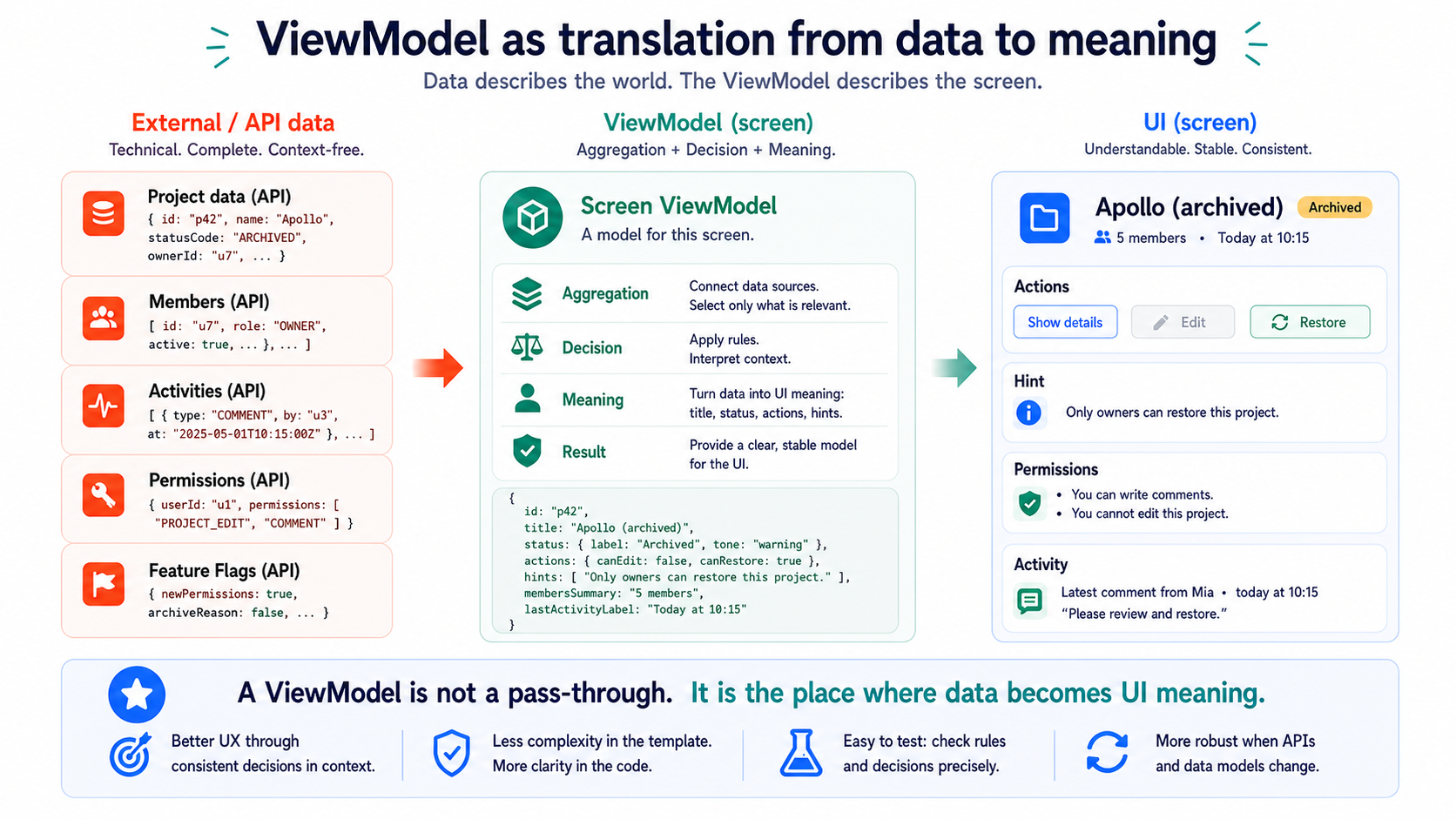
ViewModel Aggregation – The ViewModel is not a pass-through
A ViewModel isn’t the polite intern who takes API data and forwards it to the component without a word.
A ViewModel is a decision.
It decides what a screen actually needs. It decides which data belongs together. It decides which states are visible. And it decides which complexity is not allowed to leak into templates, components, or backend DTOs.
At first that sounds like architecture poetry.
It isn’t.
It’s one of the differences between a frontend that’s still understandable after two years and a frontend where every component has secretly become its own little integration project.
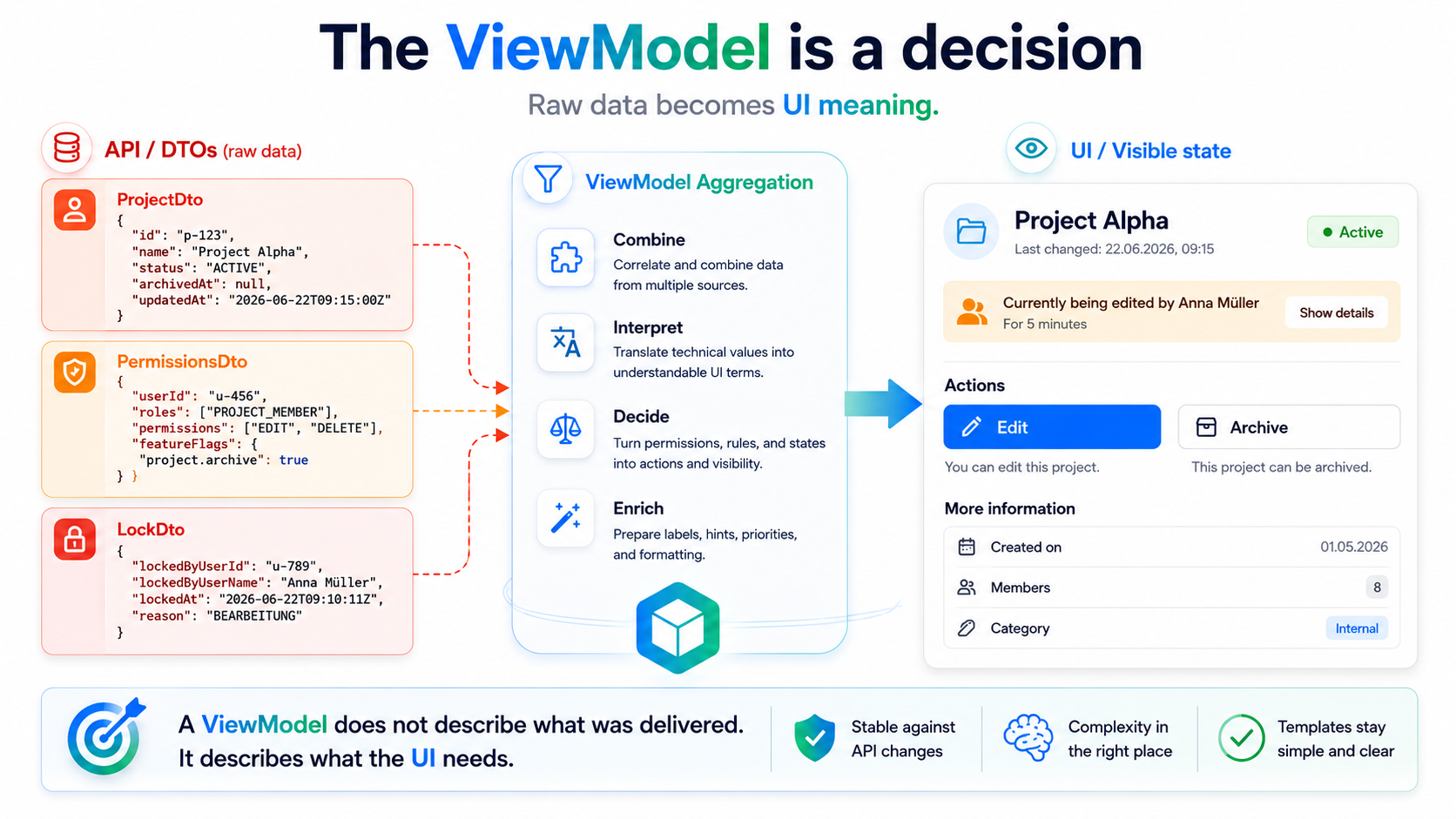
The myth: the backend already delivers everything
Section titled “The myth: the backend already delivers everything”The myth usually goes something like this:
“We don’t need an extra ViewModel. The API already delivers all the data.”
That’s one of those sentences that sounds efficient at first glance.
No extra layer. No transformation. No mappers. Less code.
Very pleasant.
Until you notice that “all the data” isn’t the same thing as “the right information for this screen.”
An API DTO usually answers the question:
What can a system deliver about a resource?
A ViewModel answers a different question:
What does this specific screen need to show, allow, or prevent in this specific situation?
That’s not the same thing.
And it doesn’t become the same thing just because both objects happen to have similar field names.
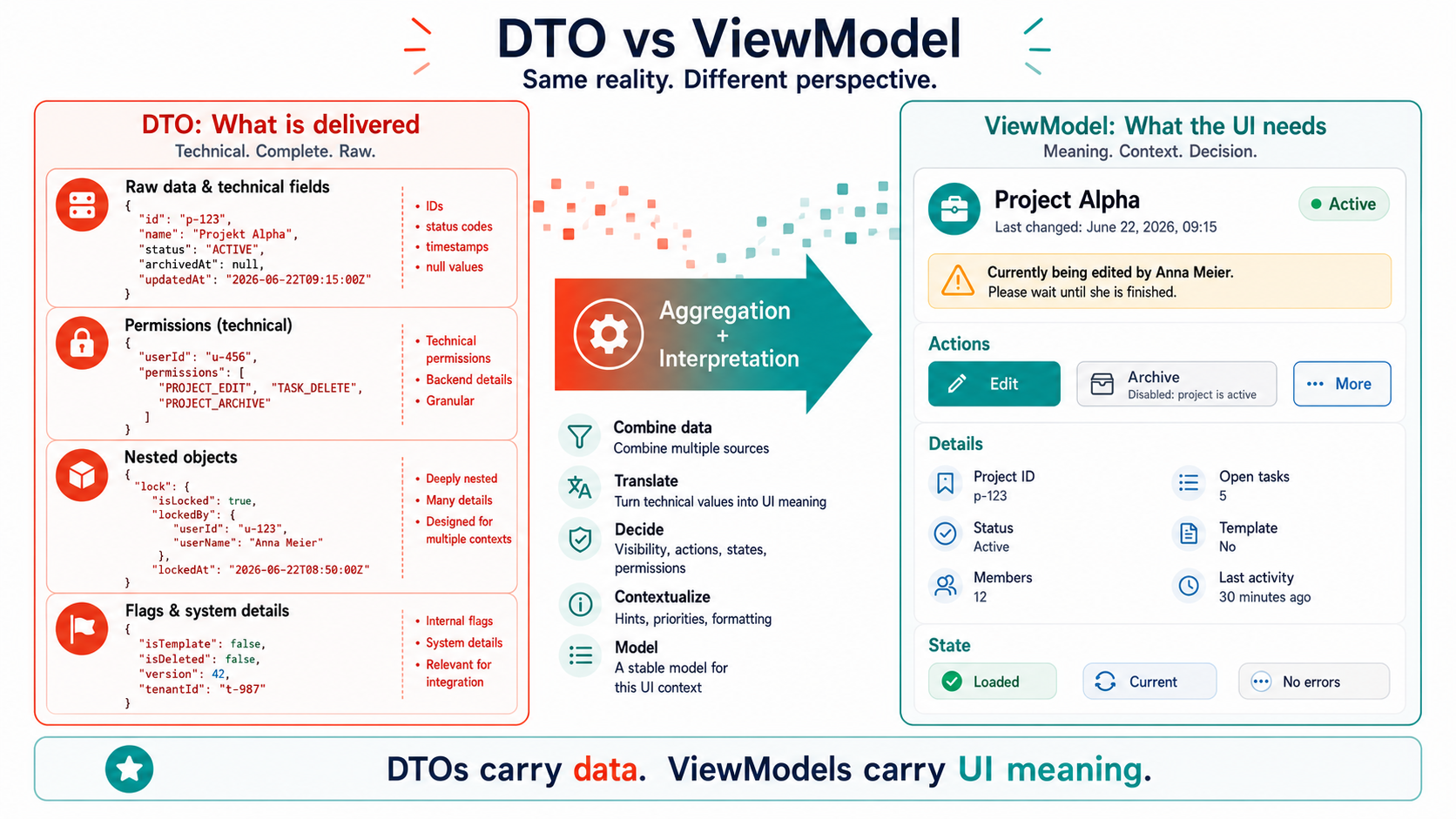
A DTO is not a UI contract
Section titled “A DTO is not a UI contract”DTOs often come from a backend perspective.
That’s completely legitimate.
They transport data across a boundary. They reflect database-shaped structures, API conventions, integration requirements, legacy structures, or external systems. Sometimes even all of that at once, because someone at some point added a field “just quickly.”
The DTO can be technically correct.
And still unsuitable as a UI model.
Because a UI doesn’t just need data. It needs meaning.
For example, not just:
{ status: 'ACTIVE', archivedAt: null, permissions: ['EDIT', 'DELETE'], lockedByUserId: 'u-123', updatedAt: '2026-06-22T09:15:00Z'}But rather:
{ title: 'Project Alpha', statusLabel: 'Active', canEdit: true, canDelete: false, warning: 'Currently being edited by Anna', primaryAction: 'Edit', isStale: false}The second object isn’t “dumber.”
It’s closer to the UI.
And so it’s often closer to the truth the user actually experiences.
Passing through isn’t architecture. It’s giving up with autocomplete.
Section titled “Passing through isn’t architecture. It’s giving up with autocomplete.”Of course you can use DTOs directly in components.
You can also write business rules into templates.
You can model loading states with three booleans.
You can duplicate permissions across five components.
You can render customer.addresses?.[0]?.city straight into HTML and hope it turns out fine.
You can do a lot of things.
The only question is whether you should call it architecture.
When a component works directly with backend DTOs, it quickly turns into a mix of:
- renderer
- mapper
- permission checker
- state machine
- fallback logic
- integration adapter
- error message factory
- and, on the side, a UI component
That’s no longer a component.
That’s a small accident wearing an Angular decorator.
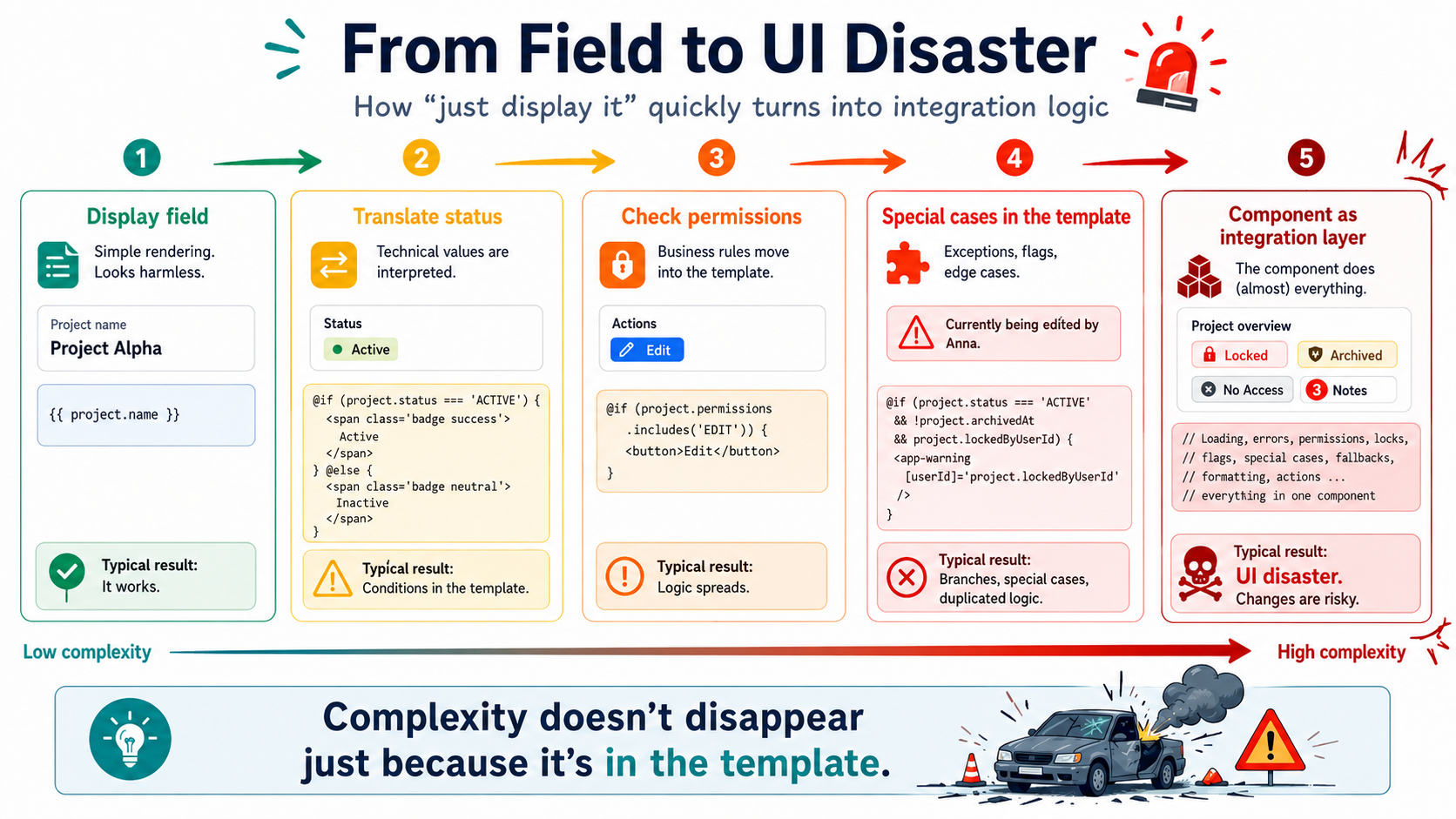
The problem rarely starts big
Section titled “The problem rarely starts big”At first it looks harmless.
A field from the API gets displayed.
{{ project.name }}Then a status gets added.
@if (project.status === 'ACTIVE') { Active }Then a permission.
@if (project.permissions.includes('EDIT')) {<button>Edit</button>}Then a special rule.
@if (project.status === 'ACTIVE' && !project.archivedAt && project.permissions.includes('EDIT')) {<button>Edit</button>}Then a locking case.
Then a feature flag.
Then a special case for migrated data.
Then a temporary workaround that sticks around for seven months.
And at some point there’s more business logic in the template than markup.
Of course, nobody calls it business logic then.
They call it “just display.”
That’s the little sister of “it’s just UI.”
ViewModel Aggregation means: taking the UI seriously
Section titled “ViewModel Aggregation means: taking the UI seriously”ViewModel Aggregation doesn’t mean renaming a DTO.
It means shaping a model from multiple sources, rules, and states that fits exactly one UI context.
That can include:
- combining data from several API responses
- translating technical status values into understandable UI states
- transforming permissions into visible actions
- modeling loading, error, and empty states
- setting priorities for notices, warnings, and calls to action
- preparing formatting
- handling fallbacks centrally
- deliberately encapsulating special cases
In short:
The ViewModel is the place where raw data becomes a presentable decision.
Not in the template.
Not scattered across five components.
Not as a get canEdit() with half a domain model living in component code.
And please not as a “small pipe” that moonlights as a business-rule oracle.
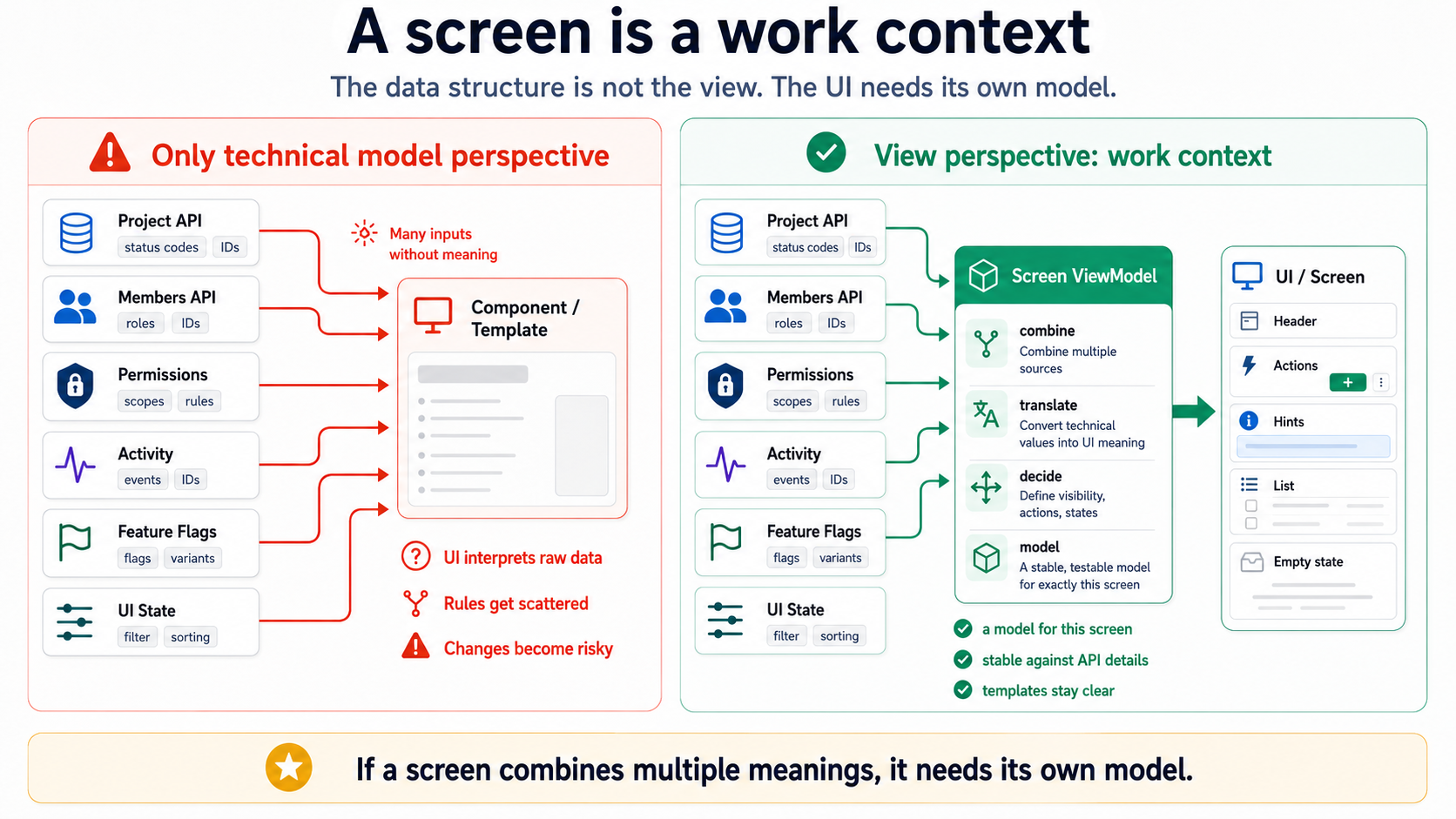
A screen is often more than one resource
Section titled “A screen is often more than one resource”Many frontend problems arise because teams act as if a screen always corresponds to exactly one backend resource.
It doesn’t.
A dashboard doesn’t display “one DTO.” A detail page doesn’t display just “one record.” A list doesn’t display just “one collection.” A form doesn’t display just “one entity.”
A screen displays a work context.
And that work context often consists of several things:
Project+ Members+ Roles+ Recent activity+ Permissions+ Open tasks+ System notices+ Loading state+ Error state+ UI selection+ Feature configurationIf there’s no ViewModel for that, the component automatically becomes the aggregation layer.
Not because anyone decided that.
But because nobody decided anything else.
That’s the most dangerous architecture mode: accidental architecture by omission.
The ViewModel is not a dressed-up backend model
Section titled “The ViewModel is not a dressed-up backend model”A common mistake is building ViewModels as just slightly renamed DTOs.
ProjectDto becomes ProjectViewModel.
But inside, it still looks like this:
type ProjectViewModel = { id: string; name: string; status: string; archivedAt: string | null; permissions: string[]; members: MemberDto[];};That’s not a ViewModel.
That’s a DTO with a fake beard glued on.
A real ViewModel isn’t interested in faithfully mirroring the backend structure. It’s interested in giving the screen a stable, understandable model.
For example:
type ProjectHeaderViewModel = { title: string; subtitle: string; status: { label: string; tone: 'neutral' | 'success' | 'warning' | 'danger'; }; actions: { edit: ViewAction; archive: ViewAction; }; notice?: { message: string; tone: 'info' | 'warning' | 'danger'; };};That’s deliberately different.
Because the UI doesn’t need a raw permission list.
It needs a decision:
Is the user allowed to edit? Should the button be visible? Is it disabled? Why? Which message is displayed?
That decision doesn’t belong scattered across three templates and two component methods.
It belongs in a ViewModel.
”But then we’re duplicating logic”
Section titled “”But then we’re duplicating logic””Yes.
Maybe.
And sometimes that’s exactly right.
Not every piece of logic that looks similar is the same logic.
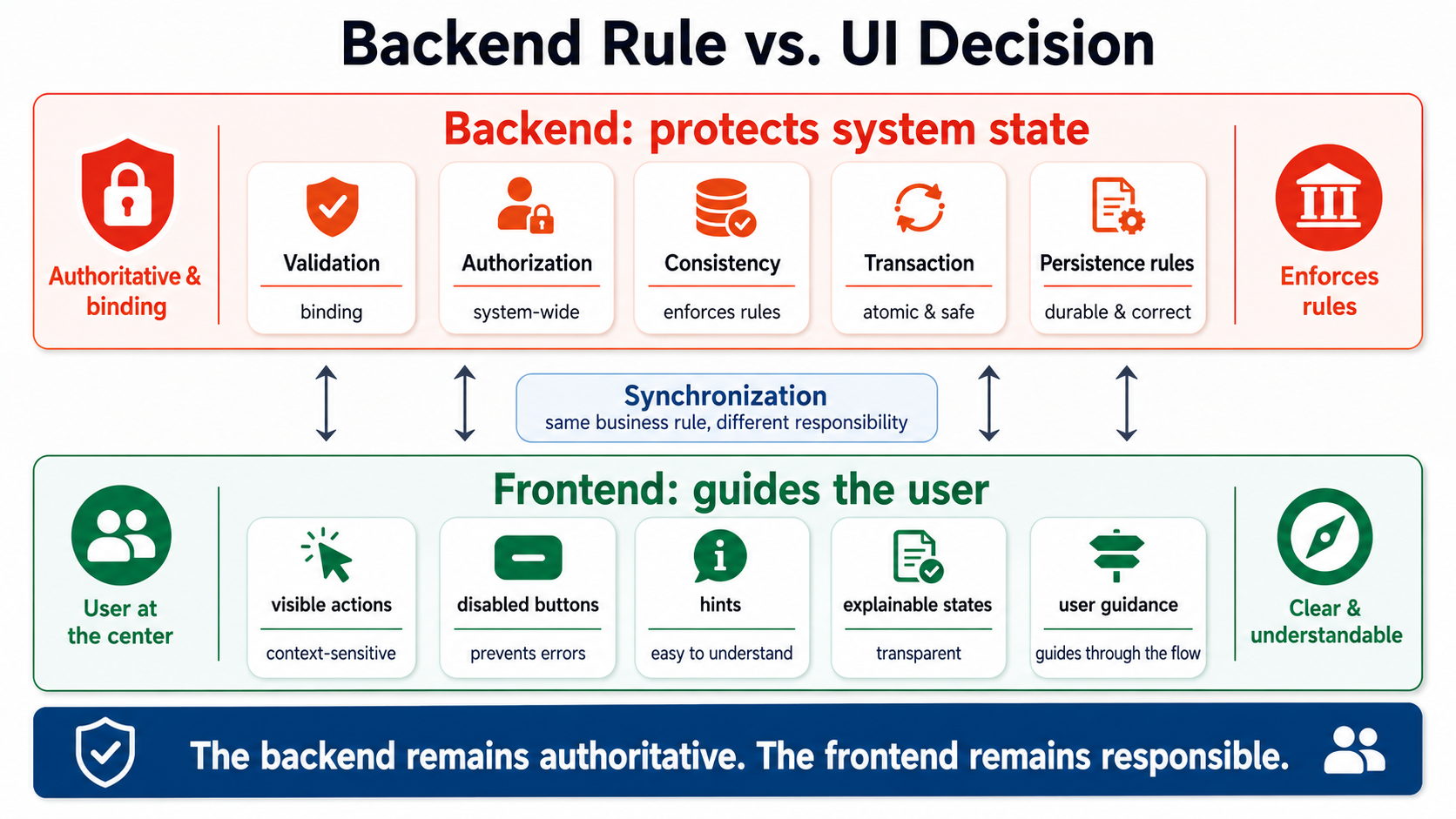
Backend logic protects system state. Frontend logic guides the user.
The backend decides, bindingly, whether an action is allowed. The frontend decides how that possibility gets presented in an understandable way.
The backend still has to validate. Always.
But that doesn’t mean the frontend has to stay dumb.
A frontend that makes no UI decisions of its own doesn’t produce simplicity. It produces bad user guidance with a clean conscience.
The classic:
“The button can stay visible. If it’s not allowed, the API will just return a 403.”
Technically correct.
Often an insult to the product.
Architecturally, a sign that someone confused “single source of truth” with “single source of frustration.”
Where ViewModel Aggregation belongs
Section titled “Where ViewModel Aggregation belongs”The worst answer is usually: “in the component.”
Not because components aren’t allowed to do anything.
But because components very quickly become the wrong place for it.
A component should render, express events, and hold UI structure. It shouldn’t quietly assemble the user’s working state from six different sources.
Better places, depending on architecture:
- facades
- stores
- signal stores
- query/presenter layers
- feature-specific adapters
- use-case-adjacent presentation services
The name matters less than the responsibility.
What matters:
The ViewModel is created in one clear place. The rules are testable. The component consumes a finished model. The screen doesn’t need to know which technical sources its state was assembled from.
In Angular with Signals, that can look like this:
readonly vm = computed<ProjectHeaderViewModel>(() => {  const project = this.project();  const permissions = this.permissions();  const lock = this.lock();
  if (!project) {    return {      title: 'Loading project',      subtitle: '',      status: { label: 'Loading', tone: 'neutral' },      actions: {        edit: { visible: false },        archive: { visible: false },      },    };  }
  const canEdit = permissions.includes('PROJECT_EDIT') && !lock.isLocked;
  return {    title: project.name,    subtitle: `Last changed on ${formatDate(project.updatedAt)}`,    status: mapProjectStatus(project.status),    actions: {      edit: {        visible: true,        enabled: canEdit,        label: 'Edit',        disabledReason: canEdit ? undefined : 'Project is currently locked',      },      archive: {        visible: permissions.includes('PROJECT_ARCHIVE'),        enabled: project.status !== 'ARCHIVED',        label: 'Archive',      },    },    notice: lock.isLocked      ? {          tone: 'warning',          message: `Currently being edited by ${lock.userName}`,        }      : undefined,  };});
That’s more code than passing data straight through.
Yes.
But it’s code in the right place.
And that’s a rather underrated quality trait.
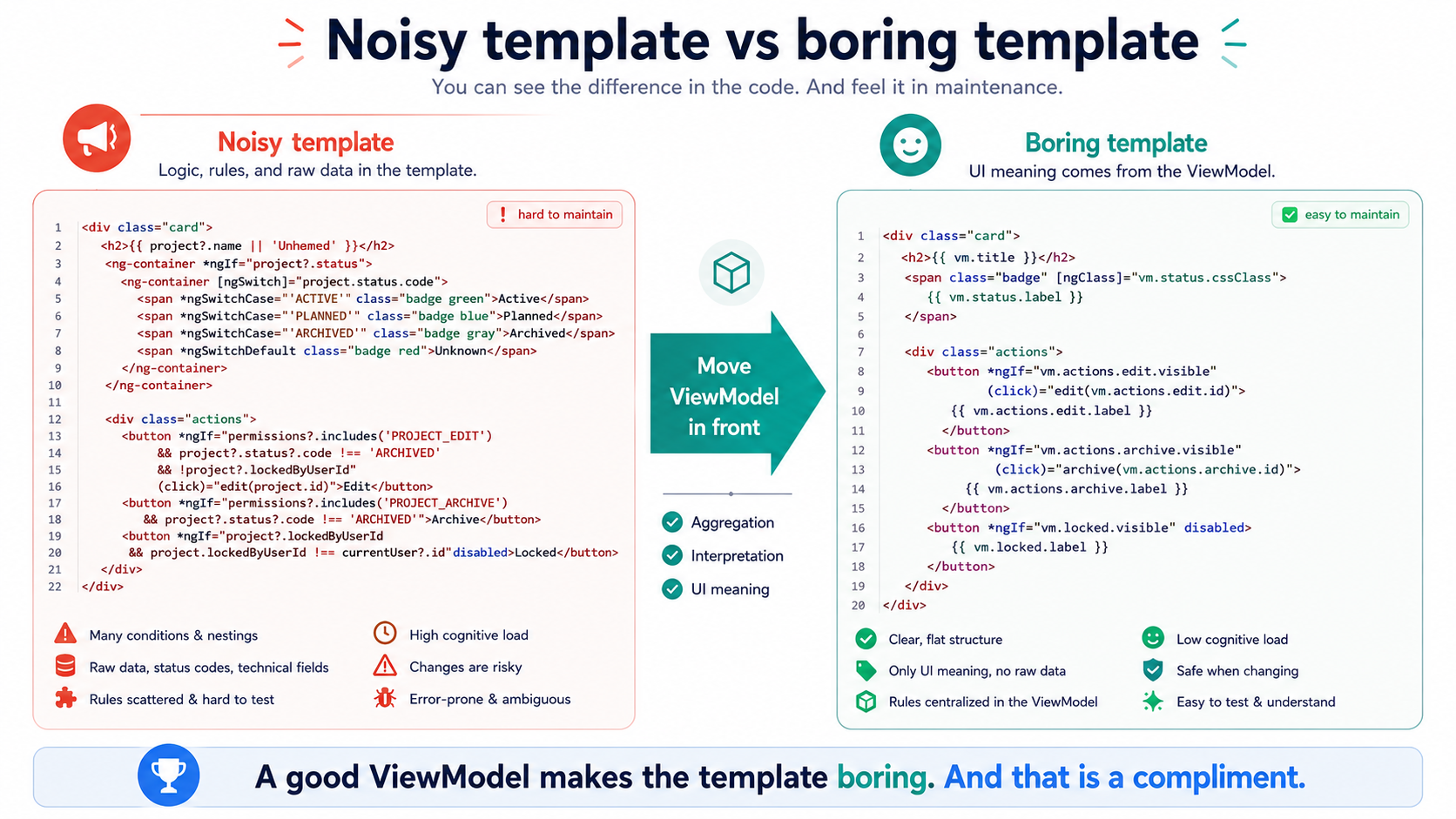
Good ViewModels make templates boring
Section titled “Good ViewModels make templates boring”A good template isn’t necessarily short.
But it should be boring.
Boring in the best sense.
It shouldn’t have to constantly explain why a button is visible. It shouldn’t interpret status codes. It shouldn’t know API structures. It shouldn’t rebuild permission logic. It shouldn’t recognize special cases from legacy data.
It should render a ViewModel.
<h1>{{ vm.title }}</h1><p>{{ vm.subtitle }}</p>
<app-status-badge [label]="vm.status.label" [tone]="vm.status.tone" />
@if (vm.notice) {<app-notice [tone]="vm.notice.tone" [message]="vm.notice.message" />} @if (vm.actions.edit.visible) {<button [disabled]="!vm.actions.edit.enabled" [title]="vm.actions.edit.disabledReason ?? ''">{{ vm.actions.edit.label }}</button>}
That’s not spectacular.
That’s exactly the point.
Spectacle belongs in architecture decisions, not in templates.
Aggregation reduces coupling
Section titled “Aggregation reduces coupling”Passing data straight through couples the UI to the API.
Not just technically.
Conceptually too.
If the template knows project.status === 'ACTIVE', it knows backend status values.
If the component checks permissions.includes('EDIT'), it knows authorization conventions.
If the UI interprets archivedAt === null, it knows storage logic.
If five components check the same combination, soon nobody knows the truth anymore.
Then every backend change turns into a UI scavenger hunt.
Where was this status used? Which component checks the flag? Which pipe formats this special case? Why does the list show something different than the detail page? Why is the button disabled here and invisible there?
And at some point someone opens a ticket:
“Display inconsistent for archived projects with locking.”
A sentence that usually means:
“We never decided where this decision lives.”
ViewModel Aggregation creates a boundary.
Not out of principle.
But so changes don’t hit everywhere at once.
Aggregation is especially important with microfrontends and SCS
Section titled “Aggregation is especially important with microfrontends and SCS”In simple applications, you can hide a lot of mistakes for a while.
Not in larger systems.
When multiple teams, self-contained systems, or microfrontends work on one product landscape, ViewModel Aggregation becomes even more important.
Because then there isn’t just one backend and one UI.
There are multiple domain contexts.
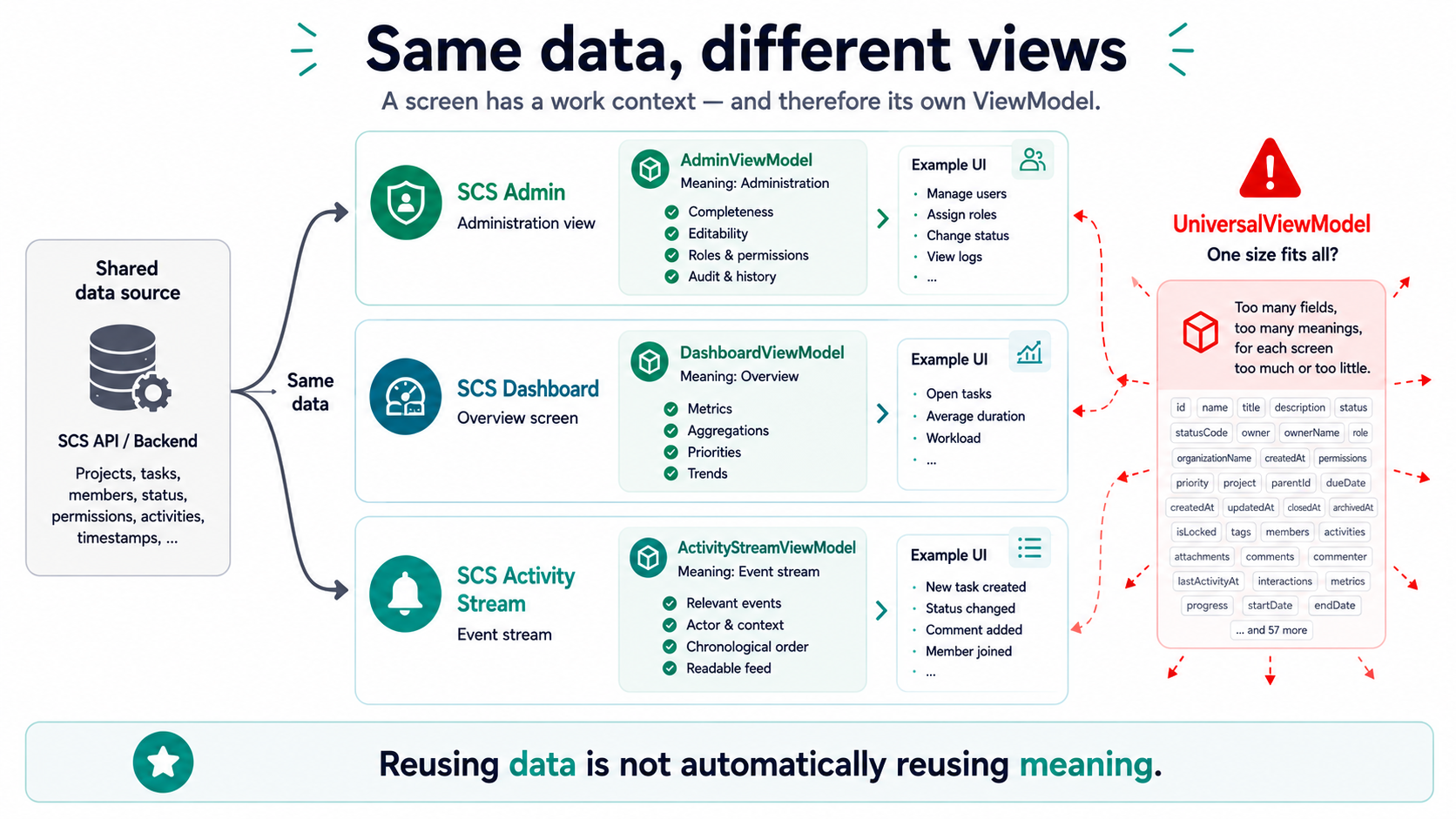
A User in the admin area isn’t the same as a User in the dashboard.
A Task in planning isn’t the same as a Task in the activity stream.
A Project in administration isn’t the same as a Project in a report.
Same data basis doesn’t mean same view.
Every UI context needs its own model.
Otherwise a very popular architecture monster emerges:
The universal shared model.
It can do everything. It’s used everywhere. Nobody is allowed to change it. Everyone hates it. But it’s called “reuse,” so it feels professional.
A ViewModel is allowed to be deliberately redundant
Section titled “A ViewModel is allowed to be deliberately redundant”Many teams are afraid of redundancy.
Understandable.
Nobody wants to maintain the same logic ten times.
But out of fear of redundancy, models often emerge that fit everything a little and nothing particularly well.
A ViewModel is allowed to be deliberately redundant if that makes a UI context clearer.
For example:
type TaskListItemViewModel = { title: string; assigneeLabel: string; dueDateLabel: string; isOverdue: boolean; rowTone: 'normal' | 'warning' | 'danger';};Yes, you could compute isOverdue from dueDate.
Yes, you could format dueDateLabel in the template.
Yes, you could derive rowTone from status, date, and priority.
You could.
But you don’t have to do it in the place that’s worst suited for it.
Redundancy in a ViewModel isn’t automatically bad.
What’s bad is uncontrolled redundancy without clear ownership.
A precomputed field in a ViewModel can make a lot of sense if it expresses a UI decision.
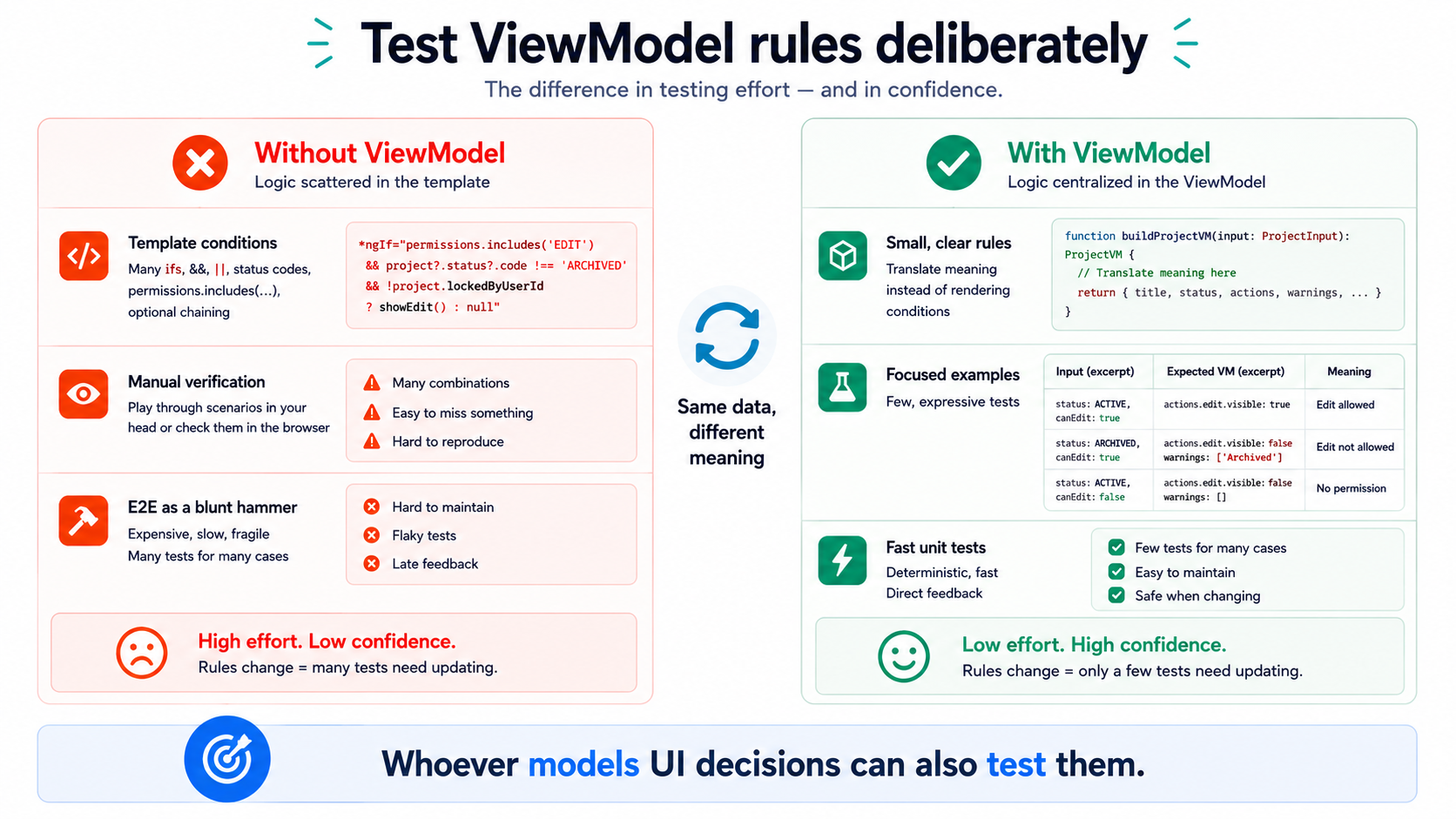
ViewModels are testable architecture
Section titled “ViewModels are testable architecture”An underrated advantage of ViewModels:
You can test them exceptionally well.
Not with huge end-to-end tests. Not with screenshot comparisons. Not with “click around and see if it looks weird.”
But with small, targeted tests on decision logic.
Examples:
If a project is locked,then the edit action is visible,but disabled,and the lock notice is displayed.Or:
If a task is overdue and critical,then the row gets the danger toneand the due date is shown as a warning notice.These are UI-specific business rules.
They don’t belong exclusively in manual tests. And they don’t belong hidden in templates.
If ViewModel Aggregation is built cleanly, you can check these rules in isolation.
That’s not a testing fetish.
That’s cheap insurance against “why does this suddenly look different here?”
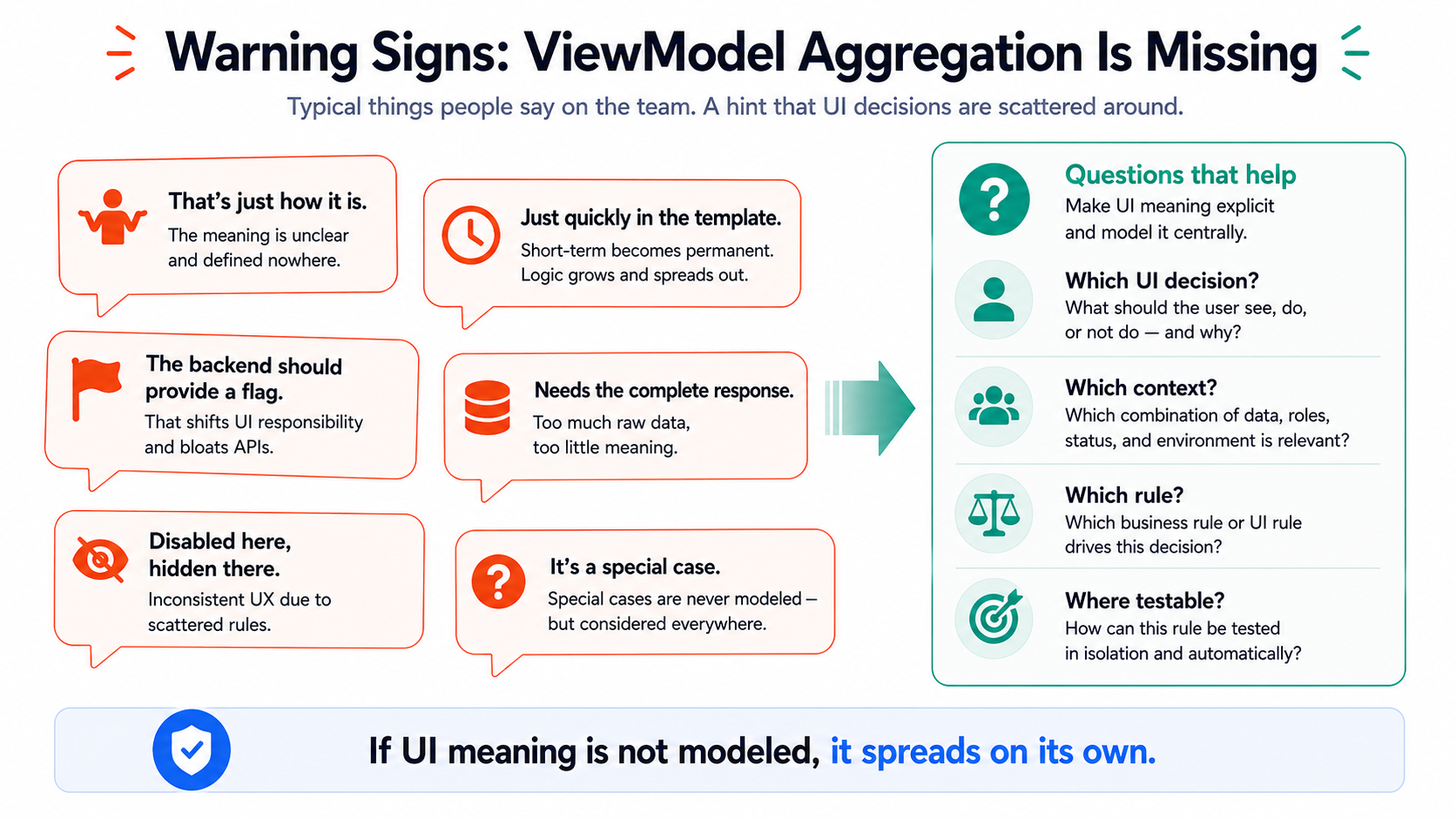
Warning signs of missing ViewModel Aggregation
Section titled “Warning signs of missing ViewModel Aggregation”You rarely spot missing ViewModel Aggregation from a big architecture diagram.
You spot it from everyday sentences.
For example:
“The field just comes from the API like that.”
“The component just needs to quickly check if the status is active.”
“That’s also in the list, but slightly different.”
“The button is disabled here, hidden there, no idea why.”
“The backend should just deliver one more flag.”
“We need the complete response because something somewhere still needs it.”
“The template is a bit messy, but it works.”
These aren’t small cosmetic flaws.
They’re signs that UI meaning hasn’t been modeled.
And when meaning isn’t modeled, it spreads out.
Into components. Into templates. Into pipes. Into helpers. Into copy-paste. Into tickets. Into people’s heads.
Especially into people’s heads.
And heads have traditionally scaled rather poorly in software projects.
Not every field needs ViewModel ceremony
Section titled “Not every field needs ViewModel ceremony”Of course, you don’t need to build a whole architecture cathedral for every label.
If a screen really only displays a few fields, the model is allowed to be simple.
Architecture doesn’t mean turning every name into a DisplayNameRenderingContextViewModel.
Please don’t.
The point isn’t maximum layering.
The point is deliberate ownership.
The more a screen decides, the more it needs an explicit ViewModel.
Rule of thumb:
If data is only displayed, a simple model is often enough. If data is interpreted, there needs to be a clear place for that interpretation. If multiple sources, rules, permissions, or states are combined, ViewModel Aggregation is no longer a luxury.
At that point, it’s fire safety.
Good ViewModel Aggregation asks better questions
Section titled “Good ViewModel Aggregation asks better questions”Instead of asking:
“What data does the API deliver?”
you should ask earlier:
“What decision does the screen have to make?”
That changes the discussion.
Suddenly it’s no longer just about fields.
It’s about behavior.
Which actions exist? When are they visible? When are they disabled? Which states are mutually exclusive? What does the user see with empty data? What happens with partial errors? Which information is primary? Which is just context? Which special cases need to be explained?
Those are product, architecture, and team questions.
Not just frontend details.
And that’s exactly why ViewModel Aggregation isn’t a cosmetic mapper off to the side.
It’s part of the design.
A better alternative: screen-specific ViewModels
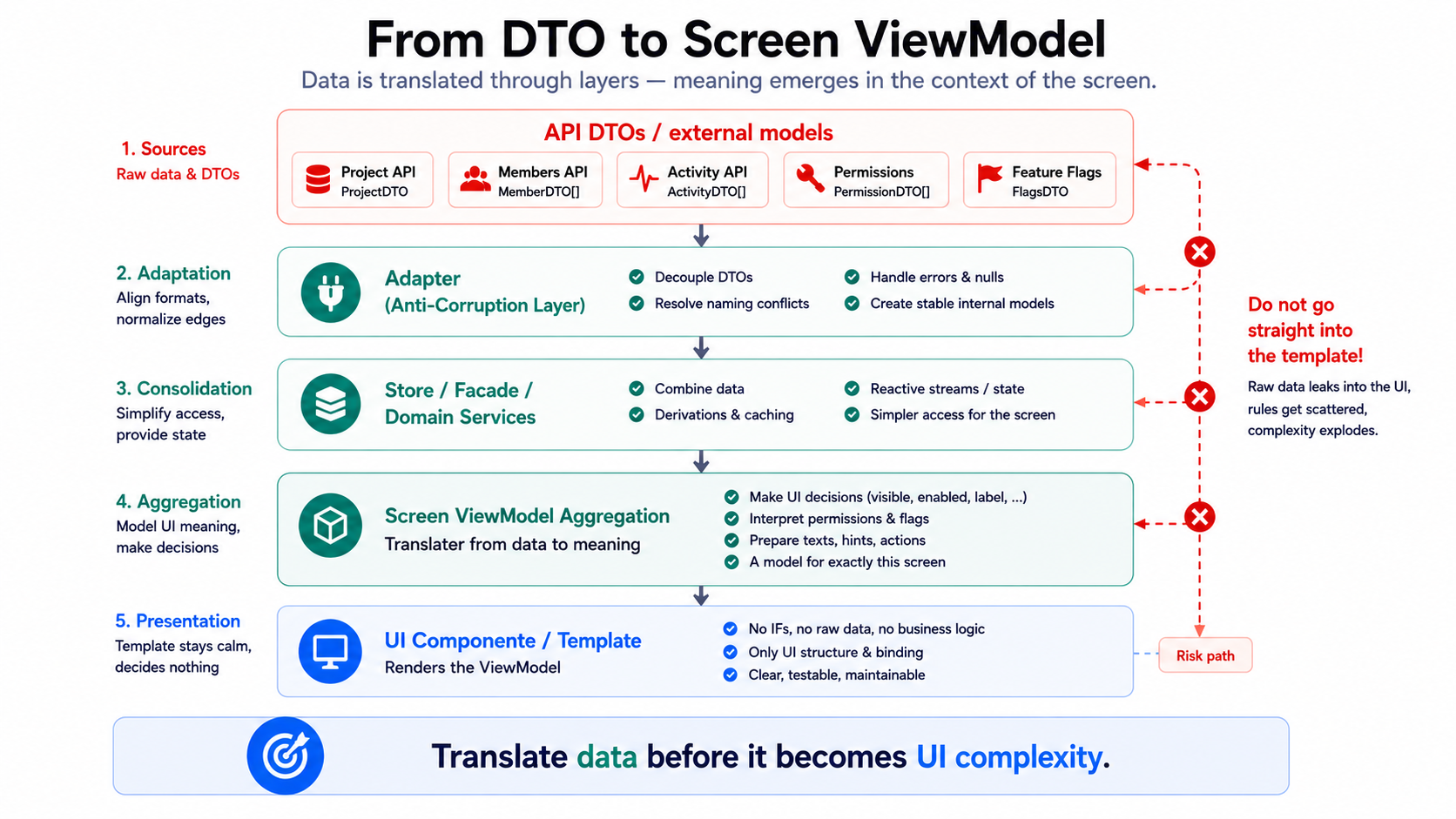
Section titled “A better alternative: screen-specific ViewModels”A usable alternative to passing data straight through looks roughly like this:
API DTOs / external models ↓Feature adapter / mapper ↓Store / facade / query layer ↓Screen-specific ViewModel ↓Component / templateWhat matters isn’t that every project uses exactly these terms.
What matters is the direction:
Raw data isn’t passed down until it explodes somewhere in a template. It gets translated early enough into a UI model the screen understands.
A good ViewModel is:
- specific enough for the screen
- stable against API details
- understandable for developers
- testable
- explicit in its UI decisions
- small enough not to become a universal monster itself
Management perspective: why this isn’t just developer aesthetics
Section titled “Management perspective: why this isn’t just developer aesthetics”ViewModel Aggregation sounds like an internal code-taste preference.
It isn’t.
Missing aggregation creates costs you feel very concretely later:
Inconsistent UIs. Slower changes. More regressions. More coordination overhead. More “why is this different here?” More fear of refactoring. More tickets for symptoms.
The problem isn’t that developers like drawing pretty models.
The problem is that unmodeled UI decisions exist anyway.
They’re just harder to find.
For decision-makers, that means:
A frontend that passes DTOs straight through looks faster in the short term.
Long term, you end up with a UI whose behavior consists of scattered conditions.
That’s not speed.
That’s borrowing against the future at a variable interest rate.
And the interest usually rises exactly when the product becomes more successful.
Team perspective: ViewModels create a shared language
Section titled “Team perspective: ViewModels create a shared language”Good ViewModels don’t just help the code.
They help the team.
If there’s a ProjectHeaderViewModel, a TaskListItemViewModel, or a DashboardActivityViewModel, you can talk about them.
Not abstractly about “the DTO.” Not vaguely about “the data.” But concretely about the view.
What does this card need? What does this list decide? Which states does this header have? Which actions are allowed? Which notices take priority?
That’s a shared language at the UI level.
And a shared language is badly needed in frontend architecture, because frontends today are no longer just presentation layers.
They’re workplaces.
They’re process guidance.
They’re where users interact with the domain.
They’re often the only part of the system users ever see.
The model is allowed to do a little more than just forward JSON.
The real point
Section titled “The real point”ViewModel Aggregation isn’t a question of beauty.
It’s a question of ownership.
Somewhere, someone has to decide how raw data becomes visible meaning.
The only real choice is:
Do we decide that deliberately, in one clear place?
Or do we let it emerge scattered across components, templates, pipes, and chance?
The first one is called architecture.
The second one is later called legacy.
The takeaway
Section titled “The takeaway”A ViewModel doesn’t describe what the backend delivered.
It describes what the screen needed to understand.
Anyone who just passes ViewModels through shifts decisions into templates, components, and people’s heads.
And heads are the most expensive runtime environment in the system.