Who Owns the URL?
One Route, Two Runtime Modes
Section titled “One Route, Two Runtime Modes”In an architecture lab, an Angular remote had a technically simple route:
/detailsWhen started independently, it was available under an equally simple URL:
https://remote.example/detailsInside the product shell, however, the same remote was mounted under an additional product area:
https://product.example/tasks/detailsThe remote still needed to define for itself what details meant and which view it activated. At the same time, the product shell had to produce a consistent product URL. A subtle routing problem appeared precisely at that boundary.
Navigation inside the remote initially looked like this:
router.navigate(['details']);In standalone mode, this could produce the expected result:
/create → /detailsInside the product shell, however, the same command was resolved from the router root:
/tasks/create → /detailsThe result was technically understandable but wrong from the domain perspective. The expected result was:
/tasks/create → /tasks/detailsAn obvious countermeasure would have been to build the host prefix directly into the remote:
router.navigate(['/tasks', 'details']);That would have solved the concrete problem inside the product shell. At the same time, the remote would have produced a route in standalone mode that did not exist there:
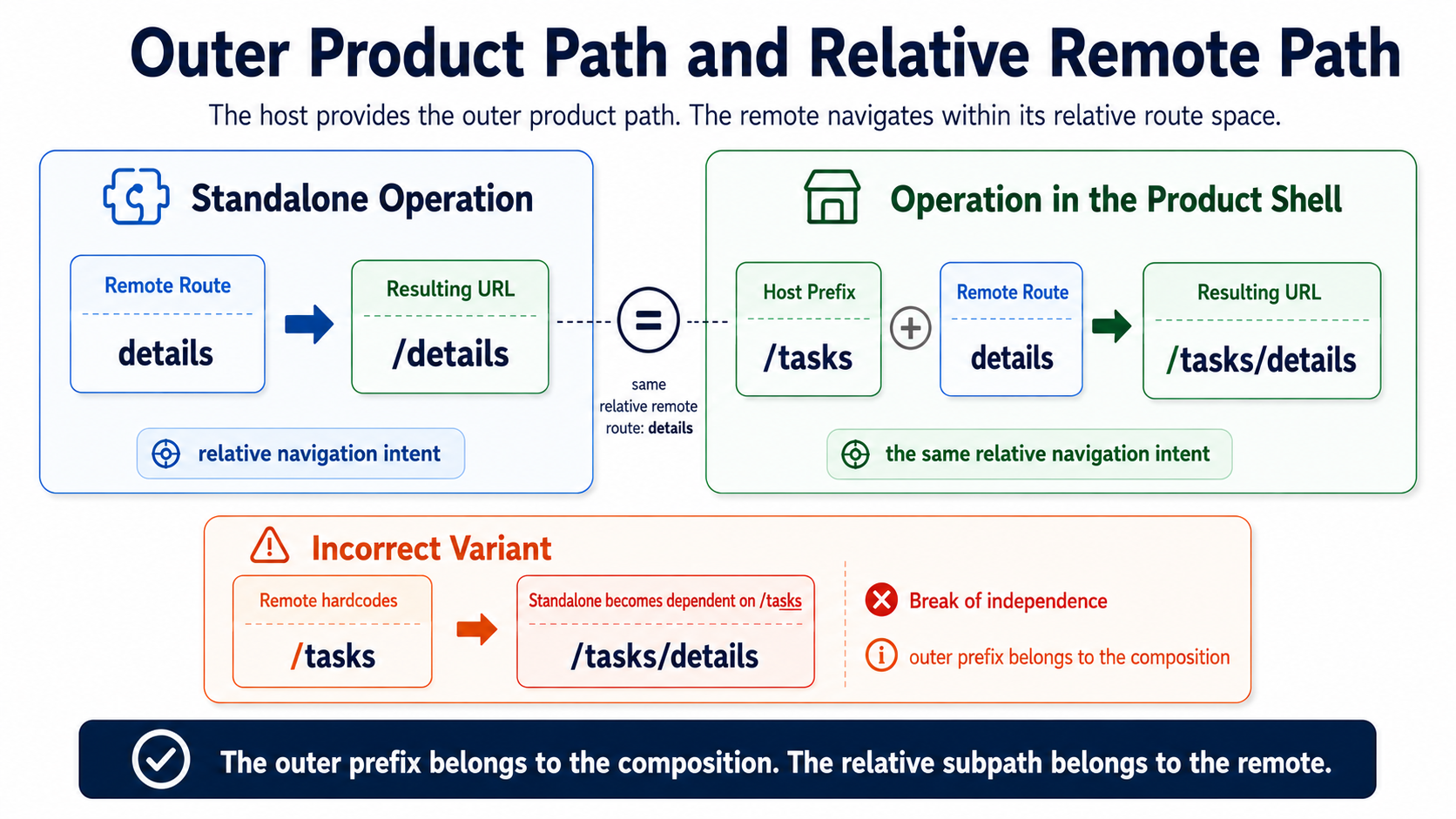
/tasks/detailsThe working solution was not to declare either complete path the one correct path. Instead, navigation was executed relative to the remote’s mount context:
router.navigate(['details'], { relativeTo: remoteShellRoute,});The navigation request remained identical in both runtime modes. Only the context in which it was resolved changed:
Standalone:  /create → /details
In the host:  /tasks/create → /tasks/details
At first, this example looks like an Angular Router peculiarity. In reality, it points to a broader architecture question:
How can a host and a remote support the same domain navigation while running under different outer URLs?
The answer does not begin with navigate, basename, or pushState. It begins with responsibility for the URL.
A URL Is a Product Contract
Section titled “A URL Is a Product Contract”A browser URL performs several roles at once in a composed application:
Browser URL├── addresses the product├── determines the entry point├── selects a product area├── may address domain state├── creates browser history└── should be reconstructable after reloadIt is an external link, a bookmark, an authentication target, an entry into a product area, a history entry, and an observable slice of product state. In a microfrontend architecture, it is also a contract between the product shell and the remote.
That is why asking which router or component technically changes the URL is not enough. What matters is which part of the system owns the meaning of each URL segment.
Route ownership is not the question of which component calls a router API. It is the question of which part of the system is responsible for which section of the canonical product URL.
The technical router may write the URL without owning its complete domain meaning. Likewise, a remote may own the meaning of its route space even though the canonical URL is produced by a router in the product shell.
Navigation is an intent. The URL is observable state.
Navigation initially describes which destination should be reached. Once that destination has been written into the browser URL and browser history, it becomes state that must be interpreted again later. This creates requirements that extend beyond the original click: direct access, reload, login redirect, remounting, and browser Back.
The Host Owns the Outer Product Path
Section titled “The Host Owns the Outer Product Path”A useful ownership model separates the outer product area from the remote’s relative route space.
For example, the product shell may mount a remote under /tasks. Within that area, the remote defines its own route tree:
Host└── /tasks
Remote└── projects    ├── list    ├── details    └── completed
This produces different complete URLs depending on the runtime mode.
Standalone:
/projects/projects/details/projects/completedInside the product shell:
/tasks/projects/tasks/projects/details/tasks/projects/completedIn this model, the host owns the product origin, the outer mount prefix, the selection of the remote, and the composition of the canonical product URL. It has to know under which product path a remote can be reached.
That does not mean the host must understand every internal route from a domain perspective. For mounting, it may be sufficient to assign the product area /tasks to the responsible remote. What projects/details means within that area remains the remote’s responsibility.
The host owns the outer product path. The remote owns its relative route space.
This model is particularly natural when the host and remote use the same router or compatible mounting mechanisms. It is not a universal rule. Delegated router areas or navigation ports can create the same separation.
The Remote Owns Its Relative Route Space
Section titled “The Remote Owns Its Relative Route Space”The remote defines its relative subpaths and their domain meaning. It decides, for example, whether a project overview is available under projects, a detail view under projects/details, or an archive under projects/completed.
It therefore owns:
- the mapping of its views to relative routes,
- the meaning of those subpaths,
- internal navigation within the product area,
- reconstruction of the domain view addressed by a route.
What the remote does not have to own is the outer mount prefix.
The host must know under which product path a remote can be reached. The remote does not need to know under which outer prefix it is currently mounted.
This separation protects both sides. The product shell can rename a product area or mount it elsewhere without redesigning the remote’s internal navigation. The remote can run independently without having to recreate an artificial host structure.
Technical path ownership and domain state ownership are not the same thing. The host may own /tasks without knowing which data a route such as projects/details requires. Conversely, the remote may own the domain meaning of details without defining the complete product URL.
Why Hardcoded Host Prefixes Destroy Independence
Section titled “Why Hardcoded Host Prefixes Destroy Independence”The same pattern appeared later in the architecture lab in another remote. It initially used relative router commands:
['projects', 'detail'];During host integration, they were changed into absolute product paths:
['/tasks', 'projects', 'detail'];Inside the product shell, the change initially appeared stable. Navigation reached the expected product area again. Only independent operation revealed the new dependency.
The remote now also produced this route in standalone mode:
/tasks/projects/detailThat route did not exist there. The remote suddenly knew not only its domain subpaths, but also the name and URL structure of its host.
More than a router command had changed:
- The host prefix became part of the remote implementation.
- Changing the mount path required changing the remote.
- Standalone and host mode no longer used the same internal navigation.
- The remote test no longer verified the same routing contract as the host integration.
- The outer product composition leaked into local domain responsibility.
An absolute path can fix a concrete integration defect while damaging architectural independence at the same time.
The problem is not that absolute URLs are inherently unsuitable. A product needs canonical absolute URLs. The problem begins when a domain-oriented product area treats the outer composition path of its current host as one of its own constants.
The host path is composition configuration, not domain knowledge of the remote.
A hardcoded host prefix does not integrate a remote. It makes the remote dependent.
Relative Navigation Needs a Mount Context
Section titled “Relative Navigation Needs a Mount Context”The alternative to absolute host paths is not simply: “Always navigate relatively.”
A command such as
router.navigate(['details']);is unambiguous only when it is clear relative to which activated route it will be resolved.
Without a defined context, the router may attach the command at the root:
Router Root└── detailsWhat was intended may instead have been:
Remote Mount└── tasks └── detailsIn the Angular case, the activated mount route of the remote was therefore used as the technical context:
router.navigate(['details'], { relativeTo: remoteShellRoute,});The underlying contract can be simplified as follows:
interface RemoteMountContext { baseRoute: ActivatedRoute;}This interface is not a general microfrontend standard. ActivatedRoute is a concrete Angular dependency and therefore tied to the shared Angular runtime. The architecture principle behind it is framework-neutral:
The remote does not need a hardcoded host path. It needs a reliable context within which its relative routes apply.
React Router can use a basename or a delegated router area for this purpose. Other integrations may provide base paths, mount props, or a navigation abstraction. What matters is not the API name, but the explicit assignment of the relative route space.
Relative navigation without a defined mount context is not automatically independent. It is merely underspecified.
Navigation Intent Is Not Router Synchronization
Section titled “Navigation Intent Is Not Router Synchronization”In the architecture lab, navigation was not executed directly from every component. Instead, components expressed small semantic navigation intents:
openListopenDetailsopenEditopenProjectDetailSuch an intent describes what the application should display. It contains neither the host prefix nor concrete Angular Router commands. It does not need to know an ActivatedRoute, and it says nothing about pushState, React Router, or browser history APIs.
A technical adapter then translated the intent into a router request:
{ commands: ['details'], relativeTo: remoteShellRoute, replaceUrl: false}A navigation intent belongs to domain or presentation-level meaning. A router request belongs to the technical adapter.
In this case, the translation ran through an Angular/NgRx Signal event channel within the same Angular application. It did not use window events, CustomEvent messages, or postMessage. Nor was the channel a framework-neutral contract between independent runtimes.
Ultimately, it transported a single request to the same Angular Router.
The event did not synchronize routers. It translated a navigation intent into a relative router request.
This distinction matters. An event does not become a stable microfrontend contract merely because it is named globally. What matters is which responsibility it transports.
A small product-wide intent could look like this:
interface ProductNavigationIntent { target: ProductLocation; history?: 'push' | 'replace';}It describes a destination and leaves the concrete URL to the responsible adapter. It does not distribute router state, does not transport foreign domain state, and does not require several stores or routers to synchronize with one another.
By contrast, a chain like this would be problematic:
Router A changes URL→ global event→ Router B synchronizes state→ Router B changes URL→ another eventThat would not be navigation across a clear boundary. It would be router synchronization.
Navigation Intent└── A component asks the URL owner to navigate.
Router Synchronization└── Several routers try to reconcile the same state with one another.
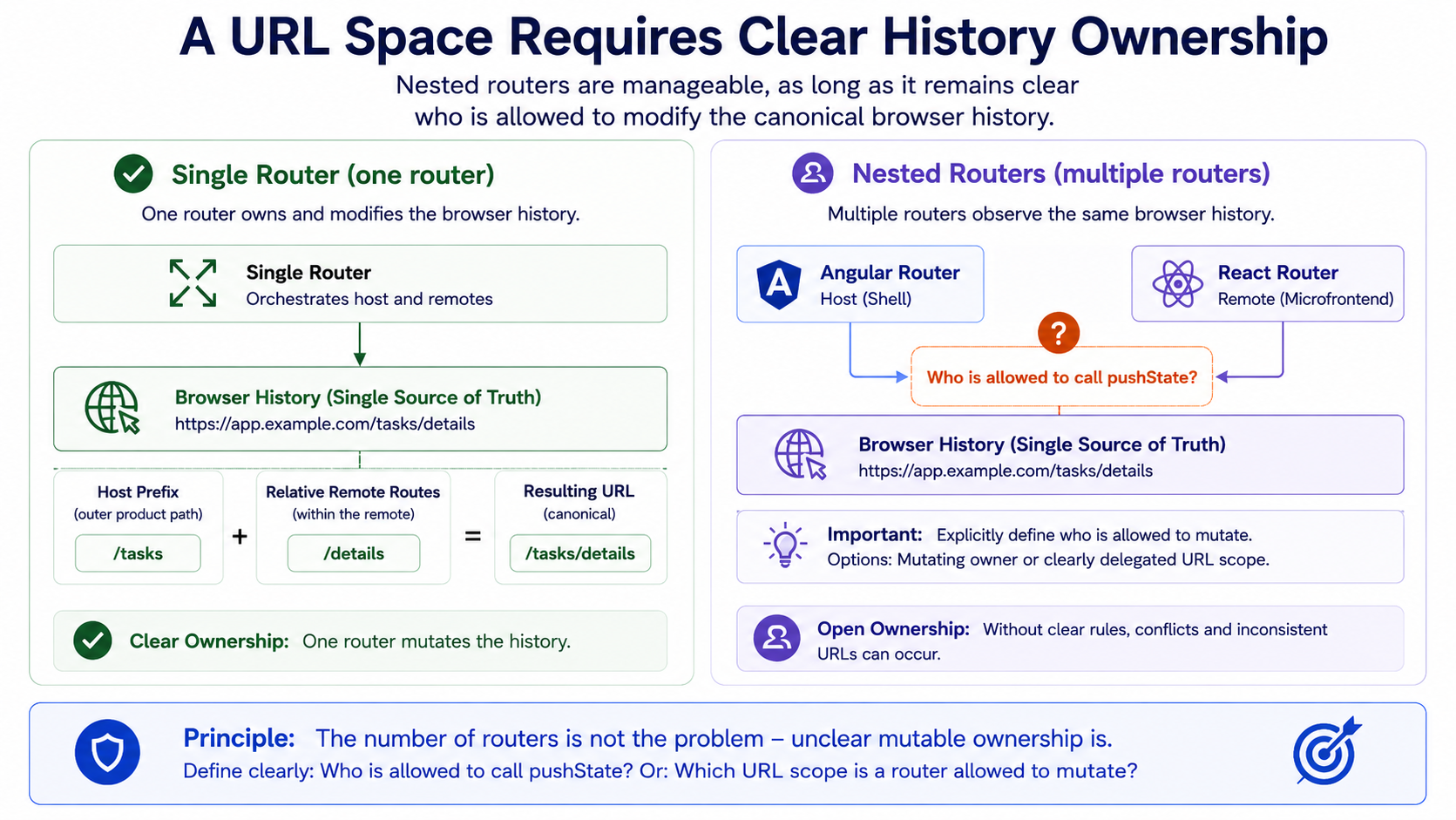
Navigation may cross a boundary as an intent. The canonical browser history should still have one clearly defined mutating owner.
One Router Is the Simple Case
Section titled “One Router Is the Simple Case”In the homogeneous Angular integration from the architecture lab, the host used an Angular Router. The Angular remotes exported relative route arrays, which the host mounted beneath product prefixes.
The result can be simplified as follows:
Browser URL │ ▼Angular Router │ ├── /todos │ └── relative Todos routes │ ├── /tasks │ └── relative Tasks routes │ └── /members-directory └── relative Members routesAll participants used the same browser history. The remote could request navigation, the shared router produced the canonical URL, and the same router later handled browser Back.
Mutating ownership was therefore clear:
One Router└── one Browser HistoryThat does not mean the remotes lack route ownership. They still own their relative route trees and their domain meaning. The shared router is merely the technical mechanism that integrates those trees into one canonical URL space.
This distinction is exactly what prevents an unnecessary shell monolith. The host does not have to model every internal route from a domain perspective. It provides the mount context and composes the relative route trees.
Two Routers Share the Same Browser History
Section titled “Two Routers Share the Same Browser History”The situation becomes more complex when a second router starts within a product area.
In the architecture lab, a React Activity Stream provided such a case. The Angular host router observed an area such as:
/activity-stream/...Within that area, the React remote used its own BrowserRouter:
<BrowserRouter basename="/activity-stream">{/* Remote routes */}</BrowserRouter>Two routers therefore observed the same URL space:
Browser History├── Angular Host Router└── React BrowserRouterA basename helps React Router interpret its relative paths below the product prefix. It does not fully answer the ownership question:
Who may change the canonical browser URL, and who may only interpret it?
Nested routers are not automatically wrong. Several models can work.
Delegated URL Area
Section titled “Delegated URL Area”The host recognizes only the outer prefix:
Host└── recognizes /activity-streamThe React remote owns everything below it:
React Remote└── owns the relative URL areaIn this model, the remote may change history within its delegated area. The contract must define mounting, unmounting, direct entry, and popstate behavior clearly.
Host as the Sole URL Owner
Section titled “Host as the Sole URL Owner”The React remote expresses only semantic navigation destinations. An adapter in the product shell turns them into browser URLs.
React Remote└── expresses navigation intent
Host└── changes browser URL
This model reduces competing history access, but couples the remote more strongly to the supplied navigation port.
Shared History Without an Explicit Contract
Section titled “Shared History Without an Explicit Contract”Both routers change and observe the same browser history:
Angular Router+React Router└── change and observe the same historyThis model can work for some time. It becomes risky when pushState, replaceState, popstate, mounting, and unmounting no longer share the same understanding of the active URL area.
Multiple routers are manageable. Multiple unclear owners of the same history are much less so.
Who May Change the Canonical URL?
Section titled “Who May Change the Canonical URL?”The question of the mutating owner cannot be answered in the same way for every architecture.
With a shared router, the technical responsibility usually already lies with that router. With a delegated URL area, a remote may change browser history within its boundary. Across a framework boundary, a navigation port may be more suitable.
What matters is that one concrete model is chosen.
A remote may navigate technically within its delegated route space. When navigating to another product area, however, it should not necessarily hardcode that area’s URL structure.
This would be problematic, for example:
navigate('/members-directory/details/42');The calling remote now knows the name, mount path, and internal structure of another product area.
A more stable product-wide intent could look like this:
navigation.openProductArea({ area: 'members', target: 'detail', id: '42',});The platform adapter turns that into the canonical product URL.
This must not grow into a central domain mega-router that catalogs every internal route of every remote. The contract should cover only navigation that actually crosses an ownership boundary.
Within its delegated route space, a remote may navigate technically. Across product boundaries, it should describe a destination rather than own another area’s URL structure.
Route ownership also does not end at the path segment. Other parts of the URL and history need defined responsibilities as well:
- path,
- query parameters,
- fragment,
- history mode:
pushorreplace, - optional navigation state.
Who owns filter parameters? Are they preserved during internal navigation? Does a fragment belong to the remote or the shell? Should a technical redirect replace the current history entry? Are parameters mapped correctly between standalone and host mode?
Route ownership does not end at the path segment. Query, fragment, and history semantics need defined ownership as well.
Browser Back Reconstructs the Route
Section titled “Browser Back Reconstructs the Route”Triggered navigation and browser Back are two different operations.
Triggered navigation creates a new state:
User clicks “Details”→ application expresses navigation intent→ URL owner creates history entryBrowser Back, by contrast, activates an existing entry:
User presses Back→ browser activates existing history entry→ router interprets new URLNavigation creates history. Browser Back interprets existing history.
With a shared Angular Router, that router processes the popstate signal, recognizes the URL, and activates the matching route tree again. It should not first have to reconstruct a domain navigation intent.
Publishing every observed URL change again as a navigation event risks duplicate history entries or feedback loops. The router interprets an existing entry, after which the application produces the same state again as a new navigation.
Browser Back is therefore not a navigation intent. It is an external state change that the URL owner and the participating route trees must interpret.
A Route Does Not Automatically Reconstruct View State
Section titled “A Route Does Not Automatically Reconstruct View State”In the architecture lab, this boundary became visible in a typical sequence:
- The host opens
/todos/board. - The user selects a todo.
- The local store saves the selection.
- The application navigates to
/todos/details. - The user switches to another remote.
- The Todos remote is deactivated.
- The user presses browser Back.
/todos/detailsis activated again.- The newly created store no longer knows the previously selected todo.
The router had fulfilled its responsibility:
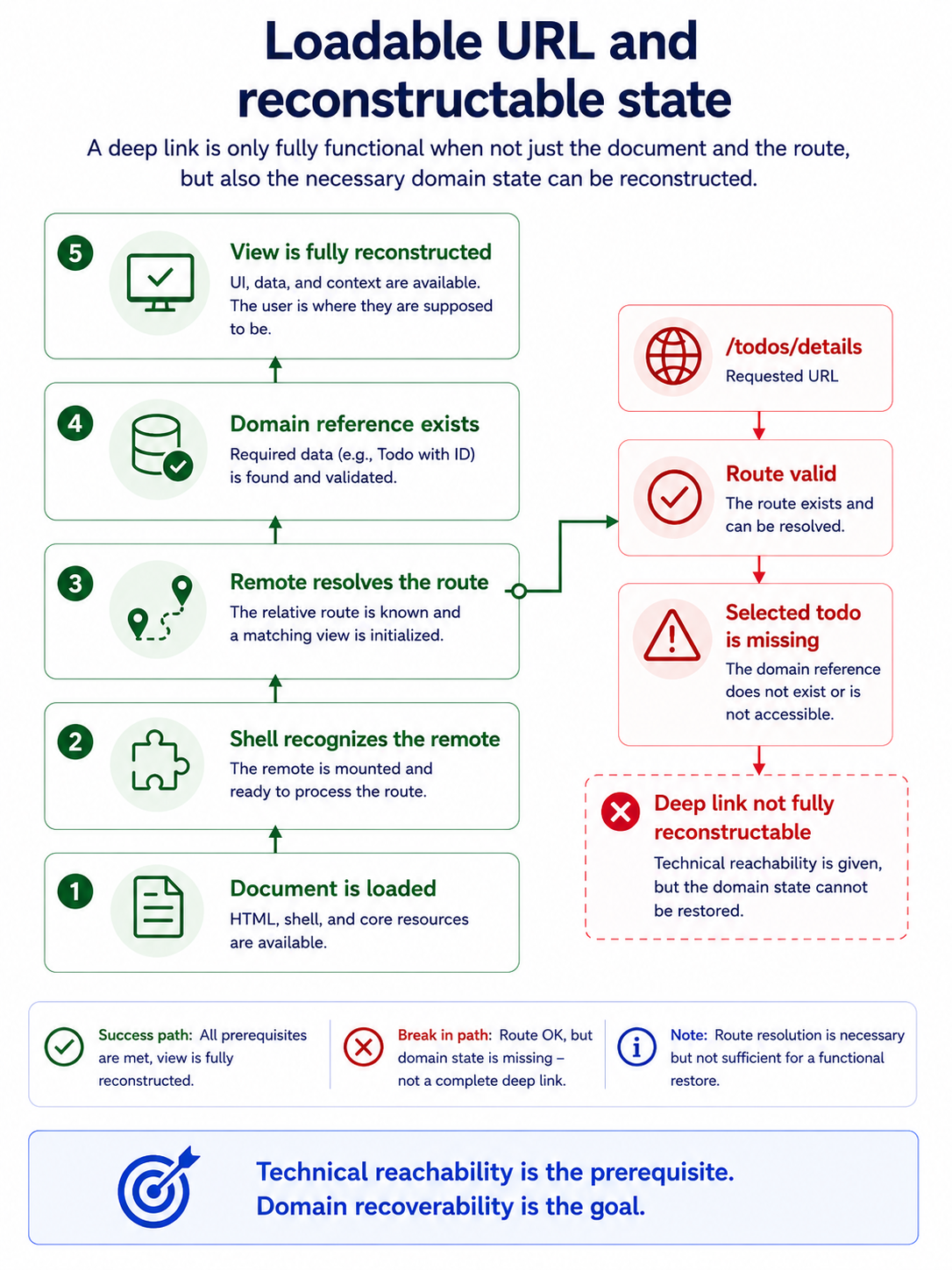
URL restoredroute recognizedremote mountedThe domain detail view was still not reconstructable. The route addressed only “Details”, not the specific todo. The required selection had existed only in the store that had since been discarded.
This produces an important distinction:
Document is loadable≠route is resolvable≠view is reconstructable≠domain state is restoredA restored route is not the same as restored view state.
Browser history can restore only state that is addressable through the URL or through a contract derivable from it.
Responsibility for that does not automatically belong to the host. The remote owns the domain meaning of its route and must decide which references are required for reconstruction. The host can activate the area, but it should not have to guess the remote’s local entity selection.
An SPA Fallback Is Not Yet a Deep Link
Section titled “An SPA Fallback Is Not Yet a Deep Link”For a direct browser request such as
https://product.example/todos/detailsseveral layers have to work:
- DNS and the reverse proxy select the correct service.
- The web server returns the entry document.
- The shell recognizes the remote prefix.
- The remote recognizes its relative subpath.
- Required domain data is reconstructed.
- Authentication redirects preserve the original destination.
A typical web server fallback can ensure that the SPA document is returned even for an unknown file path:
try_files $uri $uri/ /index.html;That proves that the browser receives an entry document. Nothing more.
The fallback proves neither successful remote mounting nor resolution of the relative path. It says nothing about permissions, domain data, or restoration of a selected entity. A login redirect may also lose the destination even though the web server previously returned index.html correctly.
A server fallback makes a URL loadable, but not yet reconstructable from the domain perspective.
A resolvable route is not yet a reliable deep link. A URL becomes reconstructable only when it addresses the state the application needs after reload, remounting, or browser Back.
Must Every Detail View Address an Entity?
Section titled “Must Every Detail View Address an Entity?”A route such as
/todos/detailscan work if the concrete selection can be reconstructed from another stable source. Within an uninterrupted flow, a local store may be sufficient.
After a reload, remount, or direct external link, however, that selection may be missing. A reconstructable alternative could therefore be:
/todos/42or:
/todos/details/42That does not mean every selection and every piece of UI state must be written into the URL.
A reliable deep link is typically meant to be shared or bookmarked. It should work after a reload, login redirect, or remount. For that, it needs a stable domain reference or another reproducible contract.
Transient view state, by contrast, may exist only within an ongoing flow. It does not have to be bookmarkable, may be discarded on reload, and does not need to be artificially promoted to public product state.
Not every view needs its own reconstructable URL. But every URL should be honest about which state it can actually restore.
A route without an entity ID is therefore not automatically defective. It becomes problematic only when it is treated as a reliable deep link even though its domain prerequisite exists only in volatile memory.
Standalone and Host URLs May Differ
Section titled “Standalone and Host URLs May Differ”The two runtime modes of a remote operate in different composition contexts.
In standalone mode, a domain route may be available at:
https://tasks.example/projects/detailsInside the product, the same route may appear as:
https://product.example/tasks/projects/detailsThe origin and outer prefix differ. The domain route projects/details remains the same.
That is not an error. A remote does not have to use the same complete browser URL in every runtime mode. What matters is that the mapping is explicit and verifiable.
At minimum, the following should hold:
- The relative route space remains stable.
- The mount context is explicit.
- Internal navigation does not use hardcoded host prefixes.
- Authentication redirects know the canonical URL for the respective mode.
- Document fallbacks work for each origin.
- Tests cover both standalone and host operation.
Independent operation does not mean identical outer URLs. It means the domain route can be resolved unambiguously in every context.
Standalone mode may provide its own mapping. A mini-host or local shell can activate the same relative route space under a different outer prefix. What matters is that this context does not silently leak into the remote’s domain responsibility.
Route Ownership as a Matrix
Section titled “Route Ownership as a Matrix”The responsibilities can be summarized in a simplified matrix:
| Responsibility | Host | Remote |
|---|---|---|
| Product origin in host mode | owns it | uses it |
| Outer mount prefix | owns it | must not hardcode it |
| Relative subpath | mounts it | defines it |
| Domain meaning of the route | knows only what is necessary | owns it |
| Product-wide navigation | coordinates it | expresses intent |
| Internal remote navigation | provides context | owns it |
| Browser history | ensures one clear owner or a delegated area | requests a change or owns the delegated area |
| Deep-link data | activates the product area | reconstructs the domain state |
| Server fallback | owns the host origin | owns the standalone origin |
This division is not an immutable law. It makes visible where different responsibilities are often confused.
The host may own the outer path without controlling the domain meaning of every subroute. The remote may own its route space without knowing the complete product path. A shared router may mutate history without automatically owning the domain meaning of the URL state.
Technical path ownership and domain state ownership are not the same thing.
There Is No Universal Routing Rule
Section titled “There Is No Universal Routing Rule”Different models may be viable depending on the integration:
- Shared router: The host mounts relative route arrays; one router owns browser history.
- Delegated router area: The host recognizes the outer prefix; the remote owns the URL space below it.
- Navigation port: The remote describes a semantic destination; a platform adapter produces the canonical URL.
- Separate standalone and host mappings: The domain destination space remains stable while the composition context produces different outer URLs.
None of these models is universally correct. What matters is whether ownership remains clear, direct entry and browser Back work, independent operation can be tested realistically, and the required domain state can be reconstructed.
The choice of model matters less than the clarity of its contract.
The URL as a Stable Product Contract
Section titled “The URL as a Stable Product Contract”The routing problem from the architecture lab could be solved technically with relativeTo. Its architectural significance did not lie in that single router option, but in separating two responsibilities.
The host could own /tasks as the outer product area. The remote could define details as its own relative route. The mount context connected both parts without writing the host prefix into the remote implementation.
A hardcoded host prefix fixes a local routing problem and creates a structural dependency.
Navigation across an ownership boundary can be expressed as an intent. The concrete URL is then produced by the responsible adapter, the shared router, or a clearly delegated router area. Multiple routers remain possible, but they need one unambiguous mutating history owner or explicitly delegated URL areas.
Responsibility does not end there. A route may be valid even though the domain state is missing. A server fallback may deliver the SPA document even though the required entity cannot be reconstructed.
A restored route is not the same as restored domain state.
Standalone and host mode may use different outer URLs. What matters is an explicit mapping between composition context and relative route space.
A stable routing contract therefore answers more than how a component moves from create to details. It answers who owns the outer product path, who interprets the relative subpath, who creates history entries, and which domain state can be restored after reload, remounting, or browser Back.
The URL does not belong to the router that happens to change it. It belongs to the product contract that makes it reconstructable.