Understanding Context, Memory, Skills, and Agents
Anyone working with a coding agent today will encounter a whole collection of terms within minutes: Context, Memory, Agent Files, Skills, Tools, and of course Agents themselves. On top of that come product-specific names such as AGENTS.md, CLAUDE.md, Custom Instructions, or SKILL.md.
At first glance, many of these sound like different names for the same thing:
Information the model somehow knows.
That may be good enough for a first interaction. But once we want to understand why an agent uses some information, no longer has access to other information, follows rules with varying reliability, or suddenly applies a particular workflow to a task, that explanation becomes too vague.
The more useful question is:
Where does a coding agent actually get the information it needs to know what to do and how to work?
A simple metaphor goes surprisingly far. Instead of imagining an artificial human, imagine a workplace with a desk. The model already brings knowledge and capabilities. The desk contains the information available for the current task. Nearby there is an archive, rules for this workplace, playbooks for particular kinds of work, and tools that make actions possible.

In simplified form:
Model=knowledge and capabilitiesalready available
Context=what is currently on the desk
Memory=archive or notebookfrom which information can laterbe brought back onto the desk
Agent Files=rules of the workplace
Skills=playbooks or work instructionsfor specific kinds of tasks
Tools=things the system can use to act
Agent=the system that pursues a taskand combines these mechanisms
This metaphor describes roles within a system. It is explicitly not a claim that an LLM works like a human brain or that an agent is a synthetic employee with human memory.
That distinction matters because many misunderstandings begin when technical mechanisms are mapped too literally onto human cognition.
Why Context Is Not Short-Term Memory
Section titled “Why Context Is Not Short-Term Memory”Context is often described as the short-term or working memory of an LLM. As a rough everyday analogy, it is easy to see why: information is available for a limited processing window and influences what happens next.
Technically, however, the analogy quickly becomes misleading. Human working memory is a dynamic biological state. Information has to be actively maintained, can fade, and is influenced by many cognitive processes.
LLM Context is different. It consists of information that is explicitly made available to a model invocation. As long as a piece of information is included in the current Context, the model can in principle take it into account. That still does not mean the model will find, weigh, or use every part of that Context equally reliably.
That is why the desk works better as a metaphor. A document can lie on a desk without the person noticing the decisive sentence inside it. An enormous desk can even become so cluttered that important information is harder to distinguish from everything else.
Fitting on the desk and being used reliably are two different properties.
What the Model Already Brings
Section titled “What the Model Already Brings”Before we place anything on the desk, the model already exists. Its Model Weights are the result of Training and Post-Training and determine a large part of what the model can already do and which patterns it has learned.
In our workplace metaphor, we can roughly think of this as education, experience, and internalized knowledge. Again, the analogy only describes the role. A model does not biologically remember an education and does not possess professional experience in the human sense.
The technically important distinction is different: when we provide additional information through Context or use a Memory system, we normally do not change the Model Weights. The model is not being retrained.
If a coding agent remembers that a particular repository uses pnpm instead of npm, the base model has not suddenly learned this fact permanently. A surrounding system stored the information and can make it available again later.
Context – What Is Currently on the Desk
Section titled “Context – What Is Currently on the Desk”Context is, in simplified terms, the information available to the model for the current processing step.
That may include the visible user request. In a real agent system, however, the user request is often only a small part of the total input. System Instructions, conversation history, repository files, search results, tool descriptions, test results, compiler errors, API responses, loaded Agent Files, activated Skills, and retrieved Memories can all become part of the current Context.
A coding agent investigating a failing test might work with information such as:
task description+relevant repository files+architecture rules+test code+output from the last failed test run+previous changes+current instructionThe model does not need to have seen these things during Training. If we give it documentation for a new library or a section of an internal repository, it can use that information during the current processing step.
That gives us a useful shorthand:
Context is what is currently on the desk.
This is simpler than many agent interfaces make it sound. A file an agent opens does not automatically become new knowledge in the Model Weights. A search result does not either. Both mechanisms initially make additional information available to a model invocation.
Context Window – How Large Is the Desk?
Section titled “Context Window – How Large Is the Desk?”In the second article in this series, we already introduced the Context Window as a technical capacity limit. In simplified terms, it describes how much material can be considered within a model invocation. The exact division of the token budget between input, internal system context, and output depends on the model and product.
In our metaphor, this is the size of the desk.
A larger desk is obviously useful. An agent can keep more code, more conversation history, or more documentation available at once before information has to be removed, summarized, or loaded again.
But size alone says little about how well the workplace is prepared. A desk covered with ten thousand unsorted pages may technically contain everything we need. A smaller desk containing exactly the relevant API documentation, affected modules, architecture rules, and current test failure may still be much more useful for the task at hand.
For practical agent systems, it helps to separate several questions. How much Context can technically fit? Which of that information is actually relevant? Which pieces are selected and when are they provided? And how reliably does the model use the information that has been selected?
A large Context Window mainly answers the first question.
Context Engineering – What Goes on the Desk?
Section titled “Context Engineering – What Goes on the Desk?”This brings us back to a term increasingly described as Context Engineering.
The idea is not to copy as much material as possible into the largest possible prompt. In large codebases, a major part of the work is instead selecting relevant information, structuring it sensibly, and making it available when it is needed. Anthropic describes this as combining classic retrieval with a “just in time” approach in which additional information is loaded only during the work, through files, search, or tools. [8]
For a concrete change, the useful Context might consist of the affected modules, current tests, an API contract, a small number of architecture rules, and the output from a failed build. An entire monorepo, every ADR from the last five years, and every documented coding convention would provide more information, but not automatically better Context.
Context Engineering decides what lands on the desk.
Designing that systematically is a topic of its own. For our mental model, the important point is simply that Context is not a static body of knowledge. Agent systems assemble it continuously while they work.
Memory – The Archive Next to the Workplace
Section titled “Memory – The Archive Next to the Workplace”With that distinction in place, we can position Memory more precisely.
If an agent system is supposed to retain information beyond a single step or session, that information has to be stored somewhere. That may be a file, database, search index, or another persistence mechanism. Later, the system can retrieve relevant information and make it available again for the current task.
In simplified form:
Memory↓Retrieval↓Context↓ModelMemory is therefore less like the model’s human long-term memory and more like an archive or notebook next to the desk.
It might contain, for example, a user’s preferred output style, a technical option the team previously rejected, an unusual build step, or the point where a longer-running task was last interrupted.
The direction matters. As long as information merely sits in the archive, the model is not automatically using it. The agent system has to retrieve it and bring it back onto the desk in a useful form.
Context is available working material. Memory is stored information that can later become Context again.
Product terminology is not fully consistent, however. Claude Code, for example, explicitly describes CLAUDE.md files and Auto Memory as two complementary Memory systems. At the same time, Anthropic states that both ultimately become Context: CLAUDE.md contains human-maintained persistent instructions, while Auto Memory contains learnings and patterns stored by the agent itself. [3]
For our mental model, it is therefore more useful to distinguish by role. We will treat human-maintained repository and project rules as Agent Files. By Memory, we mean stored information that persists across steps or sessions and can later be made available again.
These are categories for understanding, not universal laws imposed by vendors. The technically important boundary remains the same: storing such information normally does not modify the Model Weights. It is persistence and later reuse, not automatically Training.
Agent Files – How Do We Work Here?
Section titled “Agent Files – How Do We Work Here?”With Agent Files, terminology becomes even more product-specific.
AGENTS.md has become an open format for instructions aimed at coding agents. It describes itself, roughly, as a README for agents: a predictable place for build commands, tests, conventions, and project-specific Context. The format is now supported by a growing number of coding-agent tools. [1]
GitHub Copilot has its own repository instructions through .github/copilot-instructions.md and path-specific NAME.instructions.md files. For agents, GitHub also supports nested AGENTS.md files; alternatively, CLAUDE.md or GEMINI.md can be used at the repository root. [2]
Claude Code, meanwhile, works natively with CLAUDE.md and .claude/rules/. It does not automatically interpret AGENTS.md as a native format, but the current documentation explicitly recommends importing an existing AGENTS.md from CLAUDE.md if a repository wants to share the same rules across multiple agent systems. [3]
It would therefore be misleading to treat “Agent File” as the name of one standard. In this article, I use the term as a broad category for files that provide a coding agent with project-specific rules and working Context.
The core question is:
How do we work in this project?
Such a file can contain architecture rules, naming conventions, dependency boundaries, test strategies, build commands, or other project-specific decisions.
For an Angular project, a section might look like this:
# Frontend Architecture
- Components do not orchestrate business logic.- Domain State lives under `domain/+state`.- HTTP access belongs in `infrastructure`.- Use Signals for local State.- New features require Unit Tests.
These rules do not yet describe a concrete workflow for implementing a feature. They tell the agent which boundaries apply inside this repository.
Another project may legitimately use NgRx, place HTTP access differently, or define different testing boundaries. That is exactly why a good Agent File is not a collection of universal claims about how software development should always work.
It describes what good work looks like here.
Agent Files Are Not a Universal Best-Practice Package
Section titled “Agent Files Are Not a Universal Best-Practice Package”This is where we first move beyond pure terminology.
It is tempting to copy a large AGENTS.md, CLAUDE.md, or a collection of Copilot Instructions from a successful project. Someone has already invested the effort, and many of the rules sound sensible at first glance.
The problem is not being inspired by good ideas. The problem begins when project-specific decisions are mistaken for universal best practices.
One repository may deliberately use Feature Slices while another is organized primarily by technical layers. One team may use Signals as its primary State model while another relies on NgRx. In one project, Integration Tests may be the most important safety boundary; in another, Unit Tests may carry much more weight. Even identical frameworks do not automatically imply identical architecture rules.
Giving an agent a foreign rule very precisely does not automatically improve the result. It may simply make the agent apply the wrong rule with impressive consistency.
Agent Files are not a universal best-practice package. They need to describe the actual architecture and working style of the project.
Skills – How Do I Perform This Kind of Task?
Section titled “Skills – How Do I Perform This Kind of Task?”A Skill answers a different question.
While an Agent File describes how work is done in a particular environment, a Skill typically describes a playbook for a particular kind of activity:
How do I perform this kind of task?
That might be a workflow for Code Review, systematic debugging, TDD, a migration, an Architecture Review, or the implementation of a recurring feature structure.
In our workplace metaphor, a Skill is therefore not the house rules. It is a playbook.
The now openly specified Agent Skills format makes this mechanism particularly tangible. A Skill is represented as a directory containing at least a SKILL.md. That file contains metadata such as name and description, together with the actual instructions. A Skill may also include scripts, reference material, and other assets. The format was originally developed by Anthropic and released as an open standard in late 2025. [4]
A Skill might describe something like:
Code Review
1. Determine the diff against the baseline.2. Check the functional requirement.3. Apply project rules.4. Look for architecture violations.5. Check tests and verification.6. Structure findings by relevance.
That is different from a project rule such as “HTTP access belongs in infrastructure.” The Skill describes a workflow. The Agent File provides rules that may need to be applied within that workflow.
A Skill Is Not Automatically a Learned Ability
Section titled “A Skill Is Not Automatically a Learned Ability”The word Skill can be slightly misleading.
For humans, we tend to associate a skill with internalized ability. Riding a bicycle, touch typing, or a practiced debugging method does not live in a Markdown file that we reread before every task.
With Agent Skills, a different model is often closer to reality. A workflow is stored as a file or structured resource. When it becomes relevant, the agent system can load those instructions and provide them to the model as additional Context.
SKILL.md↓load↓Context↓ModelA Skill may be called a Skill, but technically it is often closer to a playbook than to an internalized ability.
Of course, the model itself already brings capabilities learned during Training. If a behavior were embedded in the Model Weights through Training or Fine-Tuning, the analogy to an internalized skill would be much closer.
A SKILL.md explaining a TDD workflow does not modify the Model Weights. It provides the agent system with a reusable playbook.
Agent File and Skill Complement Each Other
Section titled “Agent File and Skill Complement Each Other”The difference becomes especially clear with a concrete coding task.
Suppose the instruction is:
Implement an Update Slice.
The Agent File might define that Domain State lives under domain/+state, Components do not orchestrate business logic, HTTP access must go through Infrastructure, and new changes need Unit Tests.
A project-specific Skill might instead define the actual workflow:
Implement Update Slice
1. Check or create the Command.2. Analyze the existing Read State.3. Implement the Application Use Case.4. Connect Infrastructure.5. Consider invalidation.6. Add tests.7. Run verification.
The two mechanisms do not compete. The Skill describes which steps are useful for this type of task. The Agent File describes which rules apply inside this project.
In short:
Agent File=How do we work here?
Skill=How do I perform this kind of task?
Or, using the workplace metaphor:
Agent File=house rules
Skill=playbook
Not every product implements this distinction in exactly the same way. As a mental model, however, it is useful because it makes two different responsibilities visible.
Progressive Disclosure – Put Playbooks on the Desk Only When Needed
Section titled “Progressive Disclosure – Put Playbooks on the Desk Only When Needed”Once we have many Skills, we immediately create a Context problem. A simple bug fix does not need the complete instructions for Release Management, data migration, UX Reviews, Incident Response, and ten different feature types at the same time.
The open Agent Skills specification therefore treats Progressive Disclosure as a central design principle. A compatible client can initially expose only a Skill’s name and description. When the Skill is activated, the complete SKILL.md is loaded into Context. Additional scripts, references, or assets can then be used only when needed. The precise implementation of discovery and activation remains the responsibility of the individual agent system. [4]
In our metaphor, there is a shelf full of labeled playbooks in the room. They do not all lie open on the desk permanently. When a relevant task appears, the appropriate playbook is taken down.
That saves Context and reduces irrelevant instructions. It also reinforces an important point: a Skill is not necessarily something the model permanently “knows.” The agent system organizes which information becomes available in the current working area and when.
Reusable Does Not Mean Universal
Section titled “Reusable Does Not Mean Universal”Skills can be more reusable than Agent Files. A well-designed workflow for systematic debugging, Code Review, or TDD may be useful across many projects.
But that still does not make it universally portable.
The closer a Skill gets to the actual architecture or development process of a team, the more project-specific it becomes. A Skill called create-angular-crud-slice, for example, needs to know what this project means by a Slice. An add-domain-command Skill depends on how Commands, State, and the Application Layer are structured in that codebase. A Skill for a Legacy Migration may even have to work deliberately with structures that should never be copied into a greenfield project.
The closer a Skill is to architecture, domain rules, and the actual development process, the more it needs to be adapted to the project.
The distinction is therefore not “Agent Files are local, Skills are global.” They have different responsibilities. Agent Files are usually strongly environment-specific by role. Skills describe repeatable work, but can range from broadly reusable to highly project-specific.
This Is Where Engineering Begins
Section titled “This Is Where Engineering Begins”Context and Memory can initially be explained rather neutrally as technical mechanisms. Information is provided, stored, and later made available again.
Agent Files and Skills require decisions from a team. Which architecture is actually intentional? Which patterns should new work reproduce, and which exist only because of history? Which commands are part of the normal workflow? Which tests matter for which types of change? What does “done” even mean in this repository?
Skills introduce additional questions. What does a good Code Review look like for this team? Which debugging steps have proven useful? How is a feature sliced? Which verification steps must not be skipped?
A team that can barely explain its own way of working will struggle to turn that work into good Agent Files and Skills.
This is where a piece of engineering begins. That does not mean a perfect agent system has to be designed before the first use. A more realistic process is iterative: observe real tasks, identify recurring failures, make rules explicit, narrow a Skill, check agent behavior, and refine the instructions.
Anthropic likewise recommends starting Skills from concrete gaps in agent behavior and representative tasks, then observing how they perform in real scenarios and refining them over time. [4]
A Skill is not good because its Markdown file sounds convincing.
A good Skill is good when it reliably improves agent behavior on real tasks.
That simple rule helps prevent a new kind of Cargo Cult: collecting extensive agent configurations whose actual effect has never been tested.
Matt Pocock’s “Skills for Real Engineers” – Inspiration, Not a Blueprint
Section titled “Matt Pocock’s “Skills for Real Engineers” – Inspiration, Not a Blueprint”A current example of how such playbooks can be structured is Matt Pocock’s Skills for Real Engineers repository. The collection includes Skills for code-review, diagnosing-bugs, tdd, implement, Research, and other parts of an engineering workflow. The implement workflow, for example, builds on previous decisions, applies TDD at agreed seams, and finishes with a Code Review. The debugging Skill defines a disciplined cycle of reproduction, minimization, hypothesis formation, instrumentation, fix, and regression testing. [5]
What is interesting is not the idea of copying these files unchanged into every repository. The useful part is the structure: tasks are kept relatively focused, workflows receive explicit names, larger processes can compose smaller Skills, and recurring engineering practices become explicit.
That makes the collection especially useful as inspiration for the scope and structure of your own Skills. It shows what kinds of working knowledge can be expressed as a playbook and that Skills can represent complete feedback loops rather than isolated prompt tricks.
It still does not make project-specific decisions for a team. What constitutes a good review, which test boundaries matter, which architecture must be preserved, and which workflow fits a particular codebase still have to be decided locally.
You can borrow the structure. You still have to develop the content yourself.
Tools – What Can the Agent Act With?
Section titled “Tools – What Can the Agent Act With?”So far, we have mostly discussed information and instructions provided to the model.
Tools change a different dimension: they give the system ways to retrieve information from its environment or perform actions in it.
A Tool can read or write files, search repository contents, run a shell command, invoke git diff, start tests, call a compiler, operate a browser, query a database, or access an external API. Functions exposed through MCP can also fall into this category.
In the desk metaphor, Tools are the equipment at the workplace.
A model without write access can explain how a file should be changed. With the appropriate Tool, an agent can actually open and modify the file. With a test runner, it can observe the effect. With Git, it can inspect the resulting diff.
This makes another distinction visible:
Skill=which steps are useful?
Tool=what can be used to perform a step?
A Code Review Skill may require analyzing the diff first. git diff or a repository Tool makes that action possible.
A debugging Skill may require testing a hypothesis with a reproducible test. Shell access and a test runner make the execution possible.
Tools are therefore not Skills, and Skills are not Tools.
Agent – The System That Pursues the Task
Section titled “Agent – The System That Pursues the Task”Only now is it useful to return to the term Agent.
There is no single universal definition here either. OpenAI describes Agents as systems that perform tasks on behalf of users with a high degree of independence, using an LLM to steer the workflow and Tools to retrieve information or take actions. Anthropic uses the broader term agentic systems but distinguishes within it between predefined workflows and Agents in which the model dynamically controls the process and Tool use. [6][7]
The boundary is not standardized.
For our mental model, the shared idea matters more: an Agent does not merely process one prompt and return one piece of text. It can inspect the state of a task over multiple steps, choose a next action, receive a result from the environment, and react to it.
In simplified form:
Task↓Agent
Model+ Context+ Memory+ Agent Files+ Skills+ Tools
↓choose action↓execute↓observe result↓choose next step↓...
Not every Agent contains exactly these components, and not every system organizes them the same way. One system may work without persistent Memory. Another may not support Skills. A third may expose only a small set of tightly controlled Tools.
The key difference from a simple single LLM call lies less in a new “thinking component” than in the organization of a multi-step workflow.
A coding agent is not just a model. It is a model inside a working environment.
How a Coding Agent Actually Works With These Pieces
Section titled “How a Coding Agent Actually Works With These Pieces”Consider a fairly ordinary task:
Fix the bug from issue 381 and add a regression test.
A coding agent might first read the issue and then search the repository. It opens the likely relevant files and may receive local Agent Instructions for that area of the repository as part of its Context. A debugging Skill can be activated for the investigation.
The agent then runs an existing test or creates a reproducible failing case. The Tool returns an error message, which can become part of the next working Context. Based on that updated state, the model decides which file to inspect or modify next.
After a change, the test runs again. Perhaps a TypeScript error appears. That new observation can feed into the next model step. The agent updates the patch, performs additional verification, and finally inspects the diff.
The flow may look roughly like this:
Issue↓inspect repository↓load relevant files↓apply Agent Files↓use debugging Skill↓run test↓observe failure↓change code↓run test again↓inspect diffA long prompt could describe many of these steps as well. An agent system additionally organizes the actions, routes results back into the process, manages the changing Context, and coordinates further model calls. That is the same surrounding work environment that mattered in the previous article when we saw that coding benchmarks do not measure the bare model alone.
Surprisingly Much Ends Up in Context
Section titled “Surprisingly Much Ends Up in Context”We can now bring the different concepts together again.
Memory may be stored outside the current model invocation. An Agent File exists as a file in the repository. A Skill may sit in a Skill directory waiting to be activated. A Tool exists as an executable capability outside the model.
For the model to use the information from these mechanisms, relevant content or descriptions normally have to become part of the current Context in some form.
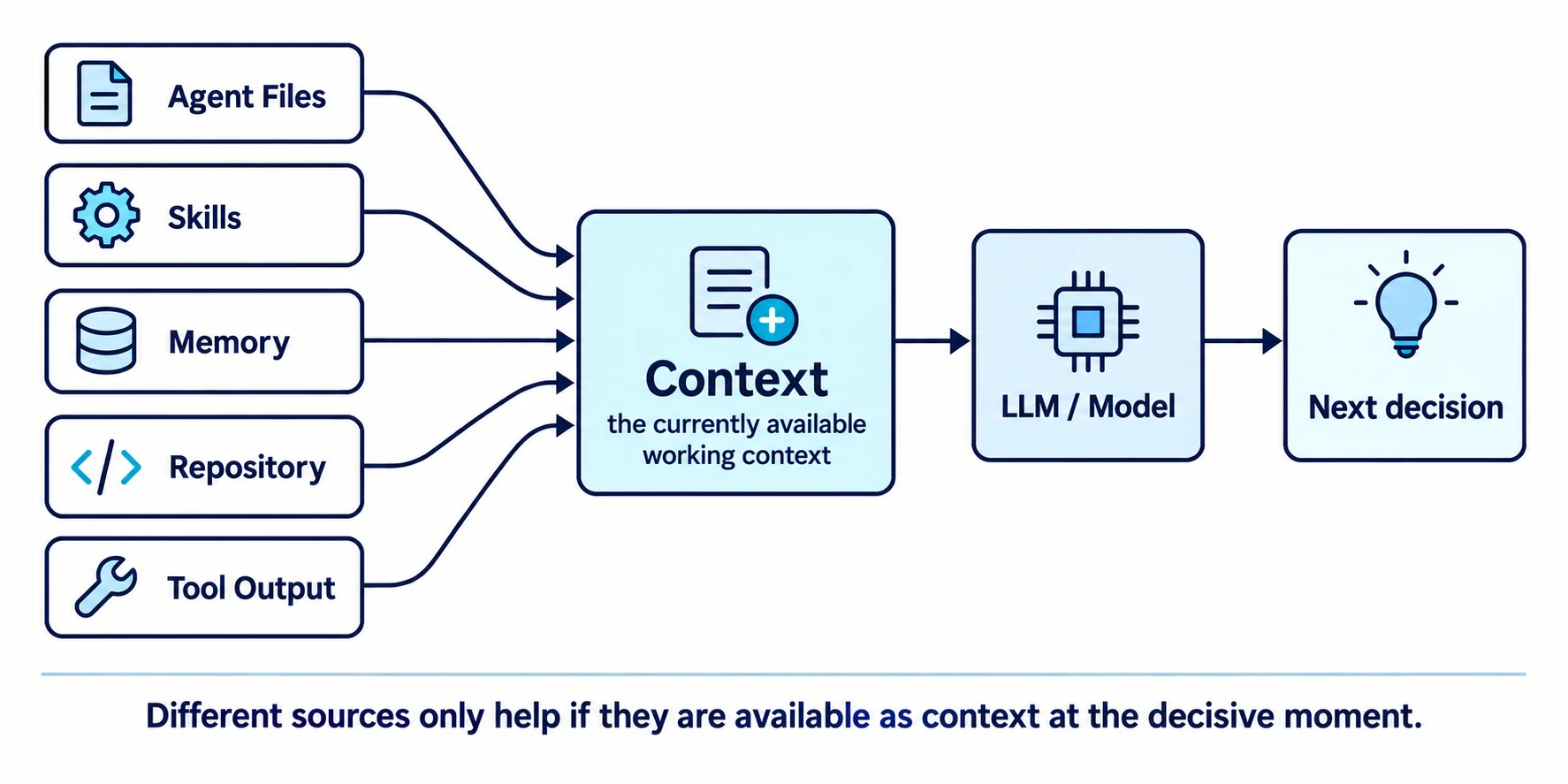
That does not make all of these mechanisms technically identical. Their lifetimes, selection rules, persistence, priorities, and execution semantics differ substantially. A Tool, for example, remains an external capability; only its description and results become Context for the model.
For demystification, however, the shared observation is important:
Many terms around Agentic AI do not describe new kinds of intelligence. They describe different ways of providing a model with information, rules, workflows, and ways to act.
A Memory system decides what is stored and later retrieved. Progressive Disclosure helps determine which Skill is loaded in full and when. Agent Files provide local rules. Tools return new observations from the environment or make changes to it possible.
The model then works with the Context assembled for that particular step.
A Compact Mental Model
Section titled “A Compact Mental Model”| Mechanism | Core question | Desk metaphor |
|---|---|---|
| Model | What can the system already do? | education and experience |
| Context | What information is available right now? | material on the desk |
| Memory | What can be stored and retrieved later? | archive / notebook |
| Agent File | How do we work here? | house rules |
| Skill | How do I perform this kind of task? | playbook / work instruction |
| Tool | What can I act with or retrieve information through? | equipment |
| Agent | How does this become a multi-step workflow? | work organization |
As with any metaphor, we should not stretch it further than it is useful. A model does not have a human education, a Memory system does not have biological long-term memory, and an Agent is not a digital employee.
The table distinguishes roles. It does not attempt to recreate human cognition.
A Large Desk Still Does Not Guarantee Good Work
Section titled “A Large Desk Still Does Not Guarantee Good Work”From the outside, a modern coding agent can look like a single intelligent system. We provide a task, watch several work steps, and eventually receive a patch.
Under the surface, however, different mechanisms work together. The Model brings capabilities from Training. Context provides the information available for the current step. Memory can retain information over time and make it available again later. Agent Files define local rules. Skills describe repeatable workflows. Tools allow the system to retrieve information from its environment or take actions in it. The Agent organizes these elements into a multi-step process.
This distinction is not merely terminological precision. It helps us identify where a problem actually originates. Does the model lack knowledge? Was the relevant information never loaded into Context? Is a Memory outdated? Does an Agent File contradict the actual architecture? Is a Skill scoped poorly? Is a Tool missing, or does it return poor feedback?
Only when we separate those questions can “the agent sometimes does weird things” become a technical problem we can investigate.
For Agent Files and Skills in particular, one practical consequence follows immediately. External repositories can provide good ideas, but they do not know our codebase. They do not know our architecture decisions, Legacy boundaries, Definition of Done, or actual development workflow either.
For Agent Files and Skills, copying someone else’s best practices is not enough. They have to fit the codebase and working style of the project.
The large desk, the archive, the house rules, the playbooks, and the tools explain a substantial part of the working environment of a coding agent. One important property still remains: even if we give the same agent the same Context, the same rules, the same Skills, and the same Tools, we do not necessarily get exactly the same solution every time.
The underlying model is probabilistic. Why that creates variation in results, and what that means for Software Engineering, is the subject of the next article.
Sources
Section titled “Sources”[1] AGENTS.md: A simple, open format for guiding coding agents. Current project documentation, September 2026. Describes AGENTS.md as a predictable place for build steps, tests, conventions, and other project-specific Context for coding agents.
[2] GitHub: Adding repository custom instructions for GitHub Copilot. GitHub Docs, September 2026. Documents .github/copilot-instructions.md, path-specific .instructions.md files, and AGENTS.md, CLAUDE.md, and GEMINI.md as Agent Instructions.
[3] Anthropic: How Claude remembers your project. Claude Code Docs, September 2026. Documents CLAUDE.md, .claude/rules/, Auto Memory, how they are loaded as Context, and importing existing AGENTS.md instructions.
[4] Agent Skills: Agent Skills Overview, Specification, and How to add skills support to your agent. Open Agent Skills standard, September 2026. The format was originally developed by Anthropic and describes SKILL.md, optional scripts, references and assets, and Progressive Disclosure for discovery, activation, and execution.
[5] Matt Pocock: Skills for Real Engineers. GitHub repository, September 2026. Collection of engineering Skills including TDD, debugging, Code Review, implementation, Research, and Domain Modeling.
[6] Erik Schluntz, Barry Zhang / Anthropic: Building effective agents. Anthropic, December 19, 2024. Distinguishes predefined workflows from Agents in which the LLM dynamically controls process and Tool use.
[7] OpenAI: A practical guide to building agents. Describes Agents as systems that perform tasks on behalf of users with a high degree of independence, using an LLM to steer workflow execution and Tool selection.
[8] Anthropic: Effective context engineering for AI agents. Anthropic Engineering, September 29, 2025. Describes, among other things, the shift from purely pre-inference retrieval toward “just in time” strategies in which agents load needed Context dynamically during execution.