Presentation – where UI and UX live
On the other side of the view contract, Presentation begins.
A view might receive the following from its facade:
customercanOrdercanDeleteloadingdeleteCustomer()placeOrder()Presentation decides how this information becomes visible and usable: how it is arranged, what loading states look like, which button appears disabled, when a dialog opens, how a form behaves, and how keyboard or touch interaction works.
The domain meaning of those values has already been determined. Up to this point, the architecture has been invisible to the user. In Presentation, it becomes the interface.
Presentation can be complex
Section titled “Presentation can be complex”“Presentation must be dumb” is too simplistic as a guideline. A good UI can be technically demanding.
Presentation may carry complex responsibilities for forms, wizards, modal dialogs, tables, drag and drop, focus management, keyboard navigation, accessibility, touch interaction, responsive layouts, animations, and UI composition. A sophisticated form can easily require hundreds of lines of UI code without containing any business logic.
An autocomplete field, for example, may need to process input, display suggestions, handle arrow keys and Escape, manage focus between the input and the suggestion list, and remain understandable to screen readers. None of those tasks determines whether the selected customer is allowed to place an order – yet the component is anything but trivial.
The boundary does not follow line count. It follows the kind of complexity involved: Presentation may contain UI complexity. Domain complexity does not belong there.
Render, do not decide
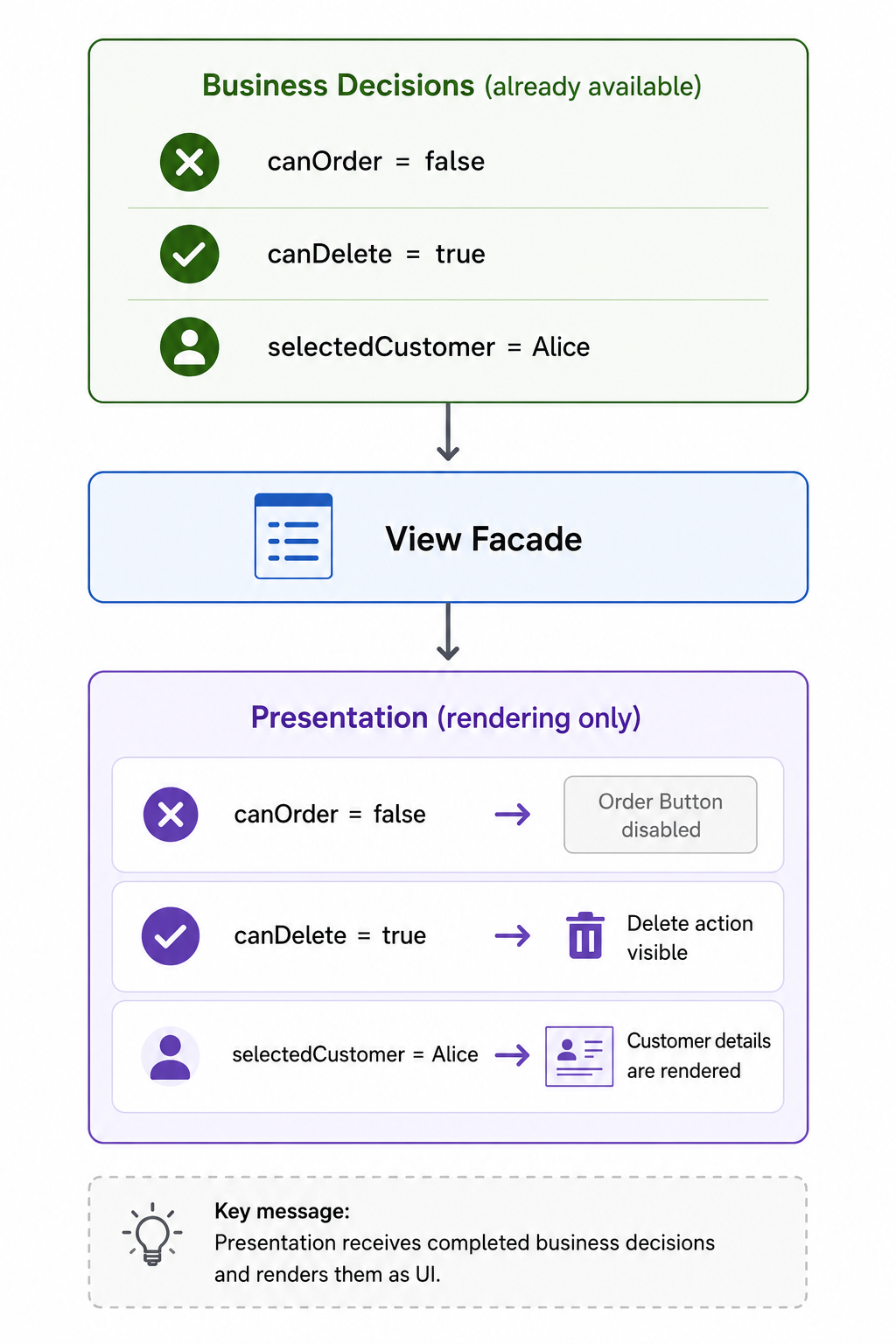
Section titled “Render, do not decide”+State has already produced the relevant information, and Application has made it available through the view facade:
canOrder;canDelete;selectedCustomer;visibleCustomers;Presentation may render those values:
canOrder = false ↓Order button is rendered as disabledIt should not reconstruct a decision that has already been made:
<button [disabled]=" facade.customer().status !== 'ACTIVE' || facade.customer().creditHold !== 'NONE' "> Order</button>As soon as a template checks which status or flag allows an action, the business rule exists a second time – only now it is harder to find because it lives in markup instead of +State.
Presentation may render a domain decision. It should not reconstruct it.
A view consumes exactly one facade
Section titled “A view consumes exactly one facade”The boundary from the Application article continues here. A view consumes exactly one view-specific contract:
CustomerListFacade ↓CustomerListViewIt does not access several internal domain areas directly:
CustomerListView ├── CustomerState ├── PermissionState ├── OrderState └── SelectionStateAnd as a rule, it should not consume several facades at once either:
CustomerListView ├── CustomerFacade ├── PermissionFacade ├── OrderFacade └── SelectionFacadeOtherwise the Presentation starts orchestrating the internal structure of the domain again – only one layer higher, with facades instead of stores.
A view consumes exactly one facade. That facade may internally access several domain areas. The view does not need to know that structure.
Forms live here
Section titled “Forms live here”Forms belong to Presentation. This includes form state and mechanics such as FormControl, FormGroup, dirty, touched, focused, submitted, field visibility, input formatting, masking, and local validation feedback.
That remains true regardless of whether a framework implements forms through reactive forms, template forms, hooks, or a dedicated form library.
Within a form, however, another distinction is useful.
Presentation may determine, for example:
- a required field is empty,
- an input does not match the expected format,
- an email address is syntactically invalid,
- two locally entered password values do not match.
A rule such as:
This customer is not allowed to change their email address in the current contract state.
does not belong in the form. That decision must already come from the domain, for example as canEditEmail in the view contract.
A technical validator function does not necessarily have to live directly in the component file either. What matters for the layer boundary is its responsibility, not the physical location of every helper function.
The form belongs to Presentation. The domain truth being changed through that form does not.
Modal dialogs and interaction flows
Section titled “Modal dialogs and interaction flows”Dialogs belong to Presentation as well:
User clicks Delete ↓Open confirmation dialog ↓User confirms ↓facade.deleteCustomer()Whether deletion is allowed at all has already been decided – in +State, exposed through canDelete.
Presentation decides whether to use a dialog, what it looks like, which buttons it contains, where focus moves, how Escape behaves, and what happens after Cancel. It does not decide again whether deletion is allowed by the domain.
The same applies while the deletion is in progress. The view contract may expose loading. Presentation decides how the interface behaves in response: whether the dialog remains open, whether it shows a spinner, whether buttons are disabled, or whether it closes automatically after success.
The state arrives. The UI decides how it feels.
Pure UI state
Section titled “Pure UI state”Alongside forms, pure UI state is another major responsibility of Presentation:
isDialogOpen;activeAccordion;hoveredRow;focusedField;selectedTab;menuExpanded;tooltipVisible;As long as these values merely describe how the interface is currently displayed or behaves, they belong in Presentation.
The same question already used in +State helps here as well:
Does this state have domain meaning independently of how it is currently presented?
If the answer is no, Presentation is very likely its natural home.
This is not an absolute rule. A selectedTab, for example, may become domain-relevant if it actually represents a domain selection. The name of a variable says little about its layer. Its meaning does.
Keep components focused
Section titled “Keep components focused”The idea of focusing UI components on presentation predates today’s signal- and store-based architectures.
John Papa’s Angular Style Guide already recommended under Defer Logic to Services that logic be delegated out of components, in part to keep them “slim, trim, and focused.” Under Keep Components Focused, it also recommends focusing a component on its view.
The current official Angular Style Guide continues the same underlying idea with “Keep components and directives focused on presentation”: code inside components and directives should generally relate to the UI being presented. Code that remains meaningful independently of that UI should be extracted into separate functions or classes.
That does not mean the Angular Style Guide defines the layering model used in this series. An extracted validator function can still remain part of Presentation responsibility.
These sources simply show that focused UI components are an established idea.
The same underlying problem exists in React, Vue, and Svelte components. Once a UI component simultaneously owns data fetching, business rules, domain aggregation, state management, and UI interaction, it loses focus – regardless of the framework rendering it. The note Components Aren’t Use Cases looks at this pattern in more detail.
One domain, multiple UI frameworks
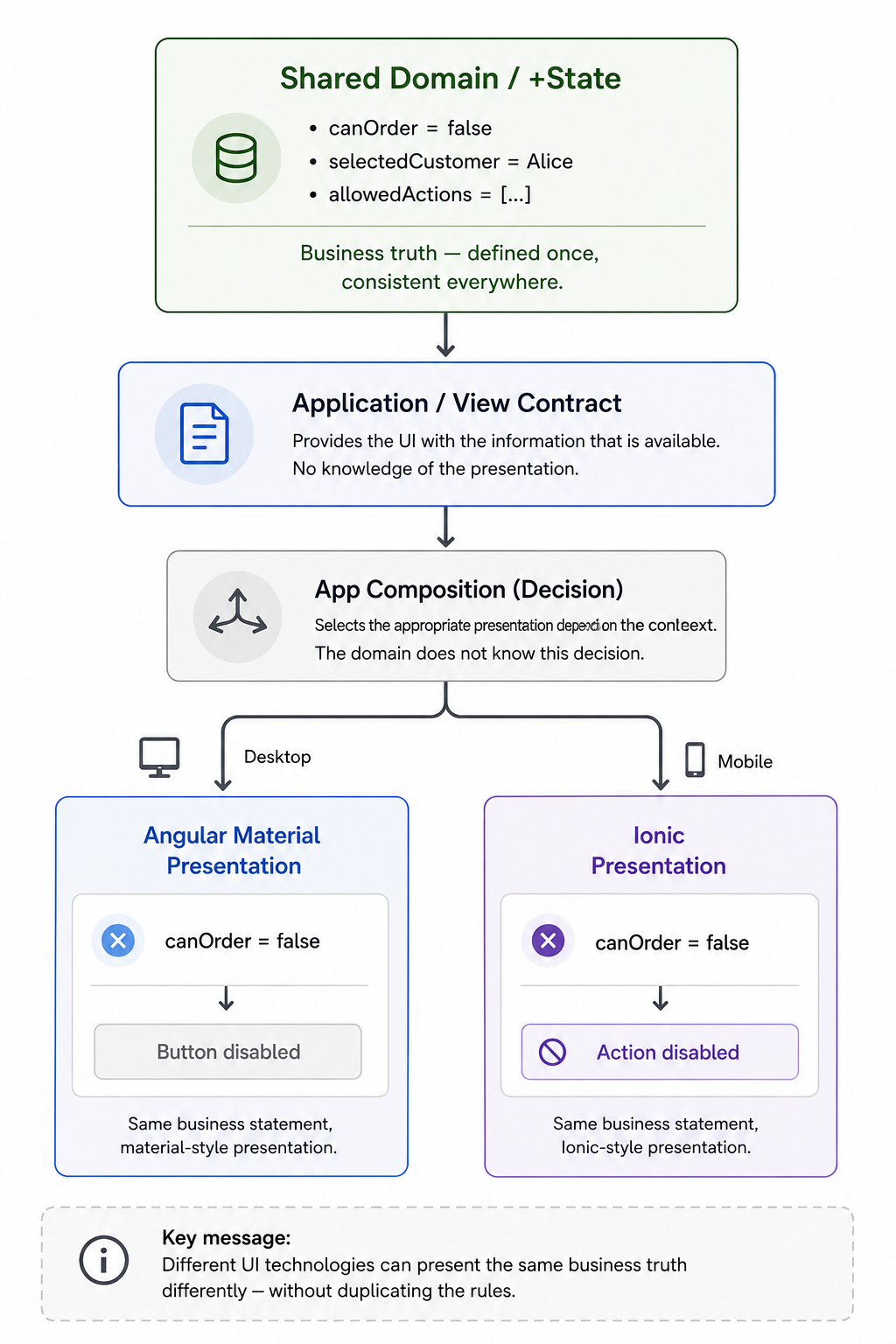
Section titled “One domain, multiple UI frameworks”Clear layer boundaries make it possible to use different Presentation technologies on the same domain foundation:
shared domain ↓ Application ↓ View Contract / \ / \ Material View Ionic ViewWhich Presentation is active can be decided outside the feature at the app or composition level:
App Composition │ ├── Desktop → Material Presentation │ └── Mobile → Ionic PresentationThe domain does not need to know why a particular Presentation is currently active.
In one long-running project, Angular Material and Ionic were used in parallel for years on top of the same domain foundation. That worked because both Presentations consumed the same domain decisions, did not reimplement business rules, and kept UI-specific differences local.
Material and Ionic were free to differ in navigation, layout, controls, dialogs, touch behavior, and responsive design. They should not differ in whether the same domain operation is allowed:
canOrder = false
Material:Button disabled
Ionic:Action greyed out or unavailable
Different UX. The same domain truth.
Angular Material and Ionic are only a practical example here. The architectural principle does not depend on those frameworks.
This does not contradict the 1:1 rule from the Application article as long as both technologies are alternative implementations of the same logical view and the same view contract.
CustomerDetailFacade / \Material IonicView ViewIf desktop and mobile evolve different requirements for their Application contract, they have become different view responsibilities. In that case, they receive their own facades as well.
The relevant boundary remains the same: A concrete Presentation consumes exactly one clearly defined view contract.
What Presentation should and should not do
Section titled “What Presentation should and should not do”Presentation may and should:
- consume exactly one view contract or facade
- render values and derived state
- receive user interactions
- delegate user actions to the facade
- manage forms
- open modal dialogs
- own local UI state
- manage focus, keyboard, and touch interactions
- implement accessibility
- control animations and responsive behavior
- compose UI components
- display UI-specific error messages
- visually represent domain decisions
Presentation should not:
- implement business rules
- reconstruct domain decisions
- interpret DTOs
- perform HTTP requests
- use external SDKs directly as a gateway to the domain
- consume
+Statedirectly - orchestrate multiple domain stores
- coordinate several facades at the domain level
- combine domain streams
- create domain-derived state
- interpret technical API error codes
- manually synchronize domain state
The benefits live in the boundary
Section titled “The benefits live in the boundary”When you open a Presentation file, you see UI and interaction code. Business rules do not have to be searched for between event handlers, form state, and CSS classes – they live in +State.
UI and UX can evolve independently of the domain. A dialog can become a drawer, a table can become cards, and desktop and mobile can use different interaction patterns. The domain does not have to change for any of that.
At the same time, canOrder, canDelete, and visibleCustomers remain consistent across multiple Presentations. Every interface consumes the same domain statements and only decides how to make them visible and usable.
A new accessibility requirement, a changed layout, or a different interaction pattern therefore does not automatically change domain state.
UI work remains UI work.
No artificially “dumb” components
Section titled “No artificially “dumb” components”A good Presentation component does not have to be five lines long.
Complex form handling, drag and drop, accessibility, or keyboard navigation can legitimately produce hundreds of lines of Presentation code.
What matters is the kind of responsibility involved:
complex UI interaction → Presentation
complex domain decision → +State
A large component is therefore not automatically an architectural problem. It becomes problematic when its size comes from mixing different kinds of responsibility.
The complete path
Section titled “The complete path”Technical outside world ↓Infrastructure ↓ +State ↓ Application ↓ Presentation ↓ UserInfrastructure protects and translates the technical outside world. +State gives state domain meaning and owns the business rules. Application shapes a contract for a concrete view. Presentation makes that contract visible and usable.
Each of these layers can be sophisticated as long as its complexity comes from its own responsibility.
That clarity is the value of layering: a decision has a natural home, and the neighboring layers do not have to make it again.