What Application Is the User Actually Seeing?
“The Page Doesn’t Work for Me”
Section titled ““The Page Doesn’t Work for Me””The previous article addressed a central question in dynamic microfrontend architectures:
Which product composition should be active for a particular usage context?
Remotes can be published independently and then combined into an approved product composition through a Composition ID. The host version forms the host context for which that composition has been approved.
From the architecture’s perspective, this may look like:
Host 5.4.2Remote A 1.1.0Remote B 2.3.1Remote C 4.7.0From the user’s perspective, however, there is only:
the applicationA user does not report:
“Remote B 2.3.1 failed during bootstrap.”
They report:
“The page doesn’t work.”
That is where the question changes.
It is no longer enough to know which product composition was activated. For a concrete failure, it must be possible to determine which product composition was resolved for that session, which artifacts the browser actually loaded, and at which technical boundary the failure occurred.
Microfrontends may be delivered independently. Their runtime therefore cannot be observed independently.
For the user, there is one application. Observability must therefore reconstruct one shared runtime context from several independently delivered frontends.
Activated Is Not the Same as Actually Loaded
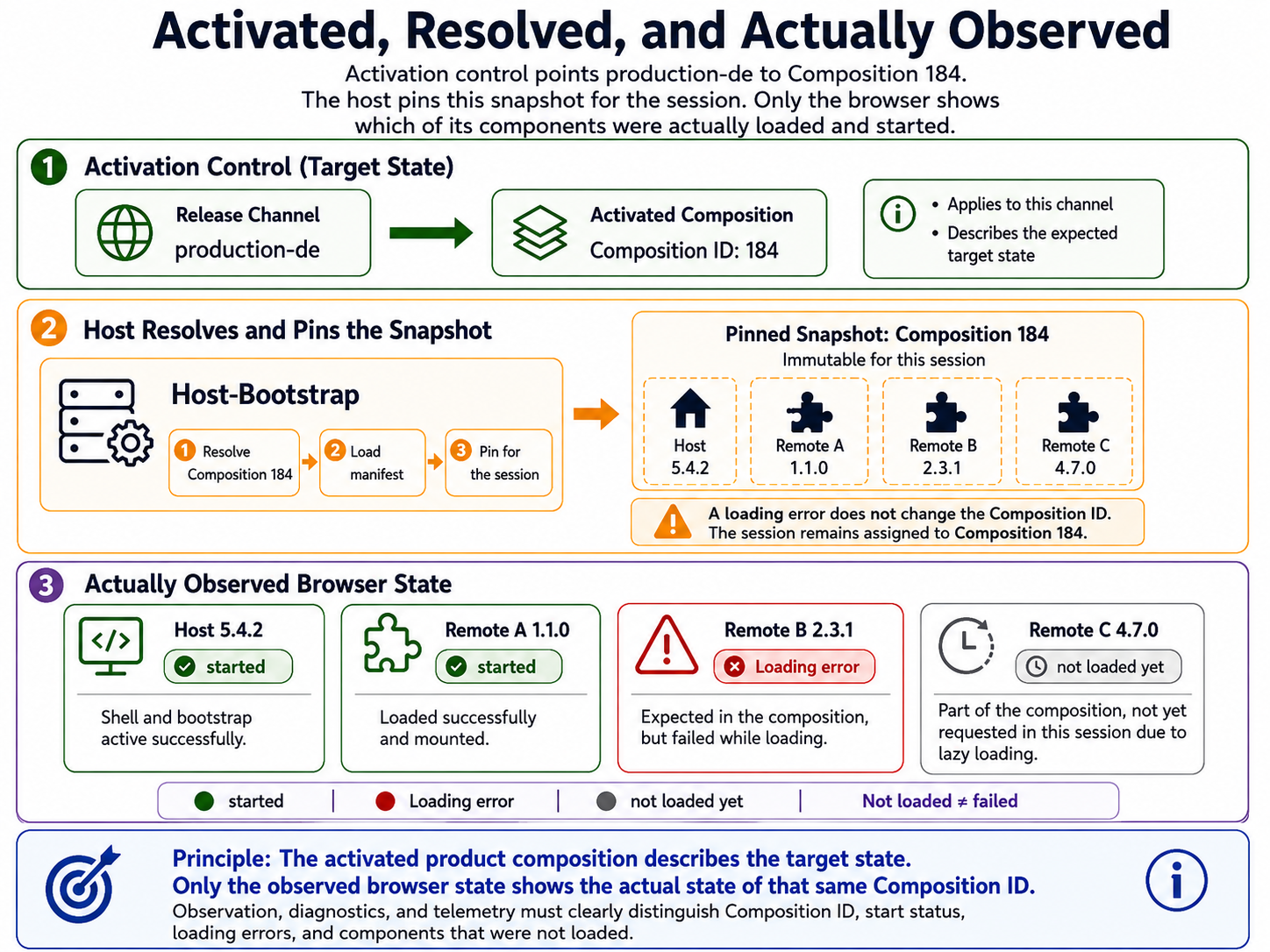
Section titled “Activated Is Not the Same as Actually Loaded”Activation control may state unambiguously:
production-de└── Composition 184This defines which product composition is intended for a particular usage context.
It does not yet answer what happened in a specific browser.
A remote may have failed to load. It may never have been needed during the session because of lazy loading. Its artifact may have loaded successfully while bootstrap failed. Or the remote may have started correctly and only later entered an error state after an API call.
Three states therefore need to be kept distinct.
Intended State, Resolved Snapshot, and Observed Browser State
Section titled “Intended State, Resolved Snapshot, and Observed Browser State”1. Activated Intended State
Section titled “1. Activated Intended State”Activation control may describe:
production-de└── Composition 184The question is:
What should be loaded?
2. Resolved Runtime Snapshot
Section titled “2. Resolved Runtime Snapshot”At startup, the host resolves the activation and pins the selected product composition for the session:
Session└── Composition 184The question now becomes:
Which approved product state was selected for this session?
This creates a reproducible reference point. Activating Composition 191 later does not automatically change this snapshot.
3. Actually Observed Browser State
Section titled “3. Actually Observed Browser State”In the browser, however, the state may look like this:
Composition 184
Host 5.4.2├── Remote A 1.1.0 → started├── Remote B 2.3.1 → load failure└── Remote C 4.7.0 → not loaded yet
Now the question is:
What actually arrived for this user?
A Composition ID initially describes the intended and resolved product state. Observability must additionally show which of its components were actually loaded, started, or discarded in the browser.
That does not make the Composition ID wrong. It remains the context in which the event occurred. It simply does not prove that every referenced artifact executed successfully.
For the User, There Is Only One Application
Section titled “For the User, There Is Only One Application”The technical decomposition of a product matters to development. To the user experience, it is initially irrelevant.
If /members does not work, the application is broken from the user’s perspective. Whether the failure originated in the host, the remote loader, the Members remote, or a backend service is a diagnostic question.
This leads to an important consequence: the technical decomposition should remain visible in observability, but it must be possible to evaluate every part inside one shared product context.
An error needs an owner.
A support case, however, needs the entire state in which that error occurred.
These requirements do not conflict.
Two Views of the Same Runtime Context
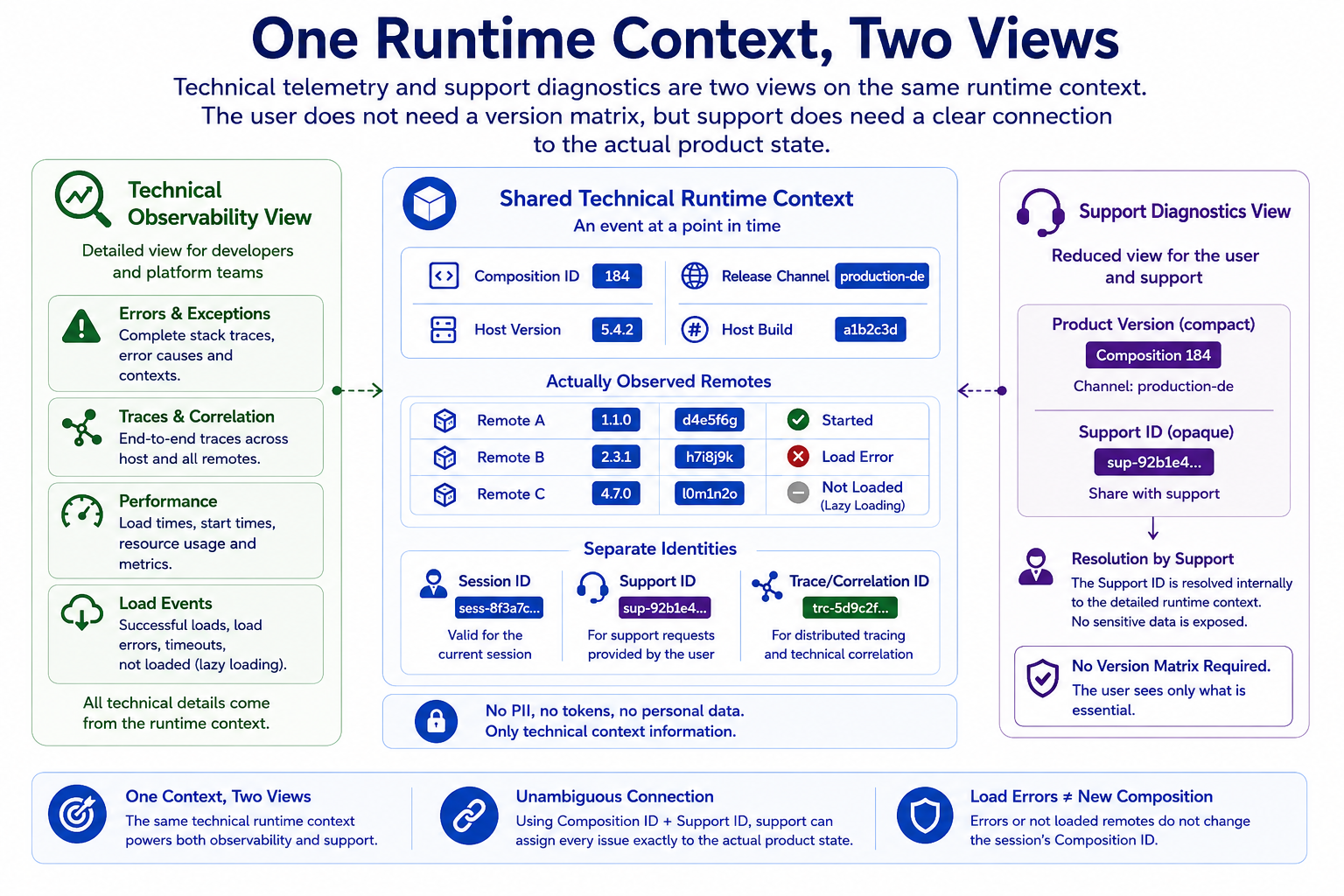
Section titled “Two Views of the Same Runtime Context”Technical observability and support diagnostics should therefore not create separate truths about the product.
They are different projections of the same Runtime Context.
Runtime Context │ ┌──────────────┴──────────────┐ ↓ ↓Technical Observability Support / Diagnostics │ │Errors, Traces, Metrics, Support ID,Performance, Load Events Version Information, User-Visible StatusTechnical observability may care about:
- Composition ID,
- host version,
- remote version,
- build ID,
- route,
- load failures,
- runtime errors,
- loading times,
- API requests,
- Correlation IDs,
- Trace IDs.
The support view may only need:
Product version2026.08.07-184
Support ID71AF-29C4
Internally, the same Support ID can resolve to the detailed runtime context.
Technical observability and support diagnostics should not produce different truths about the application. They are different projections of the same runtime context.
A Shared Runtime Context
Section titled “A Shared Runtime Context”A vendor-neutral reference model might look like this:
Runtime Context├── Composition ID├── Release Channel├── Host Version├── Host Build ID├── Session or Support ID├── Correlation or Trace ID├── Resolution Timestamp└── observed remote instances ├── name ├── version ├── Build ID ├── load state └── load timeNot every piece of information has to be repeated in every telemetry event. What matters is that the pieces can be related unambiguously.
The Composition ID describes the pinned product state. A remote version helps humans understand what they are looking at. A Build ID should point unambiguously to a concrete artifact; an artifact digest can additionally protect the identity of the exact delivered bytes. Session ID, Support ID, Correlation ID, and Trace ID serve different purposes and do not have to be identical. Together, they make it possible to relate events across technical boundaries.
This is not global domain state.
A shared Runtime Context is not domain communication between remotes.
A Composition ID, Build ID, or Correlation ID does not violate domain autonomy. It merely describes the technical product state in which an event occurred.
Who Creates the Runtime Context?
Section titled “Who Creates the Runtime Context?”A natural starting point is the host bootstrap:
Host bootstrap├── resolves Composition ID├── creates session/support context└── initializes technical Runtime ContextWhen a remote loads successfully, the observed context can be extended:
Remote A loaded└── registers: ├── Remote A ├── Version 1.1.0 ├── Build 184 ├── load time └── Status: startedIf loading fails, the remote code may never get the chance to report this information itself. The expected version and Build ID must then come from the resolved product composition:
Remote B expected├── Version 2.3.1├── Build 92└── observed status: load-failedThis keeps a clean distinction between what the composition expected and what the browser actually observed. No central domain registry is required.
The technical context can be carried through a small observability interface, standardized telemetry, a shared SDK layer, or existing browser and tracing mechanisms.
The concrete implementation is secondary. What matters is the contract around technical identities.
Which Metadata a Delivered Frontend Should Know
Section titled “Which Metadata a Delivered Frontend Should Know”Every independently delivered frontend should be able to identify itself technically.
For example:
{ "name": "members", "version": "2.7.4", "buildId": "918", "commit": "8c7a5e1"}Or, for a compact representation:
members 2.7.4+918The exact shape matters less than uniqueness.
A semantic version such as 2.7.4 is useful for humans, but it does not necessarily identify the exact delivered bytes. The same version string must not be reused casually for artifacts whose contents changed afterward.
Build metadata should therefore be produced during the build and remain permanently tied to the artifact.
Reliable reproduction requires knowing the concrete artifact in which the failure occurred.
A Git commit ID can be useful internally. It does not automatically have to appear in a public diagnostics view.
Expected Version and Actually Loaded Version
Section titled “Expected Version and Actually Loaded Version”In the normal case, product composition and browser observation agree:
Composition 184 expects:Remote A 1.1.0
Browser observes:Remote A 1.1.0 / Build 184
The deviations are more interesting:
Composition 184 expects:Remote B 2.3.1
Browser:Remote B could not be loaded
If an architecture supports controlled fallbacks, another state might be:
Composition 184 expects:Remote B 2.3.1
Browser:Remote B 2.3.0 / fallback
That deviation must be observable.
Observability should know both the expected and observed state.
This does not mean automatic fallback is always desirable. In tightly controlled systems, a clear failure may be safer than serving a product composition that was never approved in that form.
Which Remotes Were Actually Loaded?
Section titled “Which Remotes Were Actually Loaded?”Dynamic microfrontends are often not all loaded during application startup.
A product composition may contain:
Composition 184├── Remote A├── Remote B├── Remote C└── Remote DA particular session may only visit areas from A and C:
actually loaded:Remote ARemote CThat must not lead to the statement:
Remote B is healthyRemote B was never executed.
For the loading and lifecycle state, examples of observable states could be:
expectednot-loadedloadingloadedbootstrap-failedstartedunmountedRuntime errors should be recorded separately as events. A successfully started remote does not automatically become runtime-failed because of every handled exception.
The exact terms are not normative. Their semantics are what matter.
Not loaded is neither success nor failure. It is its own observable state.
Load Failures Happen Before Remote Code
Section titled “Load Failures Happen Before Remote Code”A particularly important case occurs when a remote never executes successfully.
User opens /members ↓Host resolves Composition 184 ↓Remote members 2.7.4 should be loaded ↓Chunk request → 404 ↓Remote code never runsThe remote itself cannot reliably report that failure. Its code never started.
A diagnostic event should nevertheless be possible:
RemoteLoadFailure├── Composition 184├── expected remote: members 2.7.4├── URL├── HTTP status: 404├── session/support ID└── timestampThis creates a clear technical responsibility:
The integration layer that loads a remote must be able to observe load failures.
That does not make the host or remote loader the domain owner of the remote. It observes only the technical integration boundary.
Host└── load Remote B ├── start ├── success └── failureFor diagnosis, it is also useful to distinguish between load failures, bootstrap failures, runtime errors after successful startup, and errors from external APIs or backend systems.
Runtime Errors Need Remote Ownership and Product Context
Section titled “Runtime Errors Need Remote Ownership and Product Context”After successful startup, responsibility shifts.
A JavaScript error from the Members remote might be classified like this:
Error Event├── Composition ID: 184├── Host: 5.4.2+8231├── Remote: members├── Remote Version: 2.7.4├── Remote Build: 918├── Route: /members/42├── Correlation ID: c-8f21...└── Error: TypeError ...Associating the error with a remote enables ownership, targeted alerting, analysis by build, and comparison before and after an activation.
The remote context alone may still not be enough.
The same build may fail only in Composition 184:
Composition 184├── Host 5.4.2├── Members 2.7.4└── Tasks 4.2.1
failure
while another combination works:
Composition 171├── Host 5.4.2├── Members 2.7.3└── Tasks 4.2.1
no failure
A remote build is an important diagnostic dimension. The Composition ID provides the product context in which that build was actually operated.
An error needs a technical owner. Diagnosis also needs the product state in which it occurred.
Correlate Errors Instead of Multiplying Them
Section titled “Correlate Errors Instead of Multiplying Them”Microfrontend boundaries increase the risk of recording the same failure several times.
Remote B└── throws error
Host└── catches the same error at an integration boundary
Global Error Handler└── sees it as well
Without correlation, this may look like three independent failures.
A better model captures the origin once and connects later observations as context or follow-up events belonging to the same incident.
Unique event or error IDs and a shared correlation context can help.
Observability should enrich an error, not multiply it at every architectural layer.
The same principle applies across frontend and backend boundaries.
A remote may have loaded and mounted successfully while its API fails afterward:
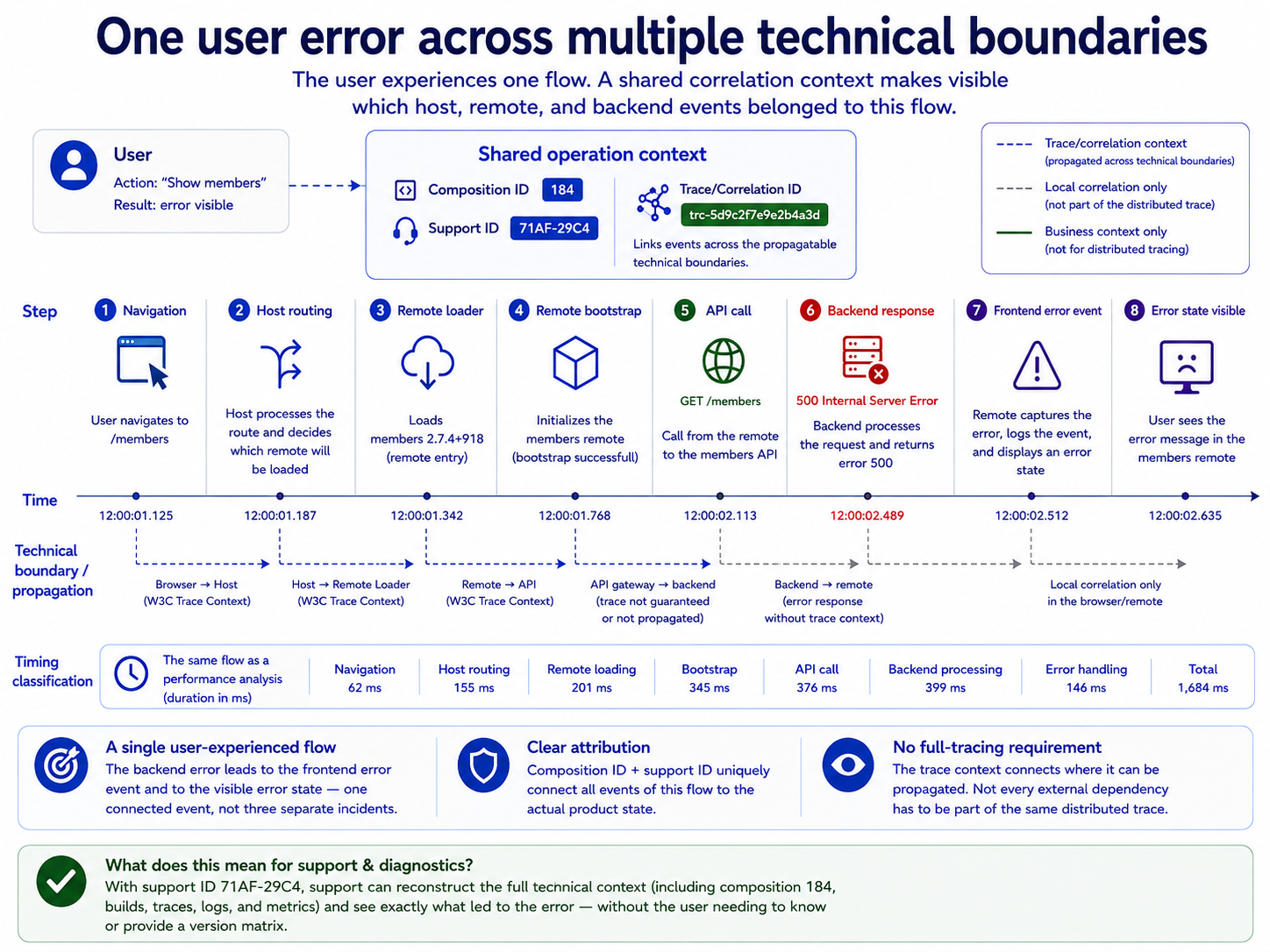
members 2.7.4├── loaded successfully├── mounted successfully└── GET /members → 500Diagnosis should then be able to recognize:
Composition 184Remote members 2.7.4+918Frontend TraceAPI RequestBackend TraceThat turns “Members does not work” into a more precise statement:
The remote is running. One of its external dependencies failed.
Source Maps Must Belong to the Concrete Build
Section titled “Source Maps Must Belong to the Concrete Build”Production code is typically transformed, bundled, and often minified.
A failure may initially look like this:
Remote A 1.1.0 / Build 184→ app.8f7c.js→ error at line 1, column 182734The matching source map makes the stack trace substantially more useful for analysis.
Build 184├── app.8f7c.js└── app.8f7c.js.mapSource maps map generated code back to its original sources and can also be used for server-side stack trace symbolication. The important point is the unambiguous binding between generated artifact and corresponding source map.
A source map from a different build may map positions to the wrong source and make diagnosis worse rather than better.
When several remote versions run in parallel, the corresponding diagnostic artifacts must remain available long enough as well. Their retention should match the intended support, rollback, and investigation window.
Source maps must be available for diagnosis. That does not necessarily mean they have to be publicly retrievable by the browser.
One possible operating model is:
Browser└── sends minified stack trace + Build ID
Error backend└── symbolicates with internally stored source map
Source maps can expose information about source structure and, depending on how they were created, source contents as well. Whether they are published or kept internal is therefore a deliberate operating decision, not a universal rule.
Performance Emerges from the Composition
Section titled “Performance Emerges from the Composition”Performance follows the user’s perspective too.
A navigation may consist of several technical phases:
Navigation→ Host renders→ Remote Entry loads→ Shared chunks load→ Remote bootstraps→ API responds→ UI becomes visibleA slow page can therefore have very different causes.
Navigation /tasks
Host routing          20 msRemote resolution     15 msRemote load          420 msRemote bootstrap      65 msInitial API          780 msRender                40 ms
A shared Runtime Context makes it possible to associate these phases with the same product composition and session.
Additional technical measurement points may be useful:
- beginning of remote load,
- Remote Entry loaded,
- bootstrap started,
- mount completed,
- first relevant rendering,
- critical API completed,
- error and timeout timestamps.
Browser-side User Timing mechanisms allow applications to capture custom marks and measures for application-specific moments such as these. The exact API matters less than a consistent measurement model.
Why Web Vitals Do Not Automatically Belong to a Remote
Section titled “Why Web Vitals Do Not Automatically Belong to a Remote”Core Web Vitals primarily describe properties of the page experienced by the user. Loading experience, visual stability, and responsiveness emerge from the composed product.
In a microfrontend architecture, this does not automatically imply:
this LCP belongs to Remote Athis INP belongs to Remote Bthis CLS belongs to the hostSeveral deployables share the DOM, network, main thread, and rendering pipeline.
Investigating individual contributions therefore requires additional technical marks, measures, or traces.
Local performance budgets are still useful. They can prevent a single remote from growing without control, for example.
They are not enough as a product metric.
Remote A is fast.Remote B is fast.The host is fast.And the overall product may still be slow.
Possible causes include duplicate dependencies, competing network requests, parallel bootstraps, unnecessary preloading, main-thread contention, or layout shifts.
Local performance budgets are useful. The relevant user experience emerges from their composition.
Connecting Frontend and Backend Events
Section titled “Connecting Frontend and Backend Events”Many failures do not stop at the frontend boundary.
Browser Session / Trace ↓Remote A ↓API Request ↓Backend ServiceIf the infrastructure and security model allow it, a technical correlation context can be carried across these boundaries.
Browser events can carry a shared trace or correlation context. API requests can propagate that context where trust boundaries and technical integration permit it. Backend telemetry can then be connected with the frontend operation.
This does not create domain communication between microfrontends. It merely makes the same technical operation traceable across several systems.
Trust boundaries still apply.
Internal IDs should not be forwarded indiscriminately to arbitrary third-party domains or external APIs. Likewise, not every request has to participate in a full distributed trace.
Correlation is a diagnostic tool, not an end in itself.
The User Does Not Need an Internal Version Matrix
Section titled “The User Does Not Need an Internal Version Matrix”A complete technical diagnostic view might contain:
Application information
Product versionComposition 184
Host5.4.2 / Build 8231
Loaded areasMembers 2.7.4 / Build 918Tasks   4.2.1 / Build 1271
Release Channelproduction-de
Support ID71AF-29C4
That level of detail is usually unnecessary for a normal user.
A reduced display may be enough:
Version2026.08.07-184
Support ID71AF-29C4
Internally, support resolves the ID:
Support ID 71AF-29C4└── Runtime Context ├── Composition 184 ├── Host 5.4.2+8231 ├── Members 2.7.4+918 ├── Tasks 4.2.1+1271 ├── Channel production-de ├── Session └── relevant telemetryThe user does not need to understand the architecture for support to diagnose it.
Whether this information is exposed through an About page, a diagnostics mode, a support role, or internal tools only is a product and operations decision.
The architectural point is different: the information comes from the same Runtime Context as errors, load events, and performance telemetry.
A Support ID as a Bridge to Technical Diagnosis
Section titled “A Support ID as a Bridge to Technical Diagnosis”A Support ID should address a technical runtime context, not the user’s identity itself.
It should therefore not automatically contain or be directly derived from an email address, user name, personnel number, customer number, session token, or access token.
A Support ID should address a technical runtime context, not expose the user.
Support processes may of course require additional protected information. That belongs in the appropriate protected context and not necessarily in publicly visible version or error information.
The Support ID remains exactly what it should be: a bridge between a concrete user experience and its corresponding technical runtime context.
Which Composition Ran in This Session?
Section titled “Which Composition Ran in This Session?”Time is part of diagnosis as well.
Assume a session started with Composition 184:
Session A└── Composition 184While that session is running, a new product composition is activated:
production-de → Composition 191Session A remains on its pinned snapshot for the time being.
A new session or a controlled reload can then receive Composition 191.
For a support case, the question
“Which version is currently in production?”
is therefore often too imprecise.
What matters is:
Which Composition ID was resolved for this concrete session, and which builds actually executed within it?
With parallel release channels, gradual activation, or context-specific product compositions, several valid answers may exist at the same time.
Technical Observability Is Not Domain Coupling
Section titled “Technical Observability Is Not Domain Coupling”A shared observability concept must not become an excuse to tear down domain boundaries again.
Not:
Host└── understands all domain events of all remotesInstead, for example:
shared technical contract├── Composition ID├── Build Metadata├── Trace / Correlation Context├── Error Format└── technical lifecycle eventsTechnical correlation information is centralized, not the domain meaning of the remotes.
The same distinction matters for other shared platform components.
An observability SDK may be a technical platform component. It should not become a hidden runtime service without which the domain capability of a remote no longer works.
Remotes remain independent in domain terms.
Their technical runtime events are merely placed into a shared product context.
What Should Trigger an Alert?
Section titled “What Should Trigger an Alert?”Not every technical event requires an alert.
The most useful signals are changes with relevant user impact, for example:
- a clear rise in remote load failures,
- new bootstrap failures after an activation,
- an increased JavaScript error rate for a particular build,
- unusual API error rates,
- a significant performance regression,
- integrity or manifest failures.
There are no universal thresholds. A single failure may matter in a safety-critical workflow, while sporadic network errors may be expected and automatically handled in another system.
Alerts should react to meaningful changes and user impact, not every individual technical exception.
From Individual Deployables Back to an Observable Application
Section titled “From Individual Deployables Back to an Observable Application”Microfrontends decompose a frontend into independently owned and independently deliverable units.
That decomposition is valuable for ownership, releases, and technical evolution.
At runtime, however, the parts must once again become observable as one product.
That does not require central domain control. It requires shared technical identities.
The Composition ID answers which approved product composition was resolved for a session.
Build IDs answer which concrete artifacts were involved.
The observed remote state answers which of them were actually loaded and started.
Correlation IDs and Trace IDs connect technical events.
Source maps connect production artifacts with analyzable source code.
Performance measurements connect individual technical phases with the journey experienced by the user.
Finally, a Support ID connects this technical view with a support case without requiring the user to understand the internal architecture.
Independent deployables therefore do not have to produce independent diagnosis. They can still form one observable product state.
Which Application Is the User Actually Seeing?
Section titled “Which Application Is the User Actually Seeing?”The previous article could determine which Composition ID is active for a usage context. For a concrete support case or failure, that information alone is not enough.
A Composition ID describes which product composition was resolved for a session. Observability must additionally show which artifacts were actually loaded and started.
Every independently delivered frontend needs unambiguous build metadata so that errors, source maps, and performance values can be associated with the artifact that actually executed.
Errors in a remote need clear ownership. At the same time, they must retain the shared product context consisting of the Composition ID, session, and technical correlation.
Load failures must be observable at the technical integration boundary because the affected remote code may never execute.
Source maps must remain unambiguously tied to the concrete build. When versions run in parallel, their corresponding diagnostic artifacts must remain available long enough as well.
From the user’s perspective, performance belongs to the complete product. Measurements of individual remotes can reveal causes, but they do not replace observation of the full user journey.
Technical correlation between host, remotes, and backend systems is not domain communication between microfrontends.
The normal user does not need a list of internal remote versions. A compact product version and Support ID can be enough as long as support can use them to reconstruct the full technical runtime context.
Not every remote in a product composition is actually loaded in every session. not-loaded, loading, started, and concrete error events must remain distinguishable.
That brings three perspectives back together:
User└── sees one application
Architecture└── sees several deployables
Observability└── connects both perspectives through a shared Runtime Context
“Which version is currently in production?” falls short here.
Which Composition ID and which concrete builds ran in this session—and what actually happened to them?
For the user, it is one application. For diagnosis, it must be possible to reconstruct exactly which versions it consisted of at that moment.