Delete Slice: Deletion is a domain decision
Deleting data is a command.
But not just any command.
A delete is destructive.
That sounds trivial.
It isn’t, though.
Because that’s exactly why a delete flow shouldn’t end up as a quick button handler somewhere:
click → http.delete() → reload() → toast()That’s technically short.
But architecturally weak.
The component knows too much then:
- it knows the destructive action
- it knows HTTP
- it knows reload
- it knows notification
- it maybe even decides on error handling
That’s why, in this article, I structure the delete flow as deliberately as the create flow:
delete intent → facade.deleteArticle(articleId) → articleDeleteEvents.deleteRequested({ articleId }) → ArticleCommandStore → ArticleCommand.deleteArticle(command) → deleteSucceeded | deleteFailed → reload / notificationThe button doesn’t delete.
The button sends a destructive intent.
The boundary
Section titled “The boundary”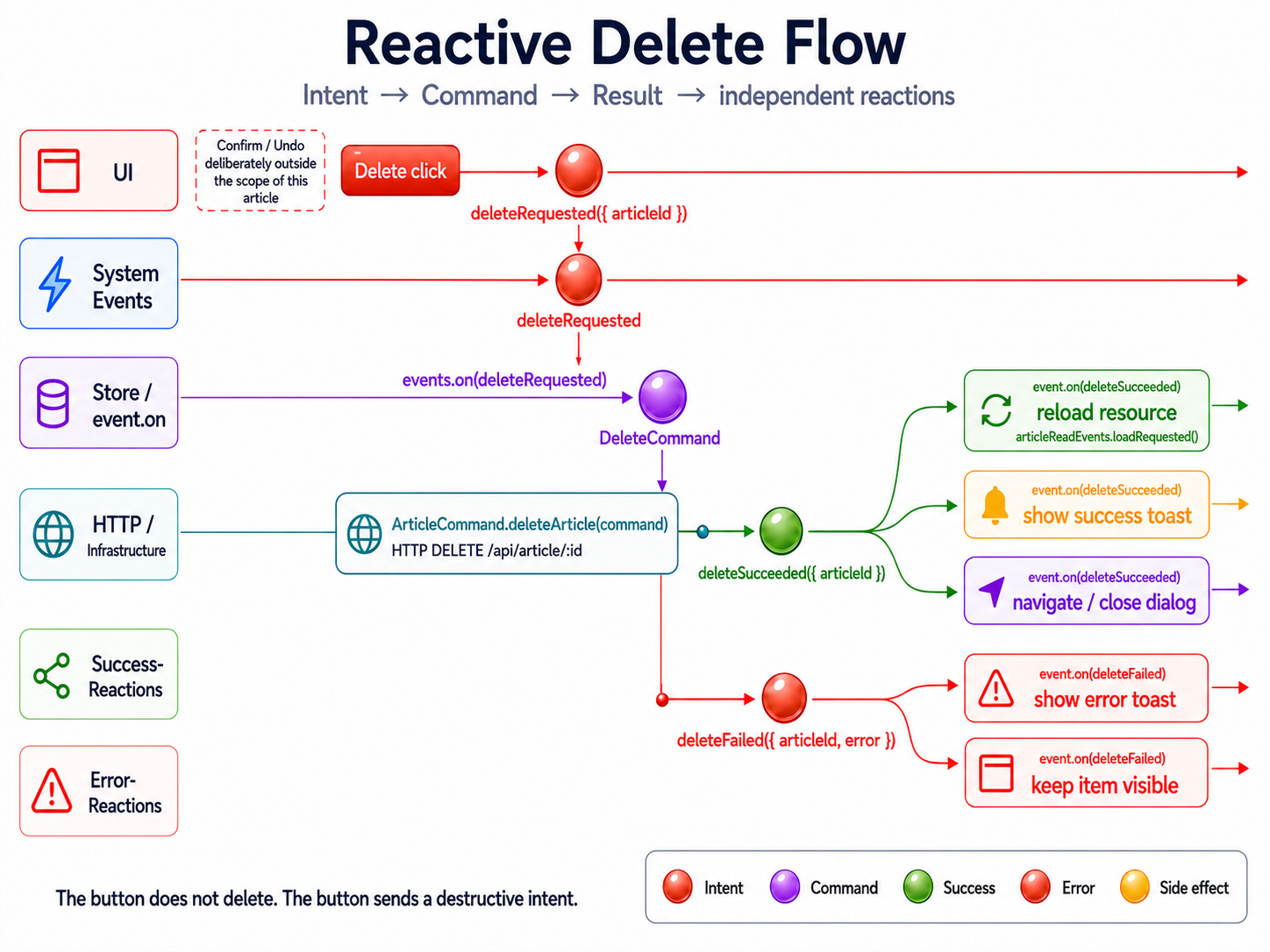
The most important point:
Delete is not a local UI action.
Delete is an intent meant to change the system.
That intent can succeed.
It can fail.
And both outcomes can be followed by several independent reactions.
deleteRequested → DELETE → deleteSucceeded | deleteFailed → independent reactionsThat’s a different design than:
click → http.delete() → reloadList() → toast()In the direct flow, every step knows too much about the next one.
In the event-driven slice, intent, execution, and reaction are separated.
What this article deliberately doesn’t show: confirm
Section titled “What this article deliberately doesn’t show: confirm”Destructive actions should be intercepted in real applications.
A delete often needs a safety question:
delete clicked → confirm → deleteRequestedOr an undo mechanism:
delete clicked → soft delete → undo possible → delete permanentlyThat matters.
But it isn’t the focus of this article.
This isn’t about dialog design, undo patterns, soft delete, or legal retention obligations.
This is about the technical slice after the decision:
The user confirmed: this article should be deleted.
From this moment on, UI interaction becomes a command.
The confirm belongs before the intent.
Not in the middle of the Command Store.
Why not delete in the Read Store?
Section titled “Why not delete in the Read Store?”The temptation is big.
The Read Store already loads the articles anyway.
So it quickly gets a method too:
deleteArticle(articleId: string): void { this.http.delete(`/api/article/${articleId}`).subscribe(() => { this.reload(); });}That works.
But the store’s role changes.
It’s no longer just a read model.
It’s suddenly a command handler too.
It loads data.
It holds ViewModels.
It deletes data.
It handles errors.
It triggers reload.
Maybe it shows toasts later.
And at some point, it’s still called ArticleStore, but it’s actually a small god.
That’s exactly what this slice wants to avoid.
ArticleResource  → encapsulates a private httpResource  → provides article, isLoading, error, and reload
Read Store  → orchestrates source signals  → computes the ViewModel  → reacts to loadRequested
Command Store  → listens to deleteRequested  → executes the DELETE  → fires deleteSucceeded / deleteFailed  → forwards success reactions as events
The Read Store stays a Read Store.
The Command Store stays a Command Store.
Target structure
Section titled “Target structure”One possible structure for this slice:
article/├── infrastructure/│ ├── article.command.ts│ ├── article.dto.ts│ ├── article.mapper.ts│ └── article.resource.ts├── +state/│ ├── article.store.ts│ ├── article.vm.ts│ ├── article-view-model.mapper.ts│ ├── delete-article.command.ts│ ├── article-delete.events.ts│ ├── article-read.events.ts│ └── article-command.store.ts├── application/│ └── article-delete.facade.ts└── presentation/ └── article-card.component.htmlIf create and delete live in the same feature, the ArticleCommandStore can of course handle both write flows.
Then the command side looks more like this:
+state/├── create-article.command.ts├── delete-article.command.ts├── article-create.events.ts├── article-delete.events.ts└── article-command.store.ts
infrastructure/└── article.command.ts
The pattern stays the same:
ArticleCommandStore → uses ArticleCommandThe store decides when a write operation gets executed.
The infrastructure decides how this write gets translated against the external API.
1. Command: describing the destructive intent
Section titled “1. Command: describing the destructive intent”A delete doesn’t need much payload.
But the intent should still be explicit.
export interface DeleteArticleCommand { readonly articleId: string;}This is not a DTO.
This is not a ViewModel.
This is not a button event.
This is the domain intent:
DeleteArticleCommand = the user wants to delete this articleFor delete, this explicitness matters.
Because we’re not modeling a technical HTTP method.
We’re modeling a destructive action.
2. Events: requested, succeeded, failed
Section titled “2. Events: requested, succeeded, failed”Now we define the events of the delete slice.
import { eventGroup, type } from '@ngrx/signals/events';
import { DeleteArticleCommand } from './delete-article.command';
export const articleDeleteEvents = eventGroup({  source: 'Article Delete',  events: {    deleteRequested: type<DeleteArticleCommand>(),    deleteSucceeded: type<{ readonly articleId: string }>(),    deleteFailed: type<{      readonly articleId: string;      readonly error: unknown;    }>(),  },});
The language matters more than the syntax again:
deleteRequesteddeleteSucceededdeleteFaileddeleteRequested isn’t a result yet.
It’s an intent.
deleteSucceeded and deleteFailed are results of execution.
I also include the articleId in deleteFailed.
Why?
Because an error without context is often worth little.
Especially in lists, you want to know:
Which delete failed?That makes error reactions more testable and traceable.
3. Read event: reload as its own intent
Section titled “3. Read event: reload as its own intent”After a successful delete, the read data should be refreshed.
But the Command Store shouldn’t know the Read Store directly.
Not like this:
deleteSucceeded → articleStore.reload()But like this:
deleteSucceeded → articleReadEvents.loadRequested() → Read Store triggers ArticleResource.reload()There’s a read event for that:
import { eventGroup, type } from '@ngrx/signals/events';
export const articleReadEvents = eventGroup({  source: 'Article Read',  events: {    loadRequested: type<void>(),  },});
This looks like a small indirection.
But that indirection is exactly the boundary.
The write side doesn’t say how the read side loads.
It only says:
After this successful write, the read article data should be requested again.
4. Infrastructure: DELETE at the API boundary
Section titled “4. Infrastructure: DELETE at the API boundary”The infrastructure bundles the write operations.
There’s a file article.command.ts for that in this slice.
import { HttpClient } from '@angular/common/http';import { Injectable, inject } from '@angular/core';
import { DeleteArticleCommand } from '../+state/delete-article.command';
@Injectable()export class ArticleCommand {  private readonly http = inject(HttpClient);
  readonly deleteArticle = ({ articleId }: DeleteArticleCommand) => this.http.delete<void>(`https://lorem-api.com/api/article/${articleId}`);}
The name is deliberately ArticleCommand.
Not ArticleResource.
Not ArticleStore.
This class bundles write operations against the external API.
DeleteArticleCommand  → domain intent
ArticleCommand  → infrastructure operations for write access
With create, a DTO often emerges here.
With delete, the ID in the URL is often enough.
If the external API later needs a different format, that decision stays at the API boundary.
Not in the component.
Not in the facade.
Not in the Read Store.
5. Command Store: executing requested, firing the result
Section titled “5. Command Store: executing requested, firing the result”Now comes the Command Store.
It holds no ViewModel.
It renders nothing.
It listens to events, executes the infrastructure, and publishes result events.
import { inject } from '@angular/core';import { signalStore, withProps } from '@ngrx/signals';import { Events, withEventHandlers } from '@ngrx/signals/events';import { mapResponse } from '@ngrx/operators';import { exhaustMap, map } from 'rxjs';
import { ArticleCommand } from '../infrastructure/article.command';import { articleDeleteEvents } from './article-delete.events';import { articleReadEvents } from './article-read.events';
export const ArticleCommandStore = signalStore(  withProps(() => ({    _articleCommand: inject(ArticleCommand),  })),
  withEventHandlers(({ _articleCommand }, events = inject(Events)) => ({    deleteArticle$: events.on(articleDeleteEvents.deleteRequested).pipe(      exhaustMap((command) =>        _articleCommand.deleteArticle(command).pipe(          mapResponse({            next: () =>              articleDeleteEvents.deleteSucceeded({                articleId: command.articleId,              }),            error: (error: unknown) =>              articleDeleteEvents.deleteFailed({                articleId: command.articleId,                error,              }),          }),        ),      ),    ),
    reloadOnDeleteSucceeded$: events.on(articleDeleteEvents.deleteSucceeded).pipe(map(() => articleReadEvents.loadRequested())),
    // notifyOnDeleteSucceeded$: events    //   .on(articleDeleteEvents.deleteSucceeded)    //   .pipe(    //     map(() =>    //       notificationEvents.showSuccess({    //         summary: {    //           key: 'articles.notifications.delete.success.summary',    //         },    //         detail: {    //           key: 'articles.notifications.delete.success.detail',    //         },    //       }),    //     ),    //   ),
    // notifyOnDeleteFailed$: events    //   .on(articleDeleteEvents.deleteFailed)    //   .pipe(    //     map(() =>    //       notificationEvents.showError({    //         summary: {    //           key: 'articles.notifications.delete.error.summary',    //         },    //         detail: {    //           key: 'articles.notifications.delete.error.detail',    //         },    //       }),    //     ),    //   ),  })),);
The store does three things:
1. accept deleteRequested2. execute the DELETE via infrastructure3. publish deleteSucceeded or deleteFailedAfter that, it translates deleteSucceeded into a read event:
deleteSucceeded → loadRequestedThis is deliberately not a direct call to the Read Store.
The Command Store doesn’t know the resource.
It doesn’t know the ViewModel.
It doesn’t know presentation.
It only knows events.
Why mapResponse?
Section titled “Why mapResponse?”The DELETE call has two possible outcomes:
success  → deleteSucceeded
error  → deleteFailed
mapResponse is exactly what makes this readable.
The success case produces a success event.
The error case produces an error event.
mapResponse({ next: () => articleDeleteEvents.deleteSucceeded({ articleId: command.articleId, }), error: (error: unknown) => articleDeleteEvents.deleteFailed({ articleId: command.articleId, error, }),});That keeps the Command Store declarative.
No nested subscribe.
No local error handling in the component.
No direct toast in the catch.
Just:
HTTP result → EventWhy exhaustMap?
Section titled “Why exhaustMap?”Delete can get triggered twice as well.
The user clicks twice.
The list renders slowly.
A button stays active too long.
That’s why I use exhaustMap for this article.
exhaustMap  → ignores further deletes while one is running
concatMap  → queues deletes one after another
mergeMap  → allows parallel deletes
switchMap  → cancels earlier deletes
For destructive commands, switchMap is usually not a good default.
A delete is not a search query.
Once a delete is in flight, I usually don’t want to silently cancel it just because a second event comes in.
exhaustMap is the conservative choice for this simple slice.
6. Success reactions stay events
Section titled “6. Success reactions stay events”After a successful delete, we want to reload in this article.
Later, maybe also show a notification.
What matters is the direction:
deleteSucceeded  → articleReadEvents.loadRequested()
deleteSucceeded  → notificationEvents.showSuccess(...)
These are event reactions.
Not direct imperative side effects in the Command Store.
That’s why I use map here.
An event becomes a new event.
reloadOnDeleteSucceeded$: events .on(articleDeleteEvents.deleteSucceeded) .pipe( map(() => articleReadEvents.loadRequested()), ),That’s more testable than:
tap(() => articleStore.reload());And it keeps the coupling small.
The Command Store doesn’t say:
Read Store, reload yourself.
It only says:
A load has been requested.
The read side decides for itself what that means.
Notifications can be modeled this way too:
notifyOnDeleteSucceeded$: events .on(articleDeleteEvents.deleteSucceeded) .pipe( map(() => notificationEvents.showSuccess({ summary: { key: 'articles.notifications.delete.success.summary', }, detail: { key: 'articles.notifications.delete.success.detail', }, }), ), ),This article doesn’t fully implement the notification.
It only sketches it.
The point is:
deleteSucceeded → loadRequested → showSuccessAs long as a reaction can be described as an event again, map stays the cleaner choice.
tap belongs at genuine imperative boundaries: router, toast service, logging, or external APIs.
7. Read Store: reacting to loadRequested
Section titled “7. Read Store: reacting to loadRequested”The concrete Angular resource stays in the infrastructure.
ArticleResource keeps the httpResource private and only exposes a small, named API publicly:
article: Signal<Article | null>isLoading: Signal<boolean>error: Signal<Error | undefined>reload(): voidThe Read Store therefore knows no HttpResourceRef.
It knows neither hasValue() nor the throwing behavior of value().
It only orchestrates the source signals ArticleResource provides, projects the ViewModel from them, and reacts to articleReadEvents.loadRequested.
import { computed, inject } from '@angular/core';import { signalStore, withComputed, withProps } from '@ngrx/signals';import { Events, withEventHandlers } from '@ngrx/signals/events';import { tap } from 'rxjs';
import { ArticleResource } from '../infrastructure/article.resource';import { articleReadEvents } from './article-read.events';import { toArticleViewModel } from './article-view-model.mapper';
export const ArticleStore = signalStore(  withProps(() => ({    _articleResource: inject(ArticleResource),  })),
  withComputed(({ _articleResource }) => ({    isLoading: _articleResource.isLoading,    error: _articleResource.error,    vm: computed(() => toArticleViewModel(_articleResource.article())),  })),
  withEventHandlers(({ _articleResource }, events = inject(Events)) => ({    reloadOnLoadRequested$: events.on(articleReadEvents.loadRequested).pipe(tap(() => _articleResource.reload())),  })),);
The ViewModel mapper thereby receives:
Article | null → ArticleVm | nullThe domain entity itself stays strict.
There’s no artificial empty article just to hide the technical lifecycle.
tap is fine here.
Not because the store itself executes HTTP or resource logic.
But because the event flow triggers an explicit infrastructure operation at this exact point:
loadRequested → ArticleResource.reload()Before this, events get mapped onto events.
Here, the read operation actually gets triggered.
The store doesn’t interpret any technical resource lifecycle in doing so. It only orchestrates a read intent into a clearly named operation of its infrastructure dependency.
That’s the intended distribution of roles:
private httpResource → ArticleResource → source signals and reload() → Read Store → ViewModelThe store still decides which signals the slice exposes publicly, and how the ViewModel gets built from them.
But it no longer decides, case by case, whether an Angular resource is currently safe to read.
That keeps the read flow quiet:
article → ViewModelloadRequested → reload()Reading the store, you’re interested in the orchestration.
Not the usage instructions of the underlying framework API.
8. Application: facade sends the intent
Section titled “8. Application: facade sends the intent”The delete facade doesn’t execute an HTTP call.
It doesn’t know an HttpClient.
It doesn’t know the resource either.
It only publishes the intent.
import { Injectable } from '@angular/core';import { injectDispatch } from '@ngrx/signals/events';
import { articleDeleteEvents } from '../+state/article-delete.events';
@Injectable()export class ArticleDeleteFacade {  private readonly dispatchDelete = injectDispatch(articleDeleteEvents);
  readonly deleteArticle = (articleId: string): void => {    this.dispatchDelete.deleteRequested({ articleId });  };}
That’s the public API of the delete UI:
deleteArticle(articleId)The facade doesn’t delete an article.
It publishes the intent to delete an article.
Presentation → facade.deleteArticle(articleId) → articleDeleteEvents.deleteRequested({ articleId })What happens after that no longer belongs to presentation.
9. Presentation: button sends a destructive intent
Section titled “9. Presentation: button sends a destructive intent”The template stays small.
<button type="button" class="article-card__delete" (click)="facade.deleteArticle(article.id)">Delete article</button>The example deliberately doesn’t show a confirm dialog.
Not because confirm isn’t important.
But because confirm is a UI safety decision that comes before the command.
The slice shown here only starts after that decision:
user wants to delete → deleteRequested({ articleId })In a real application, I’d almost always secure destructive actions: confirm, undo, soft delete, or role-dependent permissions.
But this safety mechanism shouldn’t obscure the command flow.
The button here only calls the facade.
The facade sends the intent.
Everything else lives in the event flow.
10. Providers and lifecycle
Section titled “10. Providers and lifecycle”For the article, the slice can be provided locally on the page or the route.
providers: [ArticleResource, ArticleCommand, ArticleStore, ArticleCommandStore, ArticleDeleteFacade];In a real application, I’d often attach these providers to the route instead.
For the article, though, the local variant is helpful because it keeps the slice visibly self-contained.
What matters is:
ArticleResourceArticleCommandArticleStoreArticleCommandStoreArticleDeleteFacadetogether form the scope of this delete slice.
ArticleResource encapsulates the private httpResource here.
ArticleStore consumes its source signals and orchestrates the read flow.
The ArticleCommandStore is deliberately part of this scope here.
That’s only the scope decision, though.
In a real application, the Command Store also actually has to get instantiated once in this slice’s lifecycle, so its event handlers are active.
That’s a small amount of lifecycle plumbing of this approach.
Depending on the project, that can happen via the route, a deliberately injected slice service, or another lifecycle spot.
I deliberately don’t show a hidden constructor hack like inject(ArticleCommandStore) just for instantiation here.
That might make the code run, but it would obscure the dependency.
What matters more for the article:
Command Store exists in the slice scope → listens to deleteRequested → fires deleteSucceeded / deleteFailedHow exactly this lifecycle gets wired up in the project is framework mechanics.
The architectural boundary remains unchanged.
11. Delete, create, and shared write reactions
Section titled “11. Delete, create, and shared write reactions”In a real feature, delete rarely stands alone.
Create, update, and delete often share the same reactions.
For example:
createSucceededupdateSucceededdeleteSucceeded → loadRequestedThen the Command Store can handle these success events together:
reloadOnWriteSucceeded$: events .on( articleCreateEvents.createSucceeded, articleUpdateEvents.updateSucceeded, articleDeleteEvents.deleteSucceeded, ) .pipe( map(() => articleReadEvents.loadRequested()), ),That’s stronger than three individual reload calls in three components.
The reload doesn’t hang off the button.
It is not tied to one specific command either.
It is triggered by the successful write.
Write succeeded → request a readThat is the abstraction that matters.
12. Error is also a result
Section titled “12. Error is also a result”Errors shouldn’t just end up as a local catchError in the component either.
An error is also a result of the command.
deleteRequested → DELETE → deleteFailed({ articleId, error })What happens after that is, again, a reaction:
deleteFailed  → notificationEvents.showError(...)
deleteFailed  → // keep row visible
deleteFailed  → // rollback optimistic state
For this article, the event is enough.
A real UI could later react to deleteFailed and show a toast, keep a dialog open, or roll back an optimistic UI state.
What matters:
The Command Store doesn’t decide how the error gets displayed.
It only publishes:
The delete failed.
13. Why this isn’t overengineering
Section titled “13. Why this isn’t overengineering”For a single button, this design can look like more code.
That’s true.
A direct http.delete() call is shorter.
But shorter isn’t automatically simpler.
A direct call is often only short because it hides coupling.
Button knows deleteButton knows HTTPButton knows reloadButton knows toastButton knows error handlingThe event-driven slice makes these transitions visible.
Intent → Command → Result → ReactionThat’s not necessary for every small button.
But it’s valuable as soon as a delete has more than one local consequence.
For example:
- reload a list
- leave a detail page
- show a toast
- close a dialog
- invalidate a cache
- update several read models
- roll back optimistic state
Then an event isn’t an academic detour.
It’s a decoupling.
Conclusion
Section titled “Conclusion”A delete is not a quick HTTP call from the component.
A delete is a destructive command.
The UI shouldn’t orchestrate this intent itself.
It only sends:
deleteArticle(articleId) → deleteRequested({ articleId })The Command Store executes the write.
The infrastructure talks to the API.
Success and error become visible as events.
Reload and notification don’t hang off the button.
They hang off the result.
deleteRequested  → ArticleCommand.deleteArticle(command)  → deleteSucceeded | deleteFailed
deleteSucceeded  → articleReadEvents.loadRequested()  → notificationEvents.showSuccess(...)
deleteFailed  → notificationEvents.showError(...)
That way, the destructive action stays explicit.
The Read Store stays a Read Store.
The infrastructure encapsulates its own technical resource.
The Read Store only orchestrates source signals, projections, and read intents.
The Command Store stays a Command Store.
And the component doesn’t become the place where deletion, reload, navigation, and toasts all stick together.